
Introduction
Thank you for choosing the KOCASO Foldable Hi-Fi Stereo Over-Ear Headphones. These headphones are designed to deliver a high-fidelity audio experience with multiple connectivity options, including Bluetooth wireless, AUX input, FM radio, and SD card playback. The foldable design enhances portability, and the integrated microphone supports hands-free communication.
Product Overview
The KOCASO headphones feature an ergonomic over-ear design for comfort during extended use. Key functionalities include:
- Bluetooth Connectivity: For wireless audio streaming from compatible devices.
- Built-in Microphone: Enables hands-free calling.
- AUX Input: For wired connection to audio sources.
- FM Radio: Integrated radio tuner for listening to broadcasts.
- SD Card Playback: Supports direct audio playback from a microSD (TF) card.
- Foldable Design: Allows for compact storage and easy transport.
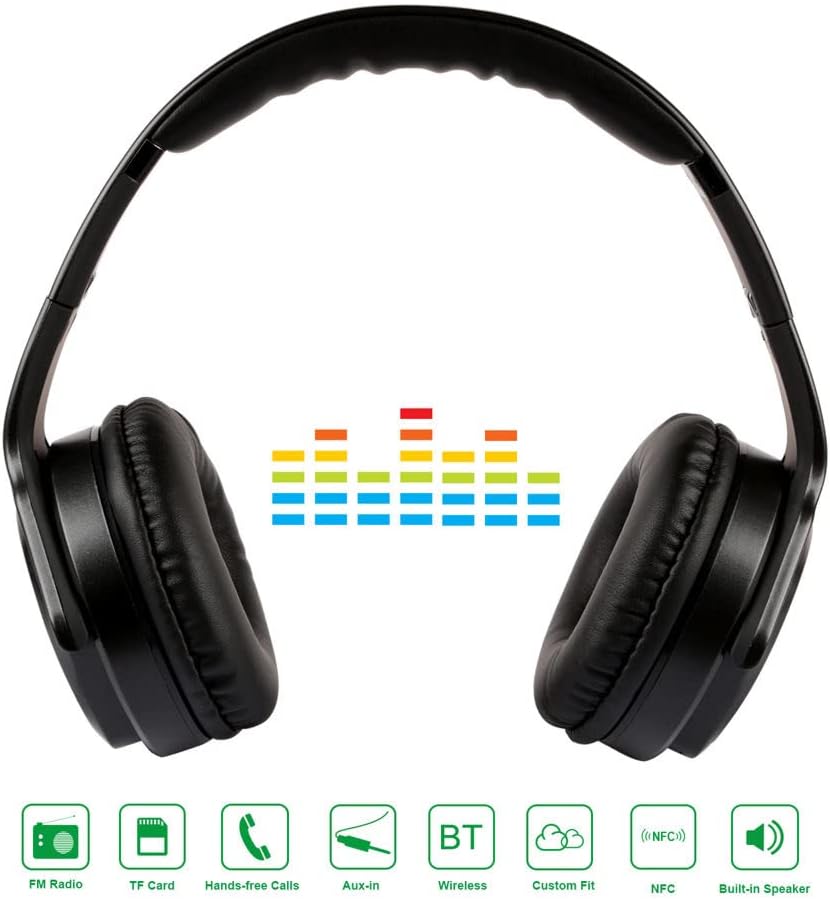
Image: Front view of KOCASO headphones highlighting various features such as FM Radio, TF Card slot, Hands-free calling, Aux-in port, Bluetooth, Custom Fit, NFC, and Built-in Speaker.

Image: KOCASO headphones shown in their folded configuration, illustrating the compact design for storage and travel.
Setup
Charging the Headphones
Before initial use, fully charge the headphones. Connect the provided USB charging cable to the headphone's charging port and to a compatible USB power source. The charging indicator light will illuminate during charging and typically change color or turn off once charging is complete.
Powering On/Off
To power on the headphones, press and hold the Power button until the indicator light illuminates. To power off, press and hold the Power button again until the indicator light turns off.
Bluetooth Pairing
- Ensure the headphones are powered on and in Bluetooth pairing mode (indicated by a flashing LED light).
- On your smartphone, tablet, or other Bluetooth-enabled device, navigate to the Bluetooth settings.
- Enable Bluetooth and search for available devices.
- Select "KOCASO Headphones" from the list to connect. A voice prompt or solid LED light will confirm successful pairing.
Operating Instructions
Bluetooth Mode
Once paired, audio from your device will stream wirelessly to the headphones. Use the headphone controls for:
- Volume Control: Use the Volume Up/Down buttons.
- Track Navigation: Use the Next Track/Previous Track buttons.
- Play/Pause: Press the Play/Pause button.
AUX (Wired) Mode
Connect one end of a 3.5mm audio cable (not included) to the headphone's AUX port and the other end to your audio source. The headphones will automatically switch to AUX mode. In this mode, controls on the headphones may be limited, and playback will be controlled by your audio source.
FM Radio Mode
Press the Mode button to switch to FM Radio mode. Use the track navigation buttons to automatically scan and save available FM stations. Press the Play/Pause button to switch between saved stations or to fine-tune.
SD Card Playback Mode
Insert a microSD (TF) card containing MP3 or other compatible audio files into the designated slot on the headphones. The headphones will automatically detect the card and begin playing audio files. Use the headphone controls for playback, volume, and track navigation.
Hands-Free Calling
When connected via Bluetooth to a smartphone:
- Answer/End Call: Press the Play/Pause button once.
- Reject Call: Press and hold the Play/Pause button for approximately 2 seconds.
- Redial Last Number: Double-press the Play/Pause button.
Maintenance
To ensure the longevity and optimal performance of your KOCASO headphones, follow these maintenance guidelines:
- Cleaning: Use a soft, dry, lint-free cloth to clean the surfaces of the headphones. Do not use liquid cleaners, solvents, or abrasive materials, as these can damage the finish or internal components.
- Storage: Store the headphones in a cool, dry place away from direct sunlight, extreme temperatures, and high humidity. Utilize the foldable design for compact and safe storage when not in use.
- Moisture: Avoid exposing the headphones to water, rain, or excessive moisture. If they become wet, power them off immediately and allow them to dry completely before reuse.
- Handling: Handle the headphones with care. Avoid dropping them or subjecting them to strong impacts.
Troubleshooting
If you encounter issues with your headphones, refer to the following common solutions:
- Headphones do not power on: Ensure the headphones are fully charged. Connect them to a power source and allow sufficient time for charging.
- No sound:
- Check that the volume on both the headphones and the connected audio device is turned up.
- For Bluetooth, ensure the headphones are successfully paired and connected to your device.
- For AUX mode, verify that the 3.5mm audio cable is securely plugged into both the headphones and the audio source.
- For SD card mode, ensure the card is inserted correctly and contains compatible audio files.
- Cannot pair via Bluetooth:
- Ensure the headphones are in pairing mode (flashing LED).
- Make sure your device's Bluetooth is enabled and within range (typically 10 meters or 33 feet).
- Try turning Bluetooth off and on again on your device.
- If previously paired, try forgetting the device on your phone's Bluetooth settings and re-pairing.
- Poor sound quality or intermittent connection:
- Move closer to your Bluetooth audio source to reduce interference.
- Avoid physical obstructions between the headphones and the audio source.
- Ensure there are no other strong wireless signals interfering in the vicinity.
Specifications
| Brand | Kocaso |
| Model Number | 616043298337 |
| Connectivity Technology | Bluetooth, AUX, SD Card, FM Radio |
| Form Factor | Over-Ear (Circumaurales) |
| Color | Black |
| Special Features | Foldable, Built-in Microphone, Built-in Speaker, Lightweight |
| UPC/GTIN | 616043298337 |
Safety Information
Please read and adhere to the following safety guidelines:
- Hearing Protection: Avoid using headphones at high volume levels for extended periods to prevent potential hearing damage.
- Disassembly: Do not attempt to disassemble, repair, or modify the headphones yourself. This may void the warranty and pose safety risks.
- Children: Keep the headphones and accessories out of reach of small children to prevent choking hazards.
- Environmental: Do not expose the headphones to extreme temperatures, direct sunlight, or open flames.
- Disposal: Dispose of the product and its battery responsibly according to local environmental regulations. Do not dispose of with household waste.
Warranty and Support
KOCASO products are typically backed by a manufacturer's warranty. For specific warranty details, support, or service inquiries, please refer to the documentation included with your purchase or visit the official KOCASO website. Please retain your proof of purchase for warranty claims.