
AcuRite 01535M
AcuRite Iris Weather Station 01535M User Manual
Model: 01535M
Introduction
The AcuRite Iris Weather Station 01535M provides comprehensive weather monitoring for your home. This system includes a wireless outdoor sensor that measures temperature, humidity, wind speed, wind direction, and rainfall, transmitting data to an indoor HD display unit. The display also features an indoor thermometer, hygrometer, and a built-in barometer for local weather forecasting. This manual provides instructions for setting up, operating, maintaining, and troubleshooting your weather station.
1. Setup
1.1 Unboxing and Components
Upon opening the package, ensure all components are present:
- AcuRite Iris HD Display Unit
- AcuRite Iris Wireless Outdoor Sensor (integrated anemometer, rain gauge, temperature/humidity sensor)
- Mounting bracket and hardware for the outdoor sensor
- Power adapter for the display unit
- User Manual (this document)

Figure 1: AcuRite Iris Weather Station components, including the HD display and the integrated outdoor sensor.
1.2 Battery Installation
The outdoor sensor requires 4 AA batteries (not included). For optimal performance, use high-quality alkaline or lithium batteries. Install batteries into the designated compartment on the outdoor sensor, ensuring correct polarity.
1.3 Outdoor Sensor Placement
Proper placement of the outdoor sensor is crucial for accurate readings. Attach the wireless outdoor sensor to a pole or post using the included mounting bracket and hardware. Ensure the sensor is:
- At least 5 feet (1.5 meters) off the ground for accurate wind readings.
- In an open area, away from obstructions like buildings, trees, or fences that could block wind or rain.
- Oriented correctly (typically facing North in the Northern Hemisphere) for accurate wind direction. Consult the markings on the sensor.
- Within the wireless range of the indoor display unit (typically up to 330 feet or 100 meters, line of sight).

Figure 2: The AcuRite Iris outdoor sensor, designed to withstand various weather conditions, shown here during rainfall.
1.4 Display Unit Setup
Plug the HD display unit into a standard electrical outlet using the provided power adapter. The display will automatically begin the setup process and attempt to synchronize with the outdoor sensor. Allow a few minutes for the units to establish a connection and begin displaying data.

Figure 3: The AcuRite Iris HD display unit positioned next to the outdoor sensor, illustrating a typical setup.
2. Operating Instructions
The AcuRite Iris HD display provides a wealth of real-time weather information and customizable features.
2.1 Display Overview
The high-definition display presents various data points, including:
- Outdoor Conditions: Temperature, humidity, wind speed, wind direction, rainfall.
- Indoor Conditions: Temperature, humidity, barometric pressure.
- Forecast: 12-hour hyperlocal weather forecast based on barometric pressure changes.
- Time & Date: Current time, date, and day of the week.
- Additional Data: Feels like temperature, dew point, heat index, frost point, moon phase, and historical records (daily, weekly, monthly, yearly highs/lows and rainfall).

Figure 4: The HD display unit showing current weather conditions, including temperature, humidity, wind speed, and lightning strike information.
2.2 Custom Alerts
You can set customizable alarms for various weather conditions. These alerts notify you when specific thresholds are met for temperature, humidity, wind speed, and rainfall. A storm alarm feature also activates when significant barometric pressure drops are detected, indicating potential severe weather.
2.3 Historical Data
The display stores and presents historical weather data, allowing you to review daily, weekly, monthly, and all-time high and low records for temperature, humidity, wind speed, and rainfall. This feature helps in tracking weather patterns over time.

Figure 5: The HD display unit showcasing the 'Today's Records' screen, detailing historical outdoor temperature, humidity, wind speed, and rainfall data.
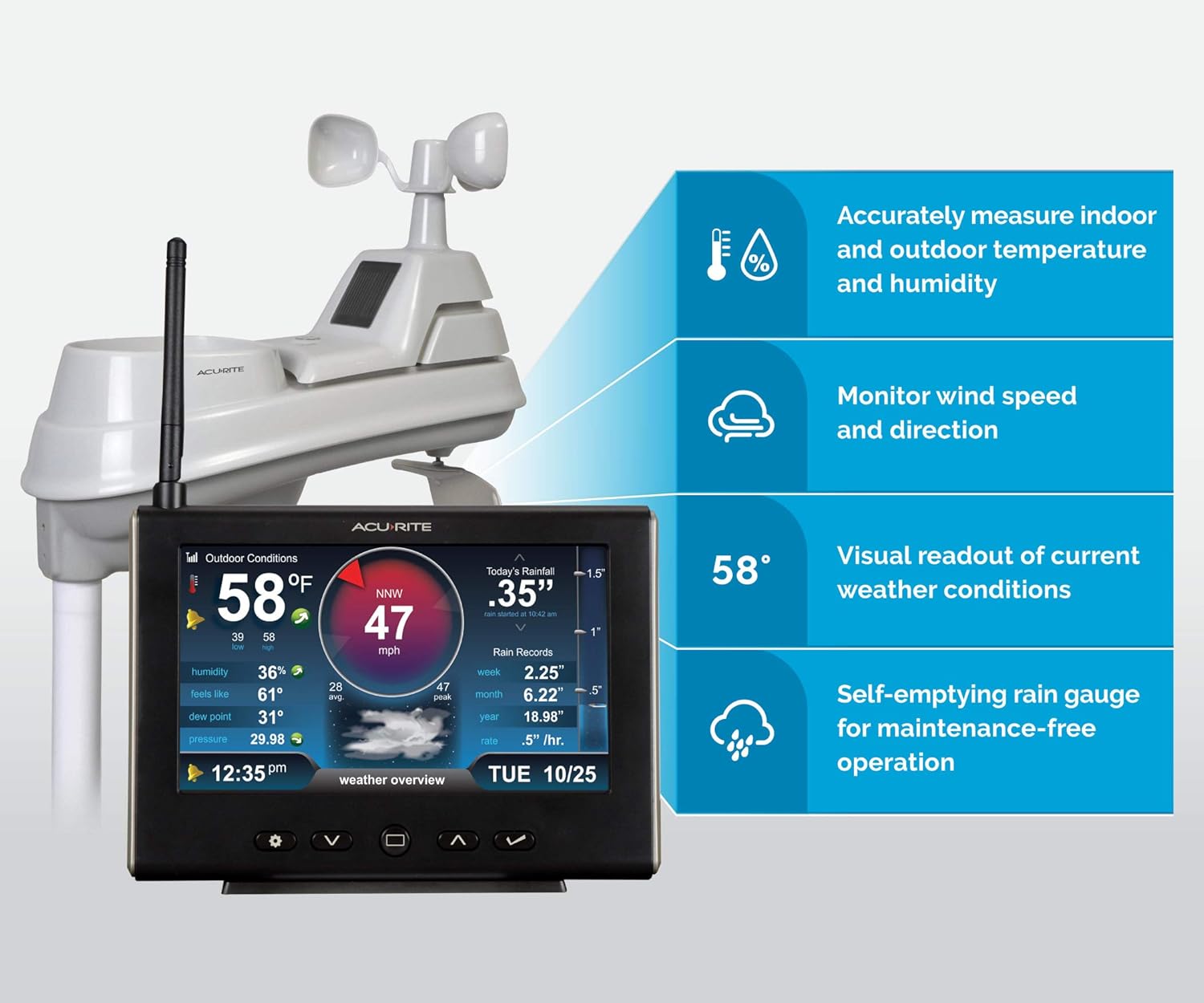
Figure 6: An infographic illustrating key features of the AcuRite Iris Weather Station, including accurate measurement of temperature, humidity, wind, and self-emptying rain gauge.
3. Maintenance
3.1 Outdoor Sensor
The integrated rain gauge is self-emptying, requiring minimal maintenance. Periodically inspect the outdoor sensor for debris (leaves, dirt) that might obstruct the wind cups, wind vane, or rain collector. Gently clean with a soft, damp cloth if necessary. Avoid using abrasive cleaners.
3.2 Display Unit
Clean the display screen with a soft, lint-free cloth. Do not use harsh chemicals or abrasive materials, as these can damage the screen.
3.3 Battery Replacement
Replace batteries in the outdoor sensor when the low battery indicator appears on the display unit. Always replace all batteries at the same time with new, high-quality batteries.
4. Troubleshooting
- No Outdoor Sensor Data: Ensure the outdoor sensor has fresh batteries and is within range of the display unit. Check for any large metal objects or electronic devices that might interfere with the wireless signal. Try relocating the display or sensor slightly.
- Inaccurate Readings: Verify the outdoor sensor is placed in an open area, away from heat sources or obstructions. For wind direction, ensure the sensor is correctly oriented.
- Display Not Powering On: Check the power adapter connection to both the display unit and the electrical outlet.
- Loss of Historical Data After Power Outage: The display unit may lose historical data (annual, monthly, weekly records) if power is interrupted. This is normal behavior, and the unit will begin collecting new data once power is restored.
5. Specifications
- Model Number: 01535M
- Product Dimensions: 0.6"D x 7.6"W x 5.5"H (Display)
- Power Source: Corded Electric (Display), 4 AA Batteries (Outdoor Sensor)
- Connectivity Technology: Wireless
- Special Features: Barometer, Clock, Hygrometer, Thermometer
- Color: White/Black
- Date First Available: December 7, 2016
6. Warranty Information
The AcuRite Iris Weather Station 01535M comes with a one-year limited warranty from the date of purchase. Please retain your proof of purchase for warranty claims. For detailed warranty terms and conditions, refer to the official AcuRite website or contact customer support.
7. Support
For further assistance, technical support, or to inquire about replacement parts, please contact AcuRite customer service. AcuRite is known for its USA-based customer service.
Visit the official AcuRite Store for additional product information and support resources: AcuRite Store on Amazon
Related documents01535M


Ask a question about this manual
Ask about setup, troubleshooting, compatibility, parts, safety, or missing instructions. Manuals+ will review the question and use this page’s manual context to help answer it.