
HoMedics Ymm-1500-Eu
HoMedics Yoga-Inspired Stretch Mat
Instruction Manual
Introduction
The HoMedics Yoga-Inspired Stretch Mat is designed to provide a unique and relaxing stretching experience, inspired by yoga movements. It utilizes precisely controlled air chambers to gently move your body through a sequence of stretches and twists, helping to relieve stress, reduce tension, and improve overall flexibility and mobility.
This manual will guide you through the proper setup, operation, and maintenance of your HoMedics Stretch Mat to ensure optimal performance and longevity.
Important Safety Information
Please read all instructions carefully before using the HoMedics Stretch Mat. Failure to do so may result in injury or damage to the product.
- Always consult with a physician before beginning any new exercise or stretching routine, especially if you have pre-existing medical conditions, injuries, or are pregnant.
- Do not use the mat if you have any open wounds, skin irritations, or severe back/neck conditions without medical advice.
- Keep the mat away from water and moisture. Do not use in a bathroom or near a sink.
- Ensure the power cord is not pinched or damaged. Do not operate if the cord or plug is damaged.
- This appliance is not intended for use by persons with reduced physical, sensory or mental capabilities, or lack of experience and knowledge, unless they have been given supervision or instruction concerning use of the appliance by a person responsible for their safety.
- Children should be supervised to ensure that they do not play with the appliance.
- Unplug the mat from the power outlet when not in use and before cleaning.
- Do not stand on the mat. Use only in a lying position.
Package Contents
Verify that all items are present in your package:
- HoMedics Yoga-Inspired Stretch Mat
- Integrated Remote Control
- Power Adapter
- Instruction Manual
Setup
- Unpack the Mat: Carefully remove the HoMedics Stretch Mat from its packaging.

Image: The HoMedics Yoga-Inspired Stretch Mat fully unfolded, showing its grey and orange design, integrated remote control, and headrest.
- Placement: Lay the mat flat on a firm, level surface such as a floor. Ensure there is enough space around the mat for comfortable use.
- Connect Power: Plug the power adapter into the mat's power input port. Then, plug the power adapter into a standard electrical outlet.
- Position Yourself: Lie down on the mat with your head on the integrated headrest and your body aligned with the mat. Ensure your back and hips are comfortably positioned over the air chambers.

Image: A woman lying on the mat, illustrating how the air chambers inflate to provide gentle stretches to the back and torso.
Operating Instructions
The HoMedics Stretch Mat features an intuitive remote control to select programs and adjust intensity.

Image: A detailed view of the remote control, highlighting the power button, play/pause, program selection buttons (Twist, Flow, Energize, Stretch), and intensity adjustment buttons.
Remote Control Functions:
- Power Button (circle with vertical line): Press to turn the mat ON or OFF.
- Play/Pause Button (two vertical lines / triangle): Press to pause or resume the current program.
- Program Selection Buttons: Choose from four pre-programmed routines:
- Twist: Focuses on gentle twisting movements for spinal mobility.
- Flow: A continuous sequence of movements for overall body relaxation.
- Energize: A more invigorating sequence to awaken the body.
- Stretch: Designed for deep, sustained stretches to improve flexibility.
- Intensity Buttons (up/down arrows): Adjust the intensity level of the chosen program (typically 3 levels). Start with Intensity 1 and gradually increase as comfortable.

Image: A man lying on the mat, holding the remote control and adjusting the intensity of the stretching program, demonstrating user customization.
Using the Mat:
- Ensure the mat is properly set up and plugged in.
- Lie down comfortably on the mat.
- Press the Power Button on the remote to turn on the mat.
- Select your desired program (Twist, Flow, Energize, or Stretch) by pressing the corresponding button.
- Adjust the intensity using the Intensity Buttons.
- Relax and allow the mat to guide your body through the movements. Breathe deeply and evenly.
- To pause the program at any time, press the Play/Pause Button. Press again to resume.
- Once the program is complete, the mat will automatically turn off. You can also manually turn it off by pressing the Power Button.
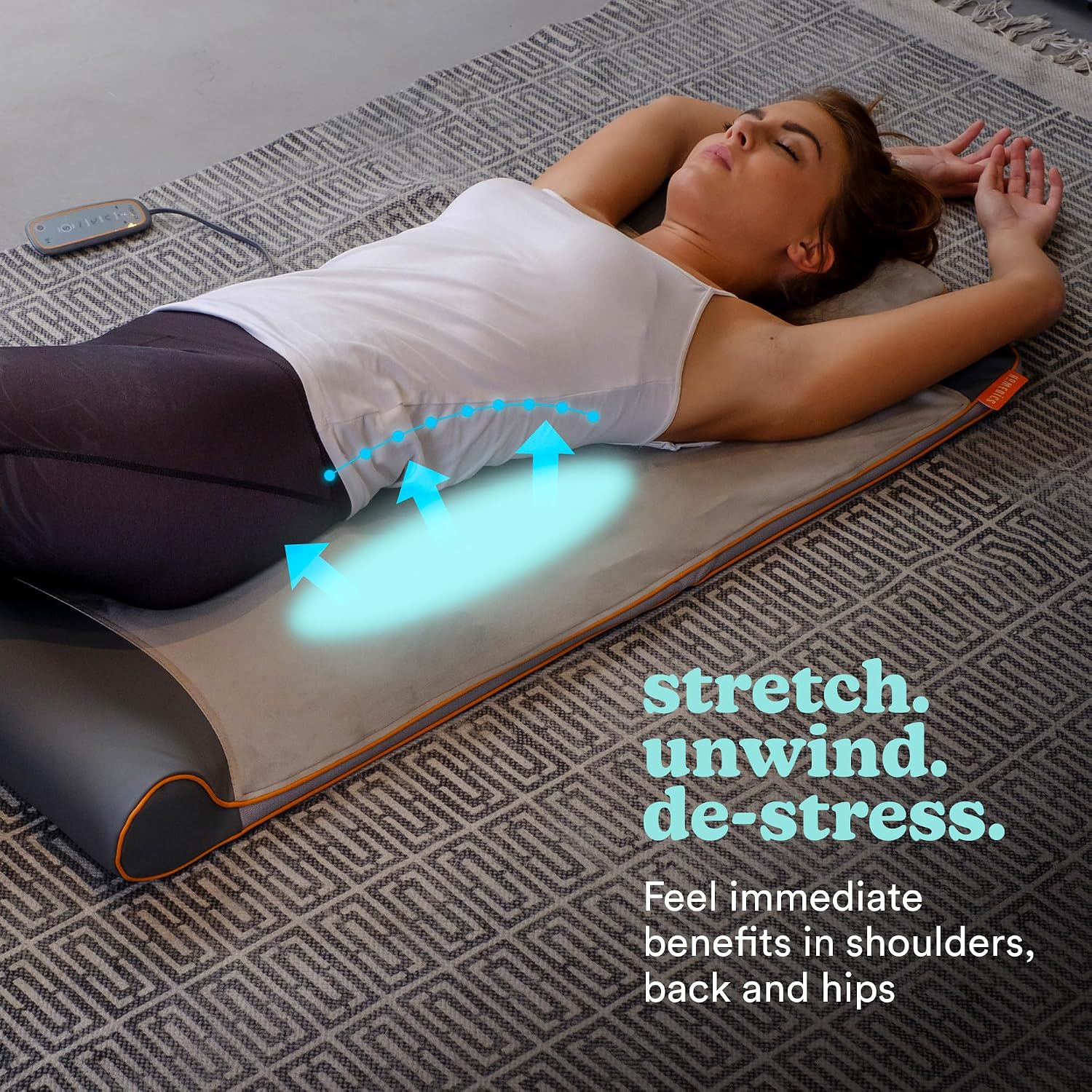
Image: A woman lying on the mat, demonstrating a stretch focused on the lower back and hips, with blue arrows indicating the direction of air chamber inflation.
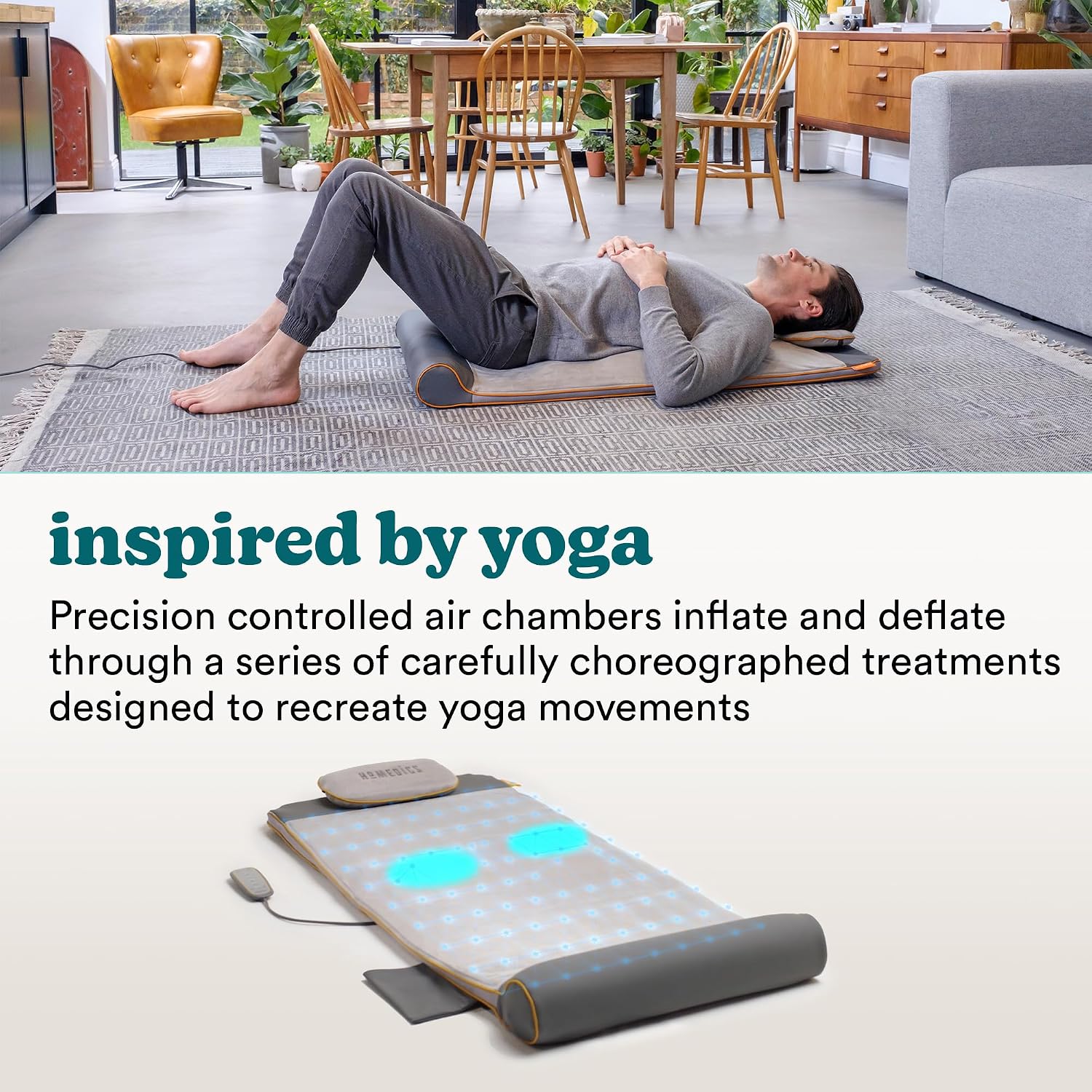
Image: A man lying on the mat with knees bent, illustrating the yoga-inspired movements created by the inflating air chambers.
Maintenance
Cleaning:
- Always unplug the mat before cleaning.
- Wipe the surface of the mat with a soft, damp cloth. Do not use abrasive cleaners, brushes, or harsh chemicals.
- Do not immerse the mat in water or any other liquid.
- The cover is not removable for washing. Spot clean only.
Storage:
- After use, allow the mat to cool down completely before storing.
- Fold the mat neatly for compact storage.

Image: A woman demonstrating how to fold the HoMedics Stretch Mat into a compact, portable size for easy storage or transport.
- Store the mat in a cool, dry place, away from direct sunlight and extreme temperatures.
- Do not hang the mat by its power cord or remote control.
Troubleshooting
| Problem | Possible Cause | Solution |
|---|---|---|
| Mat does not turn on. | Not plugged in; Power outlet not working; Power button not pressed. | Ensure power adapter is securely plugged into the mat and a working electrical outlet. Press the power button firmly. |
| Air chambers are not inflating. | Program not selected; Mat is paused; Internal issue. | Select a program. Press the Play/Pause button to resume. If problem persists, contact customer support. |
| Movements feel too strong/weak. | Intensity level needs adjustment. | Use the Intensity buttons on the remote to increase or decrease the intensity to your comfort level. |
| Unusual noise during operation. | Normal operation sound of the air pump; Obstruction. | A low hum from the air pump is normal. Ensure no objects are obstructing the mat or air vents. If noise is excessive or unusual, discontinue use and contact support. |
Specifications
| Feature | Detail |
|---|---|
| Model Number | Ymm-1500-Eu |
| Brand | HoMedics |
| Dimensions (L x W x H) | Approx. 120 x 50 x 12 cm (unfolded) |
| Weight | Approx. 5.1 Kilograms |
| Material | Polyester |
| Number of Air Chambers | 7 |
| Programs | 4 (Twist, Flow, Energize, Stretch) |
| Intensity Levels | Variable (typically 3 levels) |
| Power Source | AC Adapter |
| Special Features | Easy to clean, Variable intensity, Anti-slip feet, Remote control |
Warranty and Support
HoMedics products are manufactured with the highest quality standards. For detailed warranty information, please refer to the warranty card included with your purchase or visit the official HoMedics website.
If you experience any issues with your HoMedics Yoga-Inspired Stretch Mat, or require technical assistance, please contact HoMedics Customer Support. Have your model number (Ymm-1500-Eu) and proof of purchase ready when contacting support.
For the most up-to-date support information, FAQs, and contact details, please visit:
Ask a question about this manual
Ask about setup, troubleshooting, compatibility, parts, safety, or missing instructions. Manuals+ will review the question and use this page’s manual context to help answer it.