
1. Setup and Assembly
This section provides instructions for assembling your Makita XUX01M5PT Power Head Kit and preparing it for use.
1.1 Unpacking and Initial Inspection
Carefully remove all components from the packaging. Inspect the power head, string trimmer attachment, batteries, and charger for any signs of damage. If any parts are damaged or missing, do not proceed with assembly and contact Makita customer support.
1.2 Battery Charging
Before first use, fully charge both 18V LXT® Lithium-Ion 5.0Ah batteries using the included 18V LXT® Lithium-Ion Dual Port Charger (DC18RD). Refer to the charger's instruction manual for detailed charging procedures. Ensure batteries are cool before charging.
1.3 Attaching the String Trimmer
- Align the shaft of the string trimmer attachment (EM405MP) with the coupling on the power head (XUX01Z).
- Insert the attachment shaft into the power head coupling until it clicks into place.
- Secure the attachment using the lever-style lock system. Ensure the attachment is firmly seated and locked to prevent accidental detachment during operation.

Figure 1: Assembled Makita XUX01M5PT Power Head with String Trimmer Attachment.
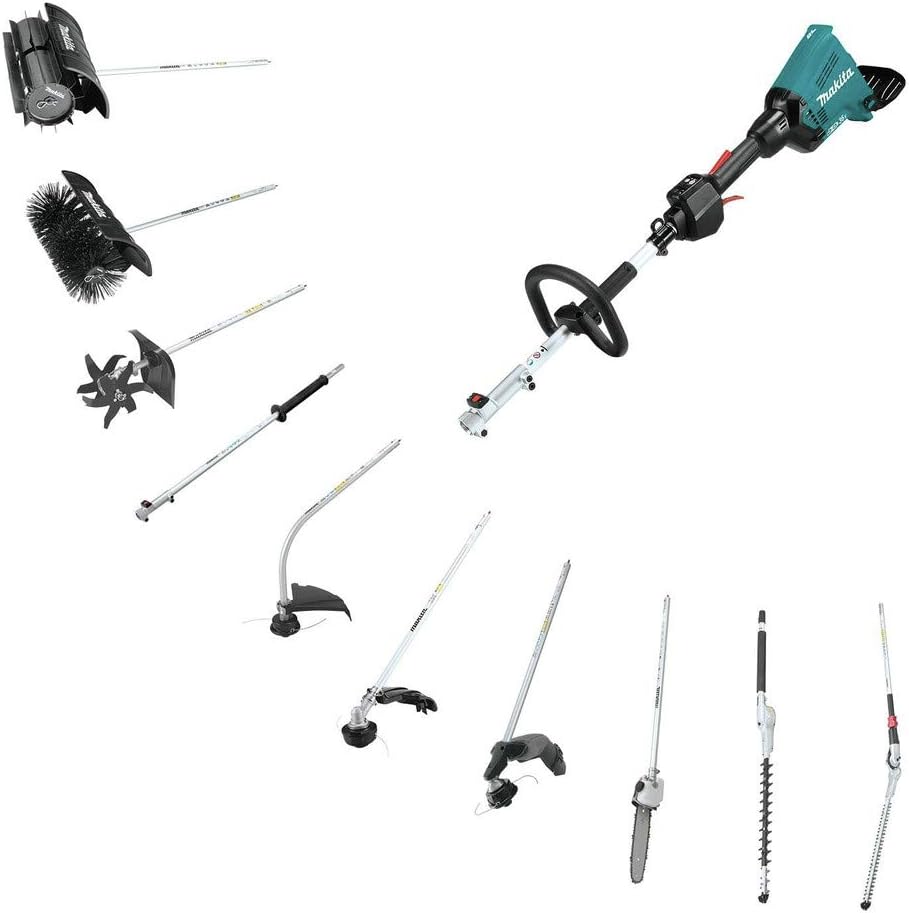
Figure 2: The Makita Couple Shaft Power Head is compatible with various attachments (sold separately), demonstrating its versatility.
1.4 Battery Installation
Insert the two charged 18V LXT® Lithium-Ion batteries into the battery ports on the power head. Ensure they are fully seated and locked into position. The tool requires two batteries for operation.
2. Operating Instructions
Follow these guidelines for safe and effective operation of your power head kit.
2.1 Powering On and Off
- To turn on: Press the power button. The indicator lights will illuminate.
- To turn off: Press and hold the power button until the indicator lights turn off.
2.2 Speed Selection
The power head features three-speed options for optimal power management:
- Low: 4,200 RPM
- Medium: 6,000 RPM
- High: 7,100 RPM
Use the speed selection button on the control panel to cycle through the available speeds. The selected speed will be indicated by the corresponding light.
2.3 Variable Speed Trigger
The variable speed trigger allows for precise control over the cutting speed. Press the trigger gently for lower speeds and increase pressure for higher speeds, up to the selected maximum RPM.

Figure 3: Close-up of the control panel, showing power, speed selection, and reverse rotation buttons.
2.4 Reverse Rotation System
The power head is equipped with a reverse (clockwise) rotation system. This feature allows the operator to quickly clear the brush cutter head of entangled weeds and grass. Activate the reverse rotation by pressing the designated 'R' button on the control panel.
2.5 General Usage
Always wear appropriate personal protective equipment (PPE), including eye protection, gloves, and sturdy footwear, when operating the tool. Maintain a firm grip on the handles and keep a balanced stance. Avoid operating the tool in wet conditions or near bystanders.

Figure 4: Proper posture and safety gear while operating the string trimmer.
2.6 Instructional Video
Video 1: Demonstration of the Makita XUX01Z 36V Power Head with String Trimmer. This video provides a visual guide to the tool's features and operation.
3. Maintenance
Regular maintenance ensures the longevity and optimal performance of your Makita power head kit.
3.1 General Cleaning
After each use, disconnect the batteries and clean the tool. Wipe down the power head and attachment with a dry cloth to remove dirt, dust, and debris. Do not use harsh chemicals or abrasive cleaners. Ensure ventilation openings are clear of obstructions.
3.2 Clearing Entangled Material
If weeds or grass become entangled around the string trimmer head, immediately turn off the tool and remove the batteries. Use appropriate tools (e.g., a stick or small brush) to carefully clear the entangled material. Avoid using your hands directly on the cutting head.
3.3 Battery Care and Storage
- Store batteries in a cool, dry place away from direct sunlight and extreme temperatures.
- Do not store fully discharged batteries for extended periods. Charge them periodically to maintain battery health.
- Always remove batteries from the tool when not in use or during maintenance.

Figure 5: The power head with batteries removed, ready for cleaning or storage.
3.4 Attachment Inspection
Regularly inspect the string trimmer attachment for wear and tear. Check the cutting line for damage and replace it as needed. Ensure all fasteners are tight.
4. Troubleshooting
This section addresses common issues you might encounter with your Makita power head kit.
4.1 Tool Stops During Operation
- Electronic Torque Control: The tool is equipped with an electronic torque control system that turns the motor off if the rotation speed suddenly slows down or stops (e.g., due to heavy load or entanglement). Turn off the tool, remove batteries, clear any obstruction, and restart.
- Overheat Warning System: If the tool overheats, an indicator light will turn on, and the motor may automatically stop. Allow the tool and batteries to cool down before resuming operation. Avoid continuous heavy-duty use without breaks.
- Low Battery: Ensure batteries are fully charged. The tool will stop if batteries are depleted.
4.2 Attachment Not Seating Properly
If an attachment does not fully insert or lock into the power head, ensure the coupling mechanism is clean and free of debris. Verify that the attachment shaft is correctly aligned with the power head's drive shaft. If issues persist, consult the detailed assembly instructions or contact customer support.
5. Specifications
| Feature | Specification |
|---|---|
| Brand | Makita |
| Model Number | XUX01M5PT |
| Power Source | Battery Powered (36V, 18V X2 LXT®) |
| Motor Type | Brushless |
| Speed Options | Low: 4,200 RPM, Medium: 6,000 RPM, High: 7,100 RPM |
| Cutting Width (String Trimmer) | 15 inches |
| Included Components | 18V X2 (36V) LXT® Brushless Couple Shaft Power Head (XUX01Z), String Trimmer Couple Shaft Attachment (EM405MP), 2x 18V LXT® Lithium-Ion 5.0Ah Battery (BL1850B), 18V LXT® Lithium-Ion Dual Port Charger (DC18RD) |
| Item Weight | 0.27 g (Note: This weight seems unusually low and may refer to a specific component or be a data error. Refer to product packaging for accurate weight.) |
| Item Dimensions (L x W) | 10"L x 60"W |
6. Warranty & Support
6.1 Manufacturer's Warranty
Makita offers a 3-year limited warranty on the tool, battery, and charger. This warranty covers defects in materials and workmanship under normal use. For full details, please refer to the warranty card included with your product or visit the official Makita website.
6.2 Customer Support
For technical assistance, service, or warranty claims, please contact Makita customer support. You can find contact information on the official Makita website or in your product documentation.
6.3 Important Safety Information
Always prioritize safety when using power tools. Refer to the comprehensive safety information provided in the official User Guide (PDF) for this product. This document contains critical warnings and precautions to prevent personal injury and property damage.
WARNING: Using non-genuine ("knock-off") Makita Lithium-Ion Batteries may cause them to burst, resulting in fires, personal injuries, or property damage. Makita U.S.A., Inc. notifies tool users of the hazards and risks of using non-genuine Makita Lithium-Ion batteries. If you have any question whether your battery is a genuine Makita product, or if you have a performance issue with your Makita battery, tool, or charger, contact a Makita Factory Service Center or Authorized Service Center, or call (800)-4-MAKITA.
You can access the official User Guide here.


