
LESHP HXY-H4
Contents
LESHP HXY-H4 LCD Display Battery Charger
User Manual
Introduction
Thank you for choosing the LESHP HXY-H4 LCD Display Battery Charger. This intelligent charger is designed to provide efficient and safe charging for a wide range of rechargeable batteries, including Li-ion, LiFePO4, Ni-MH, and Ni-CD types. Its advanced features, such as independent slot monitoring and an informative LCD display, ensure optimal battery health and user convenience.
Key features include:
- Each of the four battery slots monitors and charges independently.
- LCD display shows voltage, charging current, charging time, and battery type for each slot.
- Advanced protection against short circuiting, over-current, overcharging, and wrong polarity direction.
- Automatic identification of Li-ion/Ni-MH/Ni-CD batteries, with manual selection for LiFePO4.
- Selectable charging current of 500mA or 1000mA.
Setup
Before using your LESHP HXY-H4 charger, please follow these simple setup steps:
- Unpack the Charger: Carefully remove the charger and all accessories from the packaging. Ensure all components, including the charger unit, AC power adapter, and car charger adapter, are present.
- Connect Power: Connect the provided AC power adapter to the charger's DC input port and then plug it into a standard wall outlet. Alternatively, for in-car use, connect the car charger adapter to the DC input port and plug it into your vehicle's 12V power socket.
- Initial Display Check: Upon connecting power, the LCD display should illuminate, indicating the charger is ready for use.

Image: The LESHP HXY-H4 charger shown with its included AC power adapter and car charger adapter, ready for connection.
Operating Instructions
The LESHP HXY-H4 charger is designed for intuitive operation. Follow these steps to charge your batteries:
- Insert Batteries: Carefully insert one or more compatible rechargeable batteries into the charging slots (A, B, C, D). Ensure the positive (+) and negative (-) terminals of the battery align correctly with the markings in the slot. The charger supports various battery sizes, including 10440, 14500, 16340, 17500, 17670, 18350, 18490, 18650, 26650, 22650, 17650 Li-ion/LiFePO4, and AA, AAA, C Ni-MH/Ni-CD.
- Automatic Detection: The charger will automatically detect the battery type (Li-ion/Ni-MH/Ni-CD) and begin charging. For LiFePO4 batteries, manual selection is required (see step 4).
- Monitor LCD Display: The LCD screen will display real-time information for each slot, including voltage (V), charging current (mA), charging time, and detected battery type. A battery icon will indicate the charging progress.
- Select Charging Current (Optional): Short press the corresponding button (A, B, C, or D) for 1 second to cycle between 500mA and 1000mA charging current for that specific slot.
- Select Battery Type (For LiFePO4): If charging a LiFePO4 battery, long press the corresponding button (A, B, C, or D) for 10 seconds. The display will switch between Li-ion and LiFePO4 battery types. Ensure the correct type is selected for safe and efficient charging.
- Charging Completion: The charger will automatically stop charging when the battery is full. The LCD display will show 'FULL' or a similar indication, and the battery icon will show a full charge.

Image: The LESHP HXY-H4 charger with four batteries inserted into its independent charging slots.

Image: Close-up of the charger's LCD display, showing voltage, current, and battery status for each of the four independent charging channels.

Image: An illustration highlighting the independent charging capability of each slot, ensuring no interference between batteries.
Maintenance
To ensure the longevity and optimal performance of your LESHP HXY-H4 charger, follow these maintenance guidelines:
- Cleaning: Disconnect the charger from power before cleaning. Use a soft, dry cloth to wipe the exterior. Do not use abrasive cleaners or solvents. Keep the charging slots free of dust and debris.
- Storage: When not in use, store the charger in a cool, dry place away from direct sunlight and extreme temperatures.
- Handle with Care: Avoid dropping the charger or subjecting it to strong impacts, as this can damage internal components or the LCD screen.
- Temperature Control: The charger features automatic intelligent temperature control. Ensure proper ventilation around the unit during operation to prevent overheating.
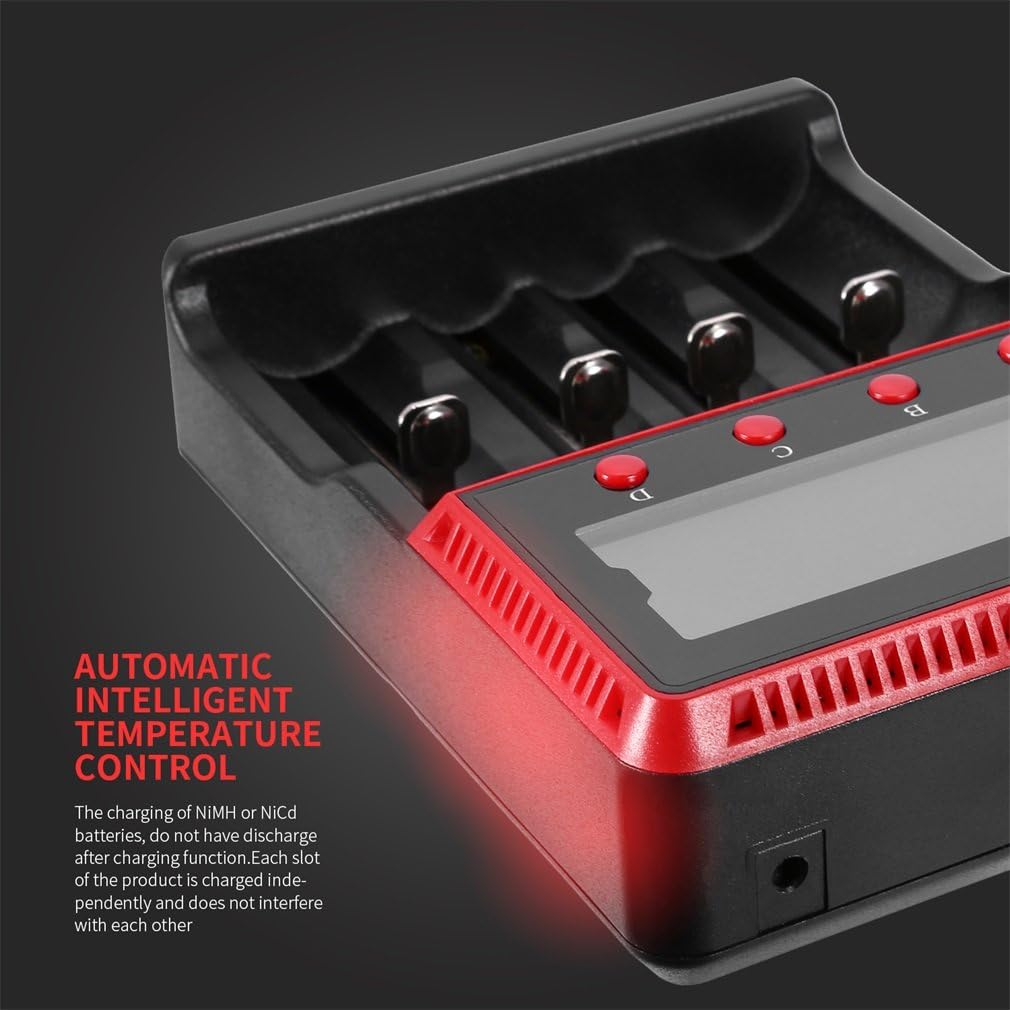
Image: A visual representation emphasizing the automatic intelligent temperature control feature of the charger, ensuring safe operation.

Image: A close-up view of the charger's copper-made metal chute design, illustrating the fine design and robust contacts for efficient charging.
Troubleshooting
If you encounter issues with your LESHP HXY-H4 charger, please refer to the following common problems and solutions:
| Problem | Possible Cause / Solution |
|---|---|
| Charger not powering on / LCD blank. | Ensure the power adapter is securely connected to both the charger and a working power outlet. Check if the outlet has power. |
| Battery not charging / Display shows error. |
|
| Charger or batteries feel excessively hot. |
|
| Inaccurate LCD readings. | Ensure the battery is clean and making good contact. Try reinserting the battery. If the issue persists, contact customer support. |
Specifications
Below are the technical specifications for the LESHP HXY-H4 Battery Charger:
| Feature | Detail |
|---|---|
| Model Number | HXY-H4 (Item model number: 4330196274) |
| Compatible Battery Types | Li-ion / LiFePO4 (10440, 14500, 16340, 17500, 17670, 18350, 18490, 18650, 26650, 22650, 17650), Ni-MH / Ni-CD (AA, AAA, C) |
| Input Voltage | 240 Volts |
| Output Voltage | 3.2 Volts (DC) |
| Charging Current | Selectable 500mA / 1000mA per slot |
| Display | LCD (Voltage, Current, Time, Battery Type) |
| Protection Features | Short circuit, over-current, overcharging, wrong polarity |
| Dimensions | 7.28 x 6.3 x 1.69 inches |
| Item Weight | 9.2 ounces (260 Grams) |
| Color | Red |
| Manufacturer | LESHP |

Image: A visual guide to the battery models compatible with the LESHP HXY-H4 charger, including various Li-ion and Ni-MH/Ni-CD sizes.
Warranty and Support
LESHP products are manufactured to high-quality standards. For information regarding warranty coverage, please refer to the warranty card included with your product or visit the official LESHP website. If you require technical assistance or have questions not covered in this manual, please contact LESHP customer support through their official channels.
For further assistance, you may also refer to the product listing page on Amazon for seller contact information or frequently asked questions.
Documents and downloads
Ask a question about this manual
Ask about setup, troubleshooting, compatibility, parts, safety, or missing instructions. Manuals+ will review the question and use this page’s manual context to help answer it.