
1. Introduction
This manual provides detailed instructions for the safe and effective use of your Tomshine 60W DJ Moving Head Light. This professional DMX-512 stage light features 6-in-1 RGBW+Amber+UV LEDs, offering a wide range of dynamic lighting effects suitable for various events. Please read this manual thoroughly before operation and retain it for future reference.

2. Safety Information
- Always connect the unit to a grounded power outlet.
- Do not open the housing; there are no user-serviceable parts inside. Refer all servicing to qualified personnel.
- Avoid direct eye exposure to the light source.
- Ensure proper ventilation around the unit to prevent overheating.
- Mount the fixture securely using appropriate hardware and safety cables.
- Keep the unit away from moisture, water, and flammable materials.
- Disconnect power before cleaning or maintenance.
3. Package Contents
Verify that all items are present and in good condition upon opening the package:
- Tomshine 60W DJ Moving Head Light
- Power Cable
- Mounting Bracket
- Mounting Screws
- User Manual (this document)
4. Product Overview
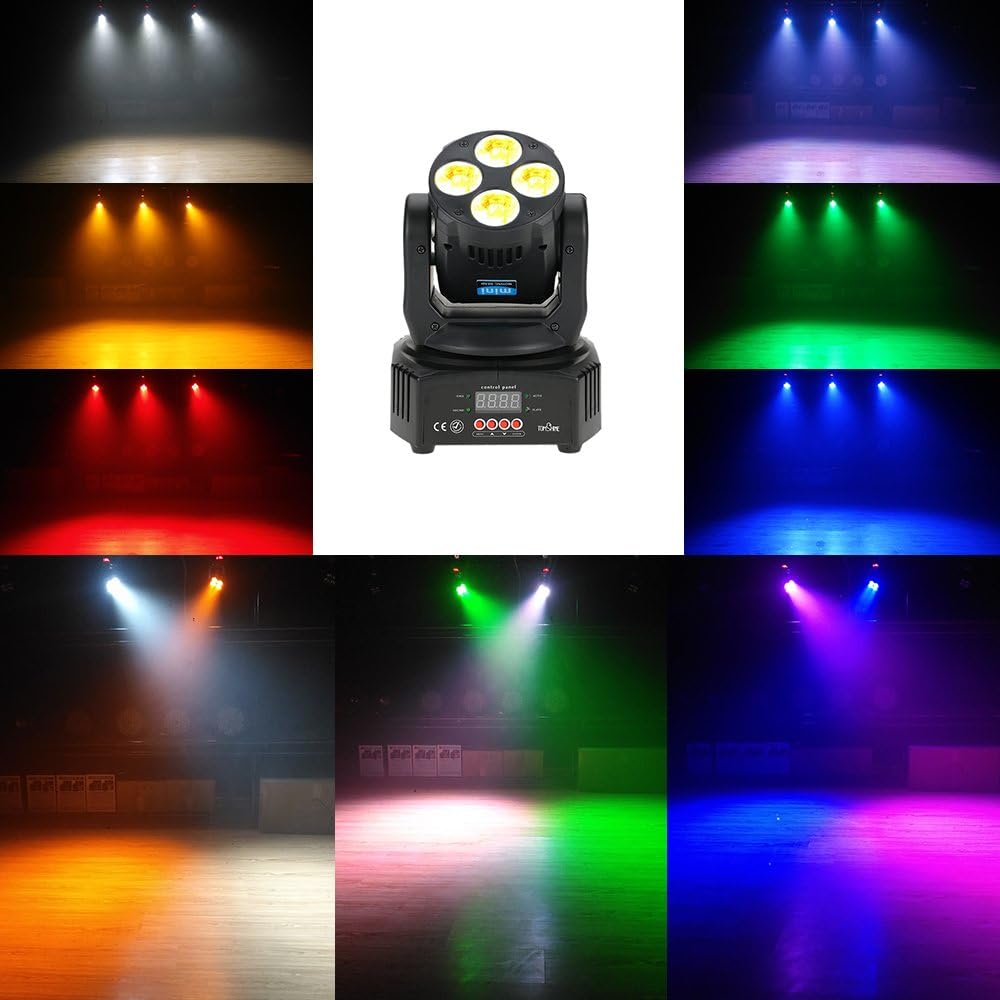
The Tomshine 60W DJ Moving Head Light is designed for professional stage and event lighting. It features a powerful 60W LED light source with RGBW+Amber+UV colors, allowing for a broad spectrum of color mixing and effects. The moving head design provides dynamic pan and tilt movements to cover large areas.
Key Features:
- Multi-channel DMX Control: Supports 16 or 18 DMX channels for precise control over various functions.
- 6-in-1 LED: Combines Red, Green, Blue, White, Amber, and UV LEDs for versatile color options.
- Multiple Operating Modes: Sound activation, auto-run, DMX512, and master-slave modes.
- Dynamic Effects: Wash light, color jumping, strobe, and dimming capabilities.
- Compact Design: Lightweight and easy to install for various applications.

5. Setup
5.1 Mounting
The fixture can be mounted in various positions (e.g., truss, ceiling, or placed on a flat surface). Always ensure the mounting surface or structure can support the weight of the fixture. Use the provided mounting bracket and screws for secure installation. For overhead installations, an additional safety cable is recommended.
5.2 Power Connection
Connect the provided power cable to the power input on the rear of the fixture and then to a suitable grounded power outlet. Ensure the voltage matches the fixture's requirements (typically 100-240V AC, 50/60Hz).
5.3 DMX Connection (Optional)
For DMX control, connect a DMX cable from your DMX controller's output to the DMX IN port of the first fixture. For multiple fixtures, daisy-chain them by connecting the DMX OUT of the first fixture to the DMX IN of the next, and so on.
6. Operation
The Tomshine Moving Head Light offers several operating modes, selectable via the control panel on the base of the unit. The control panel typically includes a digital display and buttons for MENU, UP, DOWN, and ENTER.

6.1 Control Panel Navigation
- MENU: Cycles through the main menu options.
- UP/DOWN: Navigates through sub-menus or adjusts parameter values.
- ENTER: Confirms selection or saves changes.
6.2 Operating Modes
- Sound Activation Mode:
The light reacts to ambient sound or music. Use the control panel to select "Sound" mode and adjust sensitivity if available. The fixture will synchronize movements and color changes with the beat.
- Auto-Run Mode:
The light executes pre-programmed sequences and patterns automatically. Select "Auto" mode from the control panel. Some models may offer different auto programs to choose from.
- DMX512 Mode:
For professional control, connect the fixture to a DMX controller. Set the DMX address for each fixture using the control panel. Refer to the DMX Channel Chart (Section 7) for specific control parameters.
- Master-Slave Mode:
Link multiple fixtures together for synchronized operation without a DMX controller. Set one fixture as "Master" and the others as "Slave." The slave units will mimic the master's movements and effects.

7. DMX Control
The Tomshine 60W DJ Moving Head Light supports DMX512 protocol with 16 or 18 channels. Each channel controls a specific function of the light (e.g., Pan, Tilt, Color, Dimmer, Strobe).
7.1 Setting DMX Address
To set the DMX address, navigate to the DMX address setting in the control panel menu. Use the UP/DOWN buttons to select the desired starting address (1-512) and press ENTER to confirm. Ensure each fixture in a DMX chain has a unique starting address.
7.2 DMX Channel Chart (Example - Consult specific product documentation for full chart)
| Channel | Function | Value Range | Description |
|---|---|---|---|
| 1 | Pan | 0-255 | 0-540 degree pan movement |
| 2 | Tilt | 0-255 | 0-180 degree tilt movement |
| 3 | Dimmer | 0-255 | 0-100% brightness adjustment |
| 4 | Strobe | 0-255 | Strobe speed from slow to fast |
| 5 | Color | 0-255 | Color selection/mixing (RGBW+Amber+UV) |
Note: This is an example DMX channel chart. The exact channel assignments and functions may vary. Please refer to the official PDF user manual for the complete and accurate DMX channel chart.
8. Maintenance
Regular maintenance helps ensure the longevity and optimal performance of your moving head light.
- Cleaning: Periodically clean the lenses and exterior housing with a soft, lint-free cloth. Do not use abrasive cleaners or solvents. Ensure the unit is unplugged before cleaning.
- Inspection: Regularly check power cables, DMX cables, and mounting hardware for any signs of wear or damage. Replace damaged components immediately.
- Ventilation: Ensure ventilation openings are clear of dust and debris to maintain proper airflow and prevent overheating.
9. Troubleshooting
If you encounter issues with your Tomshine 60W DJ Moving Head Light, refer to the following common problems and solutions:
| Problem | Possible Cause | Solution |
|---|---|---|
| Light does not power on | No power, faulty cable, or internal issue. | Check power connection. Try a different outlet. Inspect power cable for damage. If problem persists, contact support. |
| No DMX control | Incorrect DMX address, faulty DMX cable, or DMX controller issue. | Verify DMX address setting. Check DMX cable connections. Ensure DMX controller is functioning correctly. Try a different DMX cable. |
| Light movement is erratic or unresponsive | Interference, calibration issue, or DMX signal problem. | Ensure no physical obstructions. Recalibrate the fixture if an option is available in the menu. Check DMX signal integrity. |
| Sound activation not working | Microphone sensitivity too low, no sound input. | Increase microphone sensitivity via the control panel. Ensure there is sufficient sound near the fixture. |
10. Specifications
| Feature | Detail |
|---|---|
| Brand | Tomshine |
| Model Number | 4334419171 |
| Light Source Type | Light Emitting Diode (LED) |
| Wattage | 60 Watts |
| Colors | RGBW + Amber + UV (6-in-1) |
| DMX Channels | 16/18 Channels |
| Operating Modes | Sound Activation, Auto-Run, DMX512, Master-Slave |
| Pan Movement | 540 degrees |
| Tilt Movement | 180 degrees |
| Material | Acrylonitrile Butadiene Styrene (ABS), Metal |
| Product Dimensions | 5.5"L x 5.5"W x 7"H (14cm x 14cm x 18cm) |
| Item Weight | 3.29 pounds (approx. 1.49 kg) |
| Power Source | Corded Electric |
| UPC | 759974666452 |

11. Warranty and Support
For warranty information, please refer to the terms and conditions provided at the time of purchase or contact your retailer.
For further assistance or technical support, please visit the Tomshine Store on Amazon or consult the official User Manual (PDF) for more detailed information.


