
KabelDirekt 1012
KabelDirekt SAT Cable User Manual
Model: 1012
1. Introduction
This manual provides comprehensive instructions for the proper use, setup, and maintenance of your KabelDirekt SAT Cable. Please read this manual thoroughly before use to ensure optimal performance and longevity of the product.
2. Product Overview
The KabelDirekt SAT Cable is a high-quality coaxial cable designed for reliable signal transmission for various applications including satellite TV, cable TV, and antenna/aerial TV. It supports Full HD and 4K resolutions and features robust shielding for interference protection.

Figure 2.1: KabelDirekt SAT Cable with its distinctive 90-degree angled F-connectors and product branding.
3. Key Features
- High Signal Quality: Guarantees highest signal quality for satellite TV, cable TV, or antenna/aerial TV, in Full HD or 4K.
- Advanced Shielding: Features multiple layers of shielding from aluminium Mylar foil and dense copper braid for excellent interference protection.
- Flexible Design: Maintains high flexibility despite robust shielding.
- Durable Connectors: Connectors are protected by a break-resistant metal sleeve.
- Versatile Connectivity: Suitable for connecting TVs, satellite receivers, radio receivers, TV antennas, wall sockets for satellite dishes, and certain internet routers.
- Angled Connectors: 90-degree angled F-connectors for convenient installation in tight spaces.

Figure 3.1: The cable's gold-plated connectors and icons indicating compatibility with DVB-T2, DVB-S2, DVB-C, Radio, Internet, and Full HD 1080p.
4. Setup and Installation
The KabelDirekt SAT Cable is designed for straightforward installation. Follow these steps to connect your devices:
- Identify Ports: Locate the F-type coaxial input port on your television, satellite receiver, cable modem, or wall outlet.
- Connect First End: Gently screw one of the 90-degree angled F-connectors of the KabelDirekt SAT Cable into the corresponding port on your source device (e.g., wall outlet). Ensure it is finger-tight to secure the connection without over-tightening.
- Adjust Angle (if needed): The angled connector can be rotated to achieve the desired cable routing, allowing for installation in tight spaces or flush against a wall. Loosen slightly, rotate, then re-tighten.
- Connect Second End: Connect the other 90-degree angled F-connector to the input port of your receiving device (e.g., TV, satellite receiver).
- Verify Connection: Ensure both ends are securely connected. A loose connection can result in signal degradation.
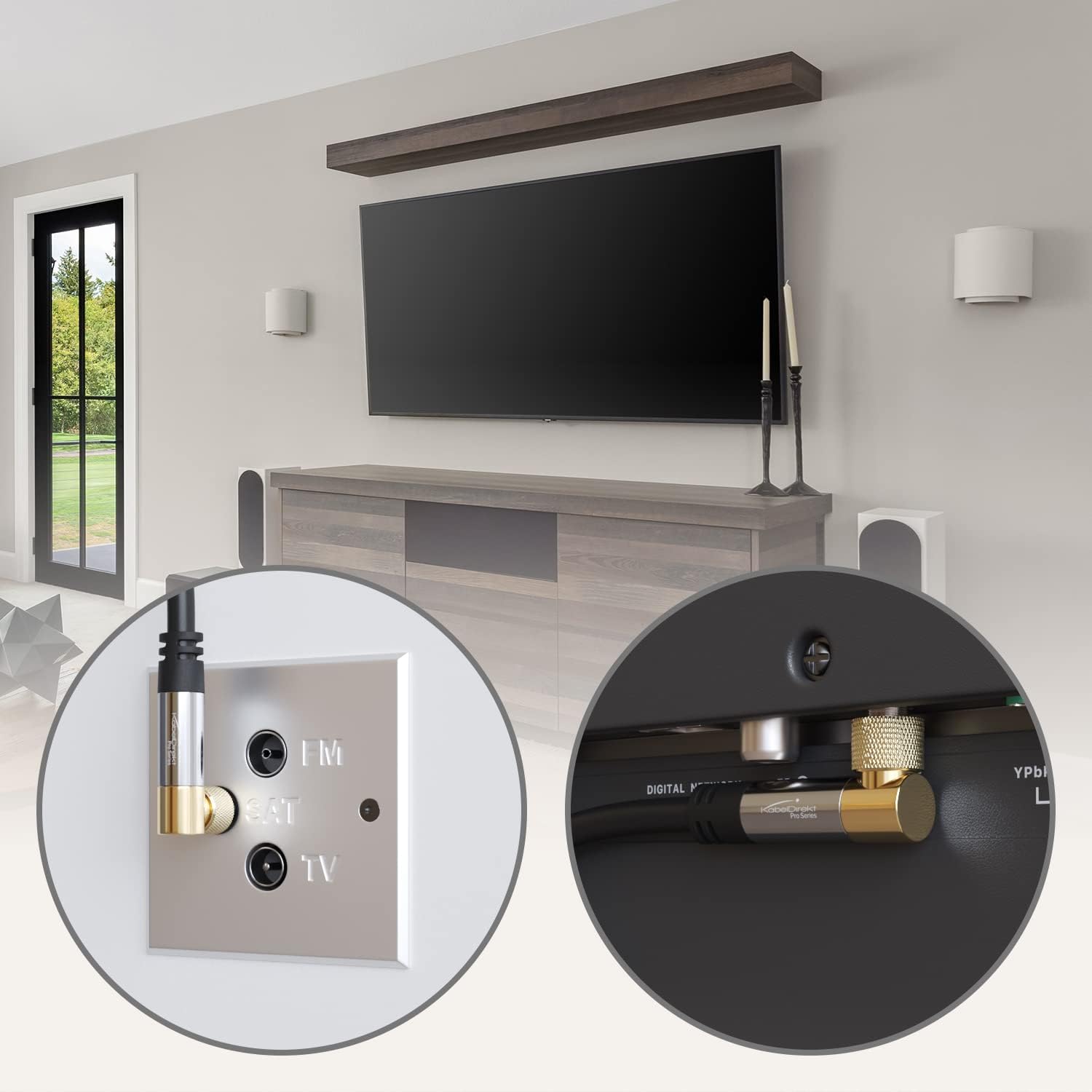
Figure 4.1: Example of the KabelDirekt SAT Cable connected to a wall plate and a television, demonstrating how the 90-degree angled connector allows for a flush installation.
5. Operating Instructions
The KabelDirekt SAT Cable functions as a passive signal conduit. Once properly connected, it requires no further operation. Its primary function is to transmit high-quality audio and video signals between compatible devices.
- Ensure all connected devices (TV, receiver, modem) are powered on and configured correctly according to their respective manuals.
- Select the appropriate input source on your television or receiver to view the signal transmitted via the cable.

Figure 5.1: Various connector configurations available for KabelDirekt satellite cables, including angled and straight options, highlighting the angled/angled configuration of this specific model.
6. Maintenance
The KabelDirekt SAT Cable is designed for durability and requires minimal maintenance. Follow these guidelines to ensure its longevity:
- Cleaning: Use a soft, dry cloth to wipe the cable and connectors. Avoid using harsh chemicals or abrasive cleaners.
- Storage: When not in use, store the cable in a cool, dry place, away from direct sunlight and extreme temperatures. Avoid sharp bends or kinks in the cable.
- Connection Check: Periodically check the connections to ensure they remain finger-tight. Loose connections can lead to signal loss or interference.
- Physical Inspection: Inspect the cable periodically for any signs of damage, such as cuts, fraying, or exposed wiring. Do not use a damaged cable.

Figure 6.1: An illustration of the KabelDirekt SAT Cable's internal construction, highlighting its multi-layered shielding for enhanced signal integrity and durability.
7. Troubleshooting
If you experience issues with your KabelDirekt SAT Cable, consider the following troubleshooting steps:
| Problem | Possible Cause | Solution |
|---|---|---|
| No Signal / Poor Picture Quality | Loose connections, damaged cable, incorrect input source selected on TV/receiver. |
|
| Interference / Static | External electromagnetic interference, loose shielding, damaged cable. |
|
8. Specifications
| Attribute | Detail |
|---|---|
| Brand | KabelDirekt |
| Model Name | KabelDirekt – SAT Cable, Coaxial – Internet, Satellite Cable – TV/Aerial/Coax Cord, F-Connector – Designed in Germany – 90° angled – 3.3ft (Radio, DVB-C/DVB-S2 – black) |
| Item Model Number | 1012 |
| Cable Type | Sat cable (Coaxial) |
| Connector Type | F Connector (90° Angled) |
| Connector Gender | Male-to-Male |
| Length | 3.3 feet (1 meter) |
| Color | Black |
| Outer Material | PVC (polyvinyl chloride) |
| Item Weight | 1.59 ounces (45 Grams) |
| Product Dimensions | 5.67 x 4.02 x 0.63 inches |
| Compatible Devices | Satellite set-top boxes, radios, antennas, DVB-T receivers, cable set-top boxes, cable modems, TVs |
| Special Feature | Braided, 90° Angled Connectors |
| Indoor/Outdoor Usage | Outdoor |

Figure 8.1: Detailed measurements of the 90-degree angled F-connector, showing its compact design for space-saving installations.
9. Warranty and Support
KabelDirekt provides a 36-month manufacturer's warranty for this product. This warranty covers defects in materials and workmanship under normal use. For warranty claims or technical support, please contact KabelDirekt customer service through their official channels or the retailer where the product was purchased.
For further assistance, please visit the official KabelDirekt website or refer to the contact information provided with your purchase.
Ask a question about this manual
Ask about setup, troubleshooting, compatibility, parts, safety, or missing instructions. Manuals+ will review the question and use this page’s manual context to help answer it.