Introduction
Thank you for choosing the Mengshen MS-YBQ041 Wireless Motion Detector Alarm System. This system is designed to provide reliable security and convenience for various applications, including home, shops, offices, and more. It features a wireless infrared motion sensor and two receivers, offering multiple operating modes and adjustable settings. Please read this manual carefully to ensure proper installation and operation.

Image: The Mengshen MS-YBQ041 system, showing one motion sensor and two receiver units.
Product Components
The Mengshen MS-YBQ041 package includes the following items:
- 1 x Infrared Motion Sensor
- 2 x Receiver Units
- 1 x Bag of Mounting Screws
- 1 x User Manual (English)
Note: AA batteries for the receiver and AAA batteries for the PIR sensor are not included in the package.
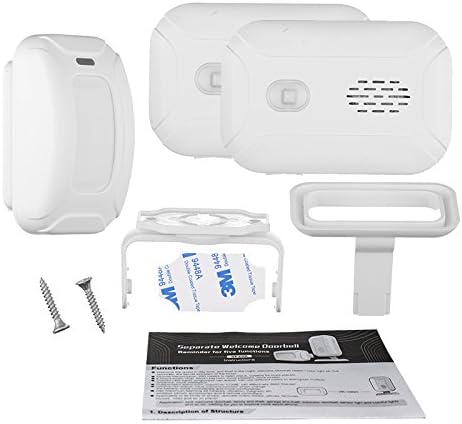
Image: All components included in the Mengshen MS-YBQ041 kit, laid out for inspection.
Product Overview
Receiver Unit

Image: Front view of the receiver unit with labels indicating the Music Select Key, Volume Key, ON/OFF and Mode Key, LED Light, Speaker, and Desk Stand.
- Music Select Key: Used to cycle through available melodies/chimes.
- Volume Key: Adjusts the sound volume (4 levels).
- ON/OFF and Mode Key: Powers the unit on/off and cycles through operating modes.
- LED Light: Illuminates to indicate detection or selected mode.
- Speaker: Emits audible alerts and chimes.
- Desk Stand: Provides stable placement on flat surfaces.
Infrared Motion Sensor

Image: Side view of the motion sensor unit with labels indicating the Infrared Induction Window, Indicator Light, USB Interface, and ON/OFF switch.
- Infrared Induction Window: Detects motion within its range.
- Indicator Light: Flashes upon motion detection.
- USB Interface: For optional micro USB power supply.
- ON/OFF Switch: Powers the sensor unit on/off.
Setup
1. Battery Installation
For Receiver Units: Open the battery compartment on the back of each receiver. Insert 3 x AA batteries (not included), ensuring correct polarity (+/-). Alternatively, power the receiver using a micro USB cable (not included).
For Motion Sensor: Open the battery compartment on the back of the sensor. Insert 3 x AAA batteries (not included), ensuring correct polarity (+/-). Alternatively, power the sensor using a micro USB cable (not included).
2. Placement and Mounting
Position the motion sensor in an area where you want to detect movement, such as an entryway, hallway, or outdoor path. The sensor has a detection range of 2-8 meters and a horizontal angle of 100 degrees. Ensure the sensor's infrared induction window has a clear line of sight to the detection area.
The receiver units can be placed indoors within 280 meters (open area) of the sensor. They can be placed on a flat surface using the integrated desk stand or mounted on a wall using the provided screws.

Image: Example of sensor and receiver placement for optimal coverage around a home entrance.

Image: A motion sensor mounted above a door, detecting a person approaching, illustrating its use as a doorbell or visitor chime.
3. Pairing (Automatic)
The system is designed for "plug and play" operation. Once batteries are installed and units are powered on, the sensor and receivers should connect automatically. No manual pairing is typically required.
Operating Instructions
1. Power On/Off
- Receiver: Press and hold the ON/OFF and Mode Key to power on or off.
- Sensor: Use the ON/OFF Switch on the side of the sensor to power on or off.
2. Mode Selection
On the receiver unit, short press the ON/OFF and Mode Key to cycle through the 5 available operating modes:
- Welcome Mode: Plays a welcome chime when motion is detected. Ideal for storefronts.
- Chime Mode: Plays a standard doorbell chime.
- Alarm Mode: Emits a loud alarm (up to 113dB) when motion is detected. Suitable for security.
- Color Light Mode: The LED light illuminates with different colors upon detection, without sound.
- Night Light Mode: The LED light illuminates softly upon detection, without sound.

Image: An illustration of the alarm mode, where the motion sensor detects an intruder and the receiver emits a warning.
3. Volume Adjustment
On the receiver unit, short press the Volume Key to cycle through 4 different volume levels.
4. Music/Melody Selection
On the receiver unit, short press the Music Select Key to cycle through the available melodies or chimes.
5. Light Brightness Adjustment (for light modes)
The LED light on the receiver has 4 brightness levels. This adjustment is typically integrated with the mode selection or a dedicated light button if available (not explicitly mentioned in provided data, assuming it's part of mode or volume key if not separate).
Maintenance
1. Battery Replacement
When the indicator light on a unit dims or the unit stops responding, it's time to replace the batteries. Follow the battery installation steps in the "Setup" section.
- Receiver: 3 x AA batteries.
- Sensor: 3 x AAA batteries.
Ensure to dispose of old batteries responsibly according to local regulations.
2. Cleaning
Wipe the units with a soft, dry cloth. Do not use abrasive cleaners or solvents, as these can damage the surface or internal components. Keep the infrared induction window of the sensor clean for optimal performance.
Troubleshooting
- No detection or intermittent detection:
- Check battery levels in both sensor and receiver. Replace if low.
- Ensure the sensor's ON/OFF switch is in the 'ON' position.
- Verify there are no obstructions in front of the sensor's induction window.
- Reduce the distance between the sensor and receiver, or relocate them to avoid excessive interference from walls or other electronic devices.
- Ensure the sensor is placed within its optimal detection range (2-8 meters).
- Receiver not producing sound:
- Check receiver battery levels.
- Ensure the receiver is powered on.
- Adjust the volume using the Volume Key.
- Verify the receiver is not in a silent light-only mode (Color Light Mode or Night Light Mode). Cycle through modes using the ON/OFF and Mode Key.
- False alarms:
- Ensure the sensor is not exposed to direct sunlight, strong drafts, or heat sources, which can trigger false detections.
- Adjust the sensor's angle or placement to avoid detecting pets or moving objects unintentionally.
Specifications
| Model | MS-YBQ041 |
| System Configuration | 1 Infrared Motion Sensor, 2 Receiver Units |
| Receiver Power Supply | 3 x AA batteries (not included) or Micro USB |
| Sensor Power Supply | 3 x AAA batteries (not included) or Micro USB |
| Frequency | 433MHz |
| Transmission Distance | Up to 280 meters (open area) |
| PIR Sensor Angle | 100° (horizontal), 15° (vertical) |
| Sensor Detection Range | 2 ~ 8 meters |
| Volume Levels | 4 levels |
| Brightness Levels | 4 levels |
| Operating Temperature | -10°C to 60°C (14°F to 140°F) |
| Color | White |
| UPC | 732030586550 |
Warranty and Support
Mengshen is committed to the quality of its products. If you encounter any issues or have questions regarding your MS-YBQ041 system, please do not hesitate to contact Mengshen customer support. We are dedicated to resolving your concerns quickly and efficiently.
For support, please refer to the contact information provided with your purchase or visit the official Mengshen website.


