
1. Product Overview
The Crystal BioGlow series Handheld UV Lamps are designed to provide reliable UV radiation for various applications. This model, part of the AA series, incorporates advanced features for user safety and operational efficiency. It offers UV radiation at specific wavelengths, making it suitable for a range of scientific and industrial uses.
Key features include a portable and lightweight design, high UV intensity, and an ergonomically designed handle for comfortable use. The unit is equipped with a unique built-in position device that automatically protects operators from direct UV radiation exposure, enhancing safety during operation.
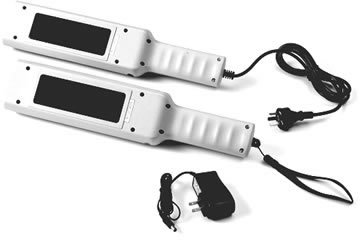
Figure 1: Crystal Handheld UV Lamps. This image displays two white handheld UV lamps, each with a black rectangular UV emission area. One lamp is connected to a power cord with a European-style plug, and the other to a smaller power adapter. Both units feature a textured grip handle and a wrist strap.
2. Important Safety Information
WARNING: UV radiation can be harmful to skin and eyes. Always follow these safety precautions to prevent injury.
- Eye Protection: Never look directly at the UV light source when the lamp is operating. Always wear appropriate UV-protective eyewear.
- Skin Protection: Avoid direct exposure of skin to UV radiation. Wear long sleeves, gloves, and other protective clothing if prolonged exposure is anticipated.
- Automatic Safety Switch: The AA series lamps are equipped with a unique automatic safety switch that deactivates the UV lamp when the unit is turned upside down. Do not attempt to bypass or disable this safety feature.
- Ventilation: Use the lamp in a well-ventilated area, especially during prolonged operation, as some UV lamps can produce ozone.
- Handling: Handle the lamp with care. Do not drop or subject it to strong impacts.
- Power Source: Use only the specified DC12V power adapter provided with the unit. Ensure the power outlet matches the adapter's requirements.
- Children and Pets: Keep the UV lamp out of reach of children and pets.
- Disposal: Dispose of the UV lamp and its components, including UV tubes, according to local environmental regulations.
3. Package Contents
Please check the package contents upon receipt to ensure all items are present and undamaged. If any items are missing or damaged, contact your supplier immediately.
- Crystal Handheld UV Lamp (Model EA1)
- DC12V Power Adapter
- User Manual (this document)
4. Setup
- Unpack: Carefully remove the UV lamp and all accessories from the packaging.
- Inspect: Visually inspect the lamp for any signs of damage during shipping. Do not use the lamp if it appears damaged.
- Connect Power:
- Locate the DC input port on the UV lamp.
- Connect the DC plug from the provided DC12V power adapter into the lamp's DC input port.
- Plug the power adapter into a suitable electrical outlet. Ensure the outlet voltage matches the adapter's specifications.
- Positioning: Place the lamp on a stable, flat surface or hold it securely during operation. Ensure there is adequate space around the lamp for ventilation.
5. Operating Instructions
Before operating, ensure you have read and understood all safety information in Section 2.
- Power On: Locate the power switch on the lamp. Flip the switch to the "ON" position. The UV lamp will illuminate.
- Safety Feature: The AA series lamps feature an automatic safety switch. When the lamp is held in the correct operating position (UV emission area facing downwards or forward), the UV light will be active. If the lamp is turned upside down (UV emission area facing upwards), the safety switch will automatically deactivate the UV light to prevent accidental exposure.
- Usage: Direct the UV light towards the area requiring illumination. Maintain a safe distance as recommended for your specific application.
- Power Off: When finished, flip the power switch to the "OFF" position. Disconnect the power adapter from the electrical outlet if the lamp will not be used for an extended period.
Note: The lamp may take a few moments to reach full intensity upon activation.
6. Maintenance
Regular maintenance ensures optimal performance and extends the lifespan of your UV lamp.
- Cleaning:
- Ensure the lamp is turned off and unplugged before cleaning.
- Wipe the exterior of the lamp with a soft, dry, lint-free cloth.
- For stubborn dirt, a slightly damp cloth with mild soap can be used, but ensure no liquid enters the lamp housing.
- Do not use abrasive cleaners, solvents, or harsh chemicals, as these can damage the lamp's finish or internal components.
- Gently clean the UV emission area with a soft cloth to remove dust or smudges that might impede UV output.
- UV Tube Replacement:
- UV tubes have a finite lifespan and will need replacement over time as their intensity diminishes.
- Refer to the specific instructions provided with replacement UV tubes for your model.
- Always ensure the lamp is unplugged and cool before attempting to replace tubes.
- Handle new tubes by their ends to avoid leaving fingerprints on the glass, which can affect performance.
- Dispose of old UV tubes according to local hazardous waste regulations.
- Storage: Store the lamp in a cool, dry place away from direct sunlight and extreme temperatures when not in use.
7. Troubleshooting
If you encounter issues with your Crystal Handheld UV Lamp, please refer to the following common problems and solutions:
| Problem | Possible Cause | Solution |
|---|---|---|
| Lamp does not turn on. |
|
|
| UV light is dim. |
|
|
| Lamp flickers. |
|
|
If the problem persists after attempting these solutions, please contact customer support for further assistance.
8. Specifications
| Feature | Detail |
|---|---|
| Model | EA1 (AA Series) |
| Brand | Crystal |
| UV Wavelengths | 254nm (Shortwave UV) |
| Power Input | DC12V |
| Number of UV Tubes | 2 |
| Safety Feature | Automatic safety switch (deactivates when unit is turned upside down) |
| Portability | Portable, lightweight, ergonomically designed |
| Manufacturer | Crystal Technology & Industrie |
| ASIN | B071W3C6Q1 |
9. Warranty and Support
Warranty Information: This Crystal Handheld UV Lamp is covered by a limited warranty against defects in materials and workmanship. The warranty period typically begins from the date of purchase. Please retain your proof of purchase for warranty claims. Specific warranty terms and conditions may vary by region and retailer. For detailed warranty information, please refer to the documentation provided at the time of purchase or contact Crystal customer support.
Customer Support: If you have any questions about the product, require technical assistance, or need to initiate a warranty claim, please contact Crystal customer support. Contact information can usually be found on the product packaging, the official Crystal website, or through your point of purchase.
When contacting support, please be prepared to provide the following information:
- Product Model: EA1 (AA Series)
- ASIN: B071W3C6Q1
- Date of Purchase
- A detailed description of the issue