
Introduction
Welcome to the user manual for your Lenovo ThinkPad T470 Laptop. This document provides detailed instructions to help you get started, operate, maintain, and troubleshoot your device. The ThinkPad T470 is designed for robust performance and versatility, featuring a durable build and a highly responsive interface. Its 360-degree hinge allows for multiple usage modes, adapting to your needs whether for work, entertainment, or creative tasks.
Setup
1. Initial Power-On and Charging
Before first use, ensure your laptop is fully charged. Connect the provided AC adapter to the laptop's power port and then to a power outlet. The charging indicator light will illuminate. Once charged, press the power button to turn on the device.
2. Operating System Configuration
Follow the on-screen prompts to complete the initial setup of Windows 10 Pro. This includes setting up your region, language, network connection, and user account. You may also configure the fingerprint reader for secure and convenient login.

Figure 1: Front view of the Lenovo ThinkPad T470 Laptop.
Operating the Laptop
1. Keyboard and Touchpad
The ThinkPad T470 features a spill-resistant keyboard designed for comfortable typing. Utilize the integrated touchpad for navigation, or the TrackPoint pointing device located in the center of the keyboard for precise cursor control.
2. Touchscreen and 360-Degree Hinge
The 14-inch display is a sensitive touchscreen, allowing for intuitive interaction with Windows 10 Pro. The laptop's 360-degree hinge enables multiple modes:
- Laptop Mode: Traditional laptop use for typing and productivity.
- Tent Mode: Ideal for presentations or watching media in a compact space.
- Stand Mode: Positions the screen closer for touch interaction.
- Tablet Mode: Fold the screen completely back to use as a tablet.
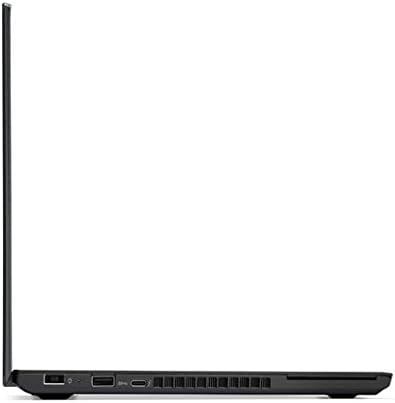
Figure 2: Left side view of the laptop, highlighting connectivity ports.
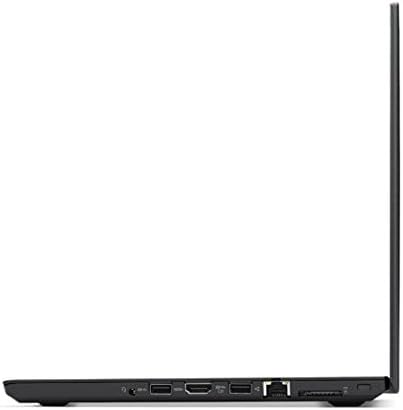
Figure 3: Right side view of the laptop, showing additional connectivity ports.
3. Fingerprint Reader
For enhanced security and quick access, the laptop includes a fingerprint reader. Register your fingerprints in the Windows settings to enable this feature. Simply place your registered finger on the sensor to log in.
Maintenance
1. Cleaning the Laptop
Regularly clean the screen with a soft, lint-free cloth specifically designed for electronics. For the keyboard and chassis, use a slightly damp cloth with a mild cleaning solution. Avoid harsh chemicals or abrasive materials. Ensure the laptop is powered off and unplugged before cleaning.
2. Battery Care
To prolong battery life, avoid extreme temperatures and fully discharging the battery frequently. For long-term storage, charge the battery to about 50-60% and store the laptop in a cool, dry place.
Troubleshooting
If you encounter issues with your ThinkPad T470, consider the following basic troubleshooting steps:
- No Power: Ensure the AC adapter is securely connected and the power outlet is functional. Try a different outlet or adapter if available.
- Screen Issues: If the screen is blank or flickering, try restarting the laptop. Check display settings in Windows.
- Slow Performance: Close unnecessary applications, check for system updates, and ensure sufficient free storage space.
- Connectivity Problems: For Wi-Fi or Bluetooth issues, restart the laptop and your router/Bluetooth device. Check device drivers in Device Manager.
For more complex issues, refer to the Lenovo support website or contact customer service.
Specifications
| Feature | Detail |
|---|---|
| Brand | Lenovo |
| Model Name | ThinkPad T470 |
| Model Number | 20HD004BUS |
| Processor | 7th Generation Intel Core i5-6300U Dual Core Processor (2.4 GHz, up to 3 GHz) |
| RAM Memory | 8GB DDR4 RAM (Max Memory: 32 GB) |
| Storage | 180GB Solid State Drive (SSD) |
| Screen Size | 14 Inches |
| Display Resolution | 1920x1080 Pixels (Full HD) |
| Operating System | Windows 10 Pro |
| Graphics Coprocessor | HD 620 Graphics (Integrated) |
| Connectivity Technology | Bluetooth 4.1, Wi-Fi (802.11g) |
| Ports | 4 Total USB Ports, 1 HDMI Port |
| Special Feature | Spill Resistant Keyboard |
| Item Weight | 3.6 Pounds |
| Battery Life | Up to 7 working hours (approximate) |
Product Overview
Product Images

Figure 4: Top-down view of the Lenovo ThinkPad T470 with the screen open, displaying the keyboard and touchpad.

Figure 5: Bottom view of the Lenovo ThinkPad T470 Laptop, showing ventilation and feet.
Product Videos
No official seller videos are available for embedding in this manual.
Warranty and Support
Your Lenovo ThinkPad T470 Laptop comes with a 1-year limited warranty. For detailed warranty terms and conditions, please refer to the documentation included with your product or visit the official Lenovo support website.
For technical assistance, driver downloads, or further support, please visit the Lenovo Store on Amazon or the official Lenovo support portal.