
Introduction
This manual provides comprehensive instructions for the assembly, operation, and maintenance of your Fractal Design Focus G Mid Tower Computer Case. Designed for high airflow and versatile component compatibility, the Focus G offers a robust foundation for your PC build.
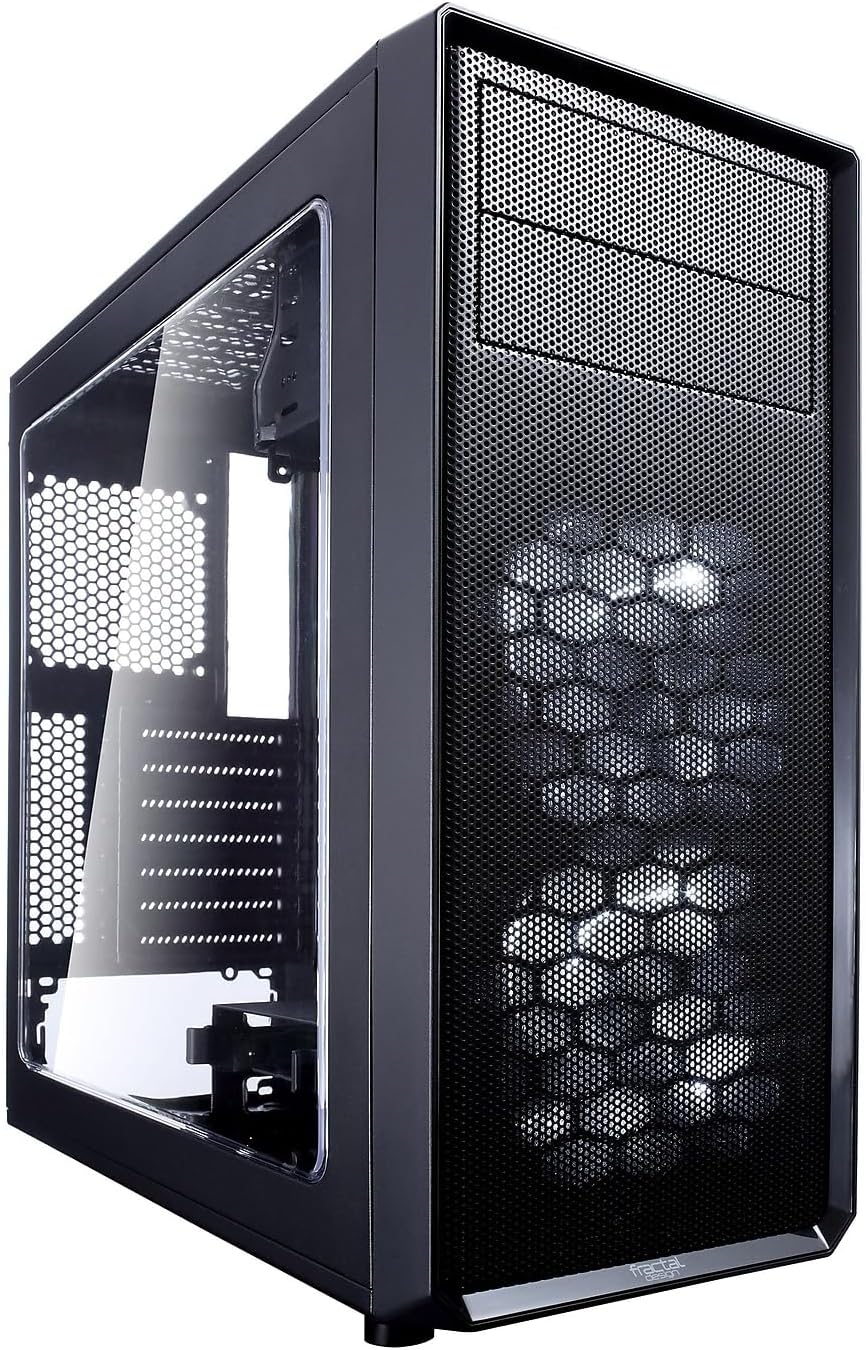
Image: Front and side view of the Fractal Design Focus G Mid Tower Computer Case, showcasing the windowed side panel and mesh front panel.
Key Features
- Contemporary ATX Case Design: Accommodates high-performance components with efficient space utilization for a compact footprint.
- Windowed Side Panel: A large windowed side panel allows for showcasing internal hardware.
- High Airflow: Includes two pre-installed Fractal Design Silent Series LL 120mm white LED fans. Supports a total of six fan positions.
- Dust Filters: Filtered front, top, and base air intakes ensure a dust-free interior.
- Cooling Support: Compatible with high-profile CPU coolers, multiple radiator configurations, and graphics cards up to 380mm long.
- Flexible Storage Options: Features two vibration-dampened universal drive bays (supporting 6TB+ HDDs and 15mm SSDs) and an additional 2.5" mount behind the motherboard tray.
Specifications
| Feature | Detail |
|---|---|
| Brand | Fractal Design |
| Model Name | FD-CA-FOCUS-BK-W |
| Case Type | Mid Tower |
| Motherboard Compatibility | ATX, Micro ATX, Mini ITX |
| Dimensions (LxWxH) | 20.8 x 19.2 x 10.7 inches |
| Item Weight | 9.92 pounds |
| Material | Metal |
| Color | Black |
| USB 2.0 Ports | 2 |
| USB 3.0 Ports | 2 |
| Max PSU Length | 230mm |
| Max Graphics Card Length | 380mm |
| Max CPU Cooler Height | 165mm |

Image: Dimensional overview of the Fractal Design Focus G case, showing its height, width, and depth.
Setup and Component Installation
The Fractal Design Focus G case is designed for straightforward assembly. Follow these steps for optimal component installation.
1. Preparing the Case
Remove the side panels by unscrewing the thumbscrews at the rear of the case. Gently slide the panels backward and lift them off. The front panel can also be removed by pulling from the bottom for fan installation or cleaning.

Image: Front panel detached from the Fractal Design Focus G case, revealing the pre-installed fans and internal structure.
2. Motherboard Installation
Install the necessary motherboard standoffs into the motherboard tray. Carefully align your ATX, Micro ATX, or Mini ITX motherboard with the standoffs and secure it with screws. Ensure all screws are tightened to prevent movement.
3. Power Supply Unit (PSU) Installation
The PSU mounts at the bottom of the case. Slide your ATX PSU into its designated slot and secure it with screws from the rear of the case. Route the necessary power cables through the cable management cutouts.
4. Storage Drive Installation
Utilize the two vibration-dampened universal drive bays for 3.5" HDDs or 2.5" SSDs. An additional 2.5" SSD can be mounted behind the motherboard tray. Secure drives using the provided screws.
5. Graphics Card and Expansion Card Installation
Install your graphics card and other PCI-E expansion cards into the motherboard slots. The case features fully removable and reusable PCI-E slot covers, which are secured with thumbscrews for convenience.
6. Cable Management
The case provides multiple cutouts and tie-down points behind the motherboard tray for efficient cable routing. This helps maintain optimal airflow and a clean interior aesthetic.
Operating the Case
The front I/O panel provides convenient access to essential ports and controls.
- Power Button: Located on the top panel, used to power on/off the system.
- Reset Button: Also on the top panel, for system reset.
- USB 3.0 Ports: Two high-speed USB 3.0 ports for data transfer.
- USB 2.0 Ports: Two USB 2.0 ports for peripheral connections.
- Audio Jacks: Separate microphone and headphone jacks.
Ensure all internal front panel headers are correctly connected to your motherboard for full functionality.
Maintenance
Regular maintenance ensures optimal performance and longevity of your computer case.
- Dust Filter Cleaning: The front, top, and bottom panels feature removable dust filters. Regularly clean these filters to prevent dust buildup and maintain airflow. For the front filter, a vacuum cleaner can be used without removal. Top filters are screwed in and require removal for thorough cleaning. The bottom filter is held by metal tabs and can be slid out.
- Interior Cleaning: Periodically clean the interior of the case with compressed air to remove dust from components and internal surfaces.
- Exterior Cleaning: Wipe down the exterior surfaces with a soft, damp cloth. Avoid abrasive cleaners.
Troubleshooting
This section addresses common issues you might encounter.
- Missing Motherboard Standoff: If a motherboard standoff is missing, ensure you acquire a replacement to properly secure your motherboard and prevent short circuits.
- Difficulty with USB 3.0 Front Panel Header: The USB 3.0 front panel header can be difficult to connect or disconnect from the motherboard. Exercise extreme caution to avoid damaging the motherboard pins or the cable connector. If frequent disconnection is needed, consider using a USB 3.0 to USB 3.1 adapter cable for easier handling.
- Limited Space for Cables: While the case offers cable management options, space behind the motherboard tray can be minimal. Plan your cable routing carefully, especially for thick PSU cables, to ensure side panels close properly.
- Top Fan/Radiator Clearance: If using an external 5.25" drive in the top bay, one of the top fan/radiator positions might be obstructed. Plan your cooling setup accordingly.
- SSD Placement (Rear): The 2.5" SSD mount behind the motherboard tray has limited airflow. Avoid placing high-heat producing SSDs in this location if possible.
Official Product Video
Watch the official Fractal Design Focus G Series overview video for a visual guide to its features and capabilities.
Video: Official product video showcasing the Fractal Design Focus G case, highlighting its design, features, and various color options.
Warranty and Support
The Fractal Design Focus G case comes with a 2-year warranty. For warranty claims, technical support, or any inquiries, please visit the official Fractal Design website or contact their customer support directly.
Official Website: www.fractal-design.com
For additional support and resources, you may also visit the Fractal Design Store on Amazon.


