
1. Introduction
This user manual provides essential information for the safe and effective operation, setup, and maintenance of the TOPCHANCES DY4100 Digital Earth Ground Resistance Tester. This device is designed for measuring earth ground resistance and earth voltage, crucial for ensuring electrical safety and proper grounding in various applications. Please read this manual thoroughly before using the instrument.
2. Safety Information
WARNING: Failure to follow these safety instructions may result in electric shock, fire, or serious injury.
- Always adhere to local and national safety regulations when performing electrical measurements.
- Do not use the meter if it appears damaged or if the insulation on the test leads is compromised.
- Ensure the meter is in good working condition before each use.
- Avoid touching exposed wires or terminals when the meter is connected to a circuit.
- The DY4100 is rated for CAT II installations. Do not use it for measurements exceeding its specified voltage and current ratings.
- Do not operate the meter in wet environments or in the presence of explosive gases or dust.
- Replace batteries promptly when the low battery indicator appears to ensure accurate readings.
- Only use specified battery types and ensure correct polarity during installation.
3. Product Overview
The DY4100 Digital Earth Ground Resistance Tester features a robust design for reliable field use. Key components include a large LCD display, function selector knob, test terminals, and control buttons.
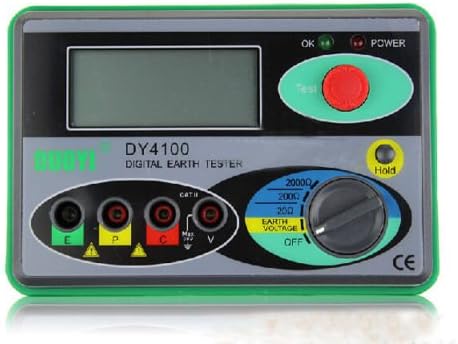
Figure 3.1: Front view of the DY4100 Digital Earth Ground Resistance Tester, showing the LCD display, rotary switch, test button, and input terminals (E, P, C, V).

Figure 3.2: Back view of the DY4100 Digital Earth Ground Resistance Tester, showing the battery compartment cover and non-slip feet.
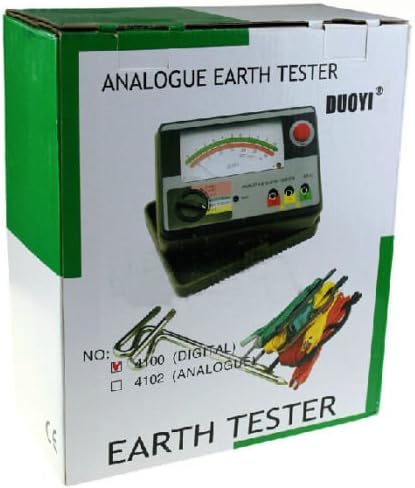
Figure 3.3: The retail packaging for the DY4100 Digital Earth Ground Resistance Tester, indicating the product model and brand.
3.1 Components:
- LCD Display: Shows measurement readings and indicators.
- Function Selector Knob: Used to select measurement ranges for Earth Ground Resistance (20Ω, 200Ω, 2000Ω) and Earth Voltage, as well as the OFF position.
- Test Button: Initiates the measurement process.
- Hold Button: Freezes the current reading on the display.
- Input Terminals: E, P, C, V for connecting test leads.
- Battery Compartment: Located on the rear for battery installation.
4. Setup
4.1 Battery Installation
The DY4100 requires 6 x AA 1.5V (UM3) batteries and 1 x 12V battery (not included). Ensure the meter is turned OFF before installing or replacing batteries.
- Locate the battery compartment cover on the back of the meter.
- Unscrew the retaining screws and remove the cover.
- Insert the batteries, observing the correct polarity (+/-) as indicated inside the compartment.
- Replace the battery cover and secure it with the screws.
4.2 Connecting Test Leads
Proper connection of test leads is crucial for accurate measurements.
- For Earth Ground Resistance Measurement: Connect the test leads to the E, P, and C terminals. Refer to the specific measurement method (e.g., 3-pole method) for proper probe placement in the ground.
- For Earth Voltage Measurement: Connect the test leads to the E and V terminals.
5. Operating Instructions
5.1 Powering On/Off
Rotate the function selector knob from the OFF position to the desired measurement range (e.g., 20Ω, 200Ω, 2000Ω, or Earth Voltage) to power on the meter. To power off, rotate the knob back to the OFF position.
5.2 Earth Ground Resistance Measurement
- Ensure the test leads are correctly connected to the E, P, and C terminals and the auxiliary earth electrodes are properly installed in the ground.
- Select the appropriate resistance range (20Ω, 200Ω, or 2000Ω) using the function selector knob. Start with the highest range if the resistance value is unknown.
- Press the 'Test' button. The measurement will be displayed on the LCD.
- If the reading is out of range, switch to a higher or lower range as necessary.
- Press the 'Hold' button to freeze the displayed reading. Press it again to release.
5.3 Earth Voltage Measurement
- Connect the test leads to the E and V terminals.
- Rotate the function selector knob to the 'Earth Voltage' position.
- The meter will display the earth voltage.
- Press the 'Hold' button to freeze the displayed reading.
5.4 Low Battery Warning
When the battery voltage is low, a low battery indicator will appear on the LCD. Replace all batteries promptly to ensure accurate measurements and proper operation.
6. Maintenance
6.1 Cleaning
Wipe the meter's casing with a soft, damp cloth. Do not use abrasive cleaners or solvents. Ensure no moisture enters the meter.
6.2 Battery Replacement
Refer to Section 4.1 for battery replacement instructions. Always use fresh batteries of the specified type.
6.3 Storage
If the meter is not to be used for an extended period, remove the batteries to prevent leakage and damage. Store the meter in a cool, dry place, away from direct sunlight and extreme temperatures.
7. Troubleshooting
| Problem | Possible Cause | Solution |
|---|---|---|
| Meter does not power on | Dead or incorrectly installed batteries | Check battery polarity; replace batteries. |
| Inaccurate readings | Low battery; poor test lead connection; incorrect range selected; environmental interference | Replace batteries; ensure secure connections; select appropriate range; minimize interference. |
| Display shows "OL" or "1" | Overload or open circuit | Switch to a higher range; check for open circuits in the test setup. |
| Low battery indicator constantly on | Batteries are depleted | Replace all batteries. |
8. Specifications
- Model: DY4100 (Part Number: CNC0129)
- Brand: TOPCHANCES
- Type: Digital Earth Ground Resistance Tester
- Earth Ground Resistance Ranges: 0/20/200/2000Ω
- Earth Voltage Range: 0~30V (Accuracy: ±3% + 5 digits)
- Resolution: 0.01Ω
- Power Source: Battery Powered (6 x AA 1.5V (UM3) + 1 x 12V, not included)
- Low Battery Warning: Yes
- Dimensions: Approximately 150 x 100 x 70mm
- Material: Plastic
- Style: Digital
- First Available Date: May 9, 2017
9. Warranty and Support
Specific warranty details for the TOPCHANCES DY4100 Digital Earth Ground Resistance Tester are not provided in the product information. For warranty claims, technical support, or service inquiries, please contact the manufacturer, TOPCHANCES, directly through their official channels or the retailer from whom the product was purchased.


