1. Introduction
This manual provides detailed instructions for the proper use and care of your Sony FE 100-400mm f/4.5-5.6 GM OSS (SEL100400GM) Super Telephoto Zoom Lens. This full-frame lens is designed for professional users, offering a versatile 100mm to 400mm zoom range, making it suitable for capturing sports, wildlife, and other distant subjects with high image quality and autofocus performance.

Figure 1: The Sony FE 100-400mm f/4.5-5.6 GM OSS lens.
2. Product Features
The Sony FE 100-400mm f/4.5-5.6 GM OSS lens incorporates advanced technology to deliver exceptional performance:
- Incredibly Sharp Optics: Features two ED (Extra-low Dispersion) glass elements and one Super ED glass element for superb resolution, clarity, and contrast across the entire zoom range.
- Smooth Backgrounds: A circular 9-blade aperture contributes to beautiful bokeh defocus effects.
- Reduced Flare and Ghosting: Sony Nano AR Coating is applied to minimize internal reflections, eliminating flare and ghosting.
- Fast and Precise Autofocus: A double linear motor and DDSSM (Direct Drive SSM) drive system ensures rapid and accurate autofocus, essential for both still photography and video recording.
- Professional Ergonomics: Designed with a sealed dust and moisture resistant construction, providing reliable operation in challenging environmental conditions.

Figure 2: The lens is designed to be compact, lightweight, and mobile for field use.
3. Components and Parts
Familiarize yourself with the various parts and controls of your lens:

Figure 3: Key components and controls of the Sony FE 100-400mm lens.
- Focusing Ring: Used for manual focus adjustments.
- Zooming Ring: Adjusts the focal length from 100mm to 400mm.
- Focus Mode Switch (AF/MF): Toggles between autofocus and manual focus.
- Focus-Range Limiter: Restricts the autofocus range for faster focusing on subjects within a specific distance. Options include FULL (full range) and ∞-3m (infinity to 3 meters).
- Optical SteadyShot Switch (ON/OFF): Activates or deactivates the built-in optical image stabilization.
- Mode Switch (1/2): Selects the image stabilization mode. Mode 1 is for general shooting, and Mode 2 is optimized for panning shots.
- Focus Hold Button: Locks the focus at the current distance when pressed.
- Zoom Smoothness Adjuster: Allows adjustment of the torque of the zooming ring for smoother or tighter zoom action.
- Mounting Index: Aligns with the camera body's mounting index for proper attachment.
4. Setup and Installation
Attaching the Lens
- Ensure both the camera and lens are powered off.
- Remove the rear lens cap and the camera body cap.
- Align the white index mark on the lens barrel with the white index mark on the camera body.
- Insert the lens into the camera mount and rotate it clockwise until it clicks into place. Do not force the lens.
Detaching the Lens
- Ensure the camera is powered off.
- While pressing the lens release button on the camera body, rotate the lens counter-clockwise until it stops.
- Remove the lens from the camera body.
- Attach the front and rear lens caps to protect the lens elements.
Attaching the Lens Hood (ALC-SH151)
The included lens hood helps to block unwanted light and protect the front element of the lens.
- Align the red dot on the lens hood with the red dot on the front of the lens.
- Insert the hood and rotate it clockwise until it clicks into place.
Attaching the Tripod Mount
The lens includes a tripod mount for stable attachment to a tripod or monopod, especially recommended for longer focal lengths.
- Loosen the knob on the tripod mount collar.
- Open the collar and attach it around the lens barrel, ensuring it is securely seated.
- Tighten the knob to secure the lens in the collar.
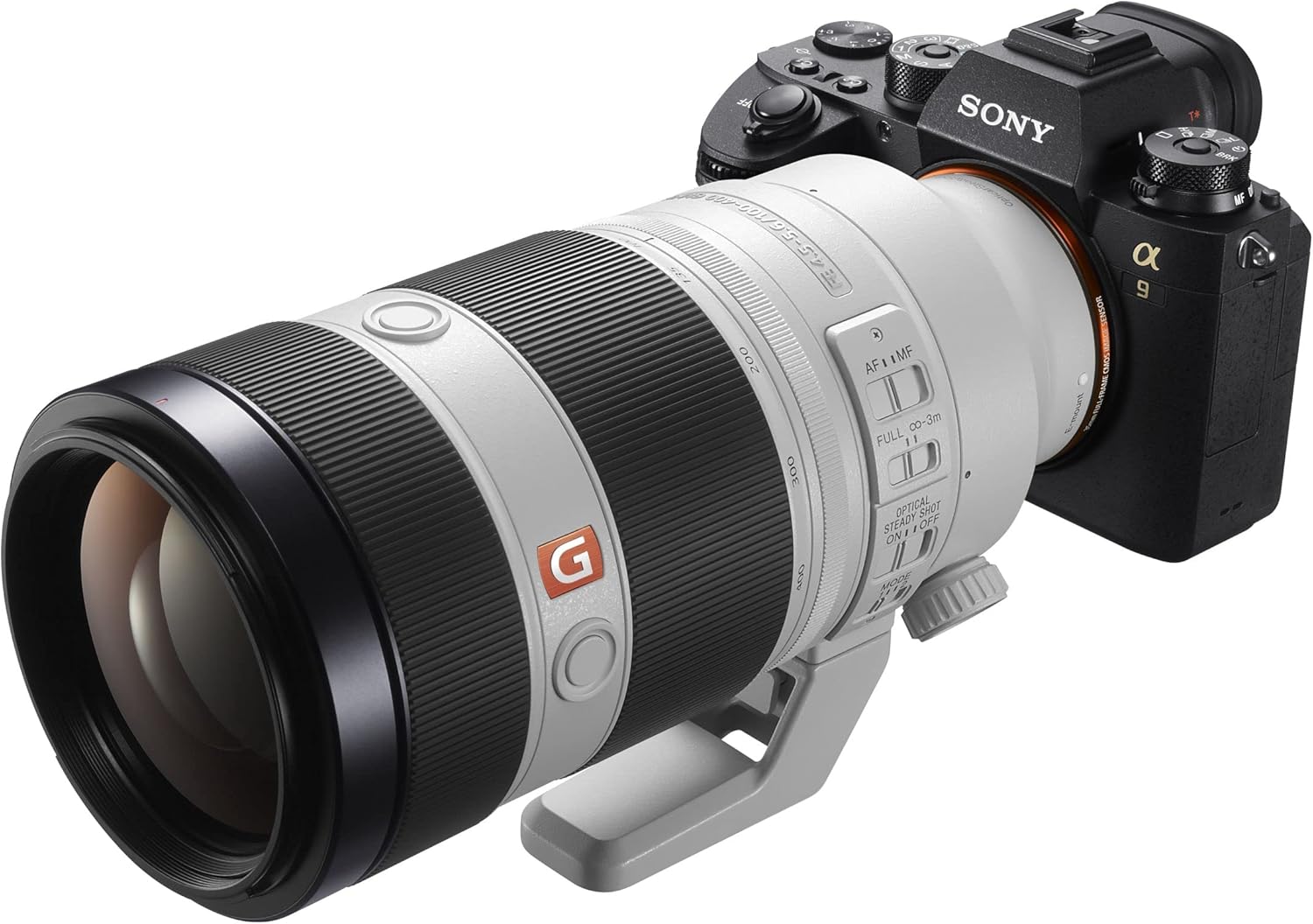
Figure 4: The Sony FE 100-400mm lens properly mounted on a camera body.
5. Operating Instructions
Autofocus (AF) / Manual Focus (MF)
Use the AF/MF switch on the lens barrel to select your desired focus mode. In AF mode, the camera will automatically focus. In MF mode, rotate the focusing ring to adjust focus manually.
Focus-Range Limiter
This switch allows you to optimize autofocus speed by limiting the focus range. Select 'FULL' for subjects at any distance, or '∞-3m' to restrict focus to subjects further than 3 meters, which can be beneficial for distant subjects like wildlife or sports.
Optical SteadyShot (OSS)
The Optical SteadyShot feature helps to reduce camera shake, especially when shooting handheld at longer focal lengths or slower shutter speeds. Set the switch to 'ON' to activate stabilization. For optimal results, ensure your camera's in-body image stabilization (IBIS) settings are compatible or configured correctly.
OSS Mode Selection
The Mode switch allows you to select the appropriate stabilization mode:
- Mode 1: General stabilization for static subjects.
- Mode 2: Optimized for panning shots, stabilizing vertical movement while allowing horizontal movement for tracking subjects.
Focus Hold Button
Pressing this button will lock the current focus distance. This is useful for recomposing shots without losing focus on your subject.
Zoom Smoothness Adjuster
Rotate this ring to adjust the tension of the zooming mechanism. A 'SMOOTH' setting allows for easier, faster zooming, while a 'TIGHT' setting provides more resistance for precise adjustments and prevents zoom creep.
6. Maintenance
Proper maintenance ensures the longevity and performance of your lens:
- Cleaning: Use a soft, lint-free cloth to clean the lens barrel. For lens elements, use a lens brush to remove dust, then gently wipe with a lens cleaning solution and a microfiber cloth. Avoid touching the lens elements with bare hands.
- Storage: Store the lens in a cool, dry place away from direct sunlight and extreme temperatures. Use the provided lens caps to protect the front and rear elements.
- Dust and Moisture Resistance: While the lens features a dust and moisture resistant design, it is not waterproof. Avoid exposing it to heavy rain or direct water spray.
7. Troubleshooting
If you encounter issues with your lens, consider the following common troubleshooting steps:
- Lens not recognized by camera: Ensure the lens is securely mounted and clicked into place. Check for any debris on the lens or camera contacts.
- Autofocus not working: Verify the AF/MF switch is set to AF. Check the Focus-Range Limiter setting. Ensure there is sufficient light for the camera's autofocus system.
- Blurry images: Check if Optical SteadyShot is enabled (if desired) and set to the correct mode. Ensure shutter speed is appropriate for the focal length and lighting conditions.
- Zoom ring too loose/tight: Adjust the Zoom Smoothness Adjuster to your preference.
For more complex issues, refer to your camera's instruction manual or contact Sony customer support.
8. Specifications
Detailed specifications for the Sony FE 100-400mm f/4.5-5.6 GM OSS lens:

Figure 5: Key specifications of the Sony FE 100-400mm lens.
| Specification | Value |
|---|---|
| Product Dimensions | 8.07 x 3.7 x 3.7 inches |
| Item Weight | 3.07 pounds (approx. 1395g without tripod mount) |
| Item Model Number | SEL100400GM.SYX |
| Brand | Sony |
| Focal Length Description | 100-400mm |
| Lens Type | Telephoto Zoom |
| Compatible Mountings | Sony FE (E-mount) |
| Filter Diameter | 77mm |
| Manufacturer | Sony |
| Date First Available | April 25, 2017 |
9. What's in the Box
Upon opening your product packaging, you should find the following items:
- Sony SEL100400GM FE 100-400mm F4.5-5.6 GM OSS Lens
- Lens Hood (model: ALC-SH151)
- Lens Front Cap (ALC-F77S)
- Lens Rear Cap (ALC-R1EM)
- Soft Case
- Tripod Mount Collar
10. Warranty and Support
For information regarding warranty coverage, product registration, and technical support, please refer to the warranty card included with your product or visit the official Sony support website. Keep your proof of purchase for warranty claims.


