
KONUS KONUSTART-900B Refractor Astronomical Telescope User Manual
Model: KONUSTART-900B | Brand: Konus
Introduction
Thank you for choosing the KONUS KONUSTART-900B Refractor Astronomical Telescope. This instrument is designed for observing celestial objects, offering clear views of the moon, planets, and brighter deep-sky objects. This manual provides essential information for assembling, operating, and maintaining your telescope to ensure optimal performance and enjoyment.
Safety Information
- Never look directly at the sun through the telescope or its finderscope without a professionally manufactured solar filter. Permanent eye damage, including blindness, can result.
- Do not leave the telescope unsupervised, especially when children are present.
- Handle optical components with care to avoid scratches or damage.
- Ensure the tripod is stable on a level surface to prevent tipping.
Package Contents
Verify that all components listed below are present in your package:
- Refractor Telescope Optical Tube (60mm diameter, 900mm focal length)
- Equatorial Mount with Right Ascension Motor
- Metal Tripod (adjustable height 69-116 cm)
- Stardot Red Dot Finderscope
- Eyepiece H 8 mm (31.8 mm diameter)
- Eyepiece H 20 mm (31.8 mm diameter)
- Barlow Lens 2x
- Moon Filter
- 1.5x Image Erector
- Smartphone Adapter
- Star Map
- Carrying Bag
- Instruction Manual
Setup Guide
- Assemble the Tripod: Extend the metal tripod legs to a stable height (between 69 cm and 116 cm) and secure them. Ensure the tripod is placed on a firm, level surface.
- Attach the Equatorial Mount: Secure the equatorial mount head to the top of the tripod. Follow the specific instructions provided with the mount for proper attachment and alignment with the tripod's central bolt.
- Mount the Optical Tube: Attach the telescope's optical tube to the equatorial mount. Ensure it is securely fastened using the mounting rings or dovetail plate, depending on your specific mount design.
- Install the Finderscope: Slide the Stardot Red Dot Finderscope into its bracket on the telescope tube and tighten the retaining screws.
- Insert Diagonal and Eyepiece: Insert the diagonal into the focuser. Then, insert the desired eyepiece (e.g., H 20 mm for lower magnification) into the diagonal and secure it with the thumbscrew. For terrestrial viewing, use the 1.5x image erector.
- Attach Smartphone Adapter: If desired, attach the smartphone adapter to an eyepiece. Place your smartphone into the adapter, ensuring the camera lens is aligned with the eyepiece.
- Balance the Telescope: Adjust the telescope tube's position in the mounting rings and the counterweights on the equatorial mount to achieve proper balance. This prevents strain on the mount's gears and allows for smoother tracking.
- Align the Finderscope: Point the main telescope at a distant, easily identifiable object (e.g., a streetlight or distant tree during the day). Look through the main eyepiece and center the object. Then, look through the finderscope and adjust its alignment screws until the red dot is also centered on the same object. This step is crucial for easily locating celestial objects.
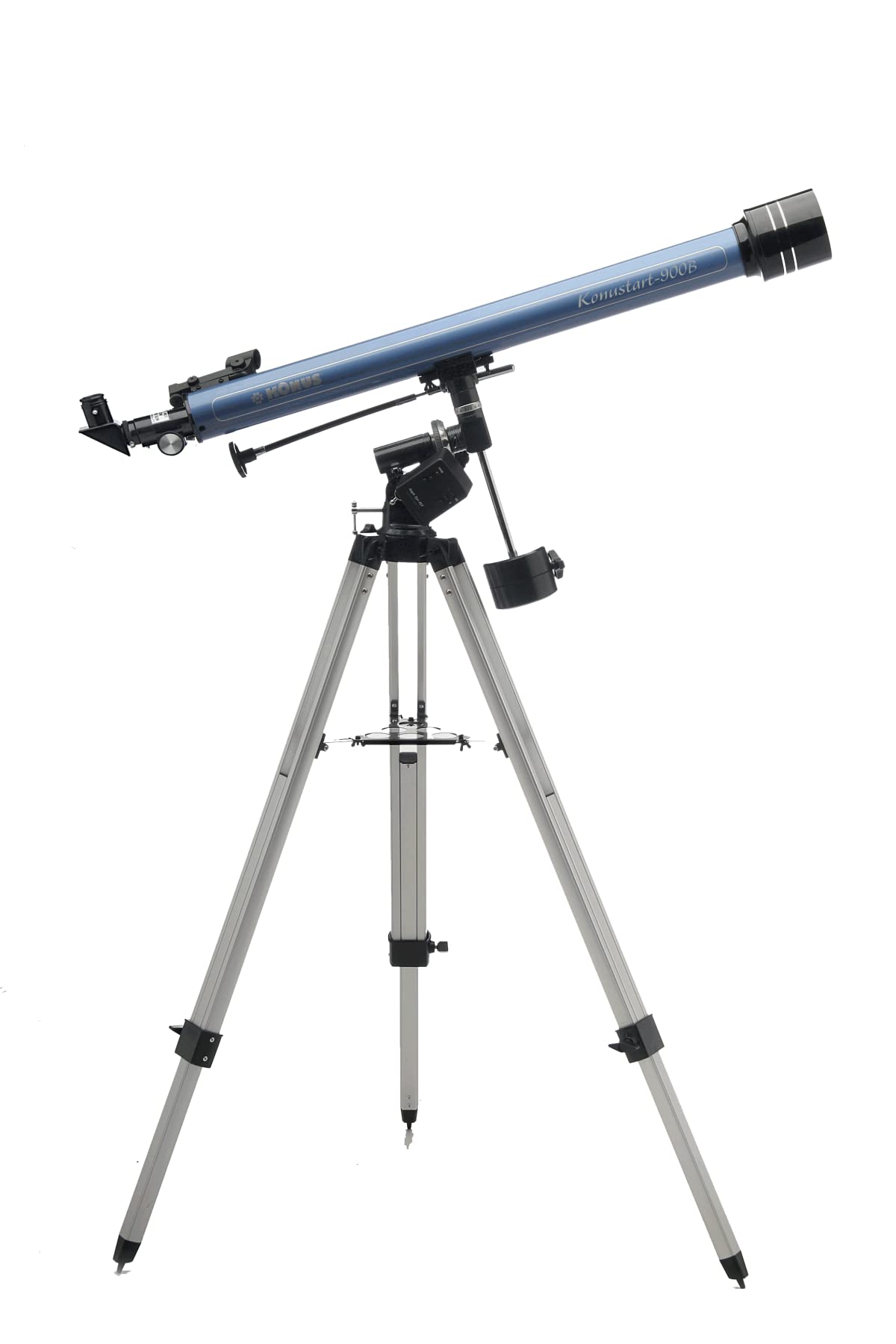
Image: The KONUS KONUSTART-900B Refractor Astronomical Telescope fully assembled on its equatorial mount and tripod.
Operating Instructions
1. Basic Observation
- Locating Objects: Use the aligned Stardot Red Dot Finderscope to point the telescope at your desired celestial object. Once the object is within the finderscope's view, it should be visible in the main telescope's eyepiece.
- Focusing: Turn the focuser knobs slowly until the image appears sharp and clear.
- Changing Magnification: Start with the lowest magnification eyepiece (H 20 mm) to locate and center objects. Once centered, you can switch to a higher magnification eyepiece (H 8 mm) for more detailed views.
- Using the Barlow Lens: The 2x Barlow lens doubles the magnification of any eyepiece. Insert the Barlow into the diagonal first, then insert the eyepiece into the Barlow.
2. Using the Equatorial Mount and Right Ascension Motor
The equatorial mount allows you to track celestial objects as they move across the night sky due to Earth's rotation. The Right Ascension (RA) motor automates this tracking.
- Polar Alignment: For accurate tracking, the equatorial mount's polar axis must be aligned with the Earth's rotational axis (pointing towards Polaris in the Northern Hemisphere). This is a more advanced step and detailed instructions can be found in dedicated astronomy guides. For casual observation, a rough alignment towards the North Star is often sufficient.
- Engaging the RA Motor: Install batteries into the RA motor (if not already done). Engage the motor by turning it on. The motor will then slowly rotate the telescope in Right Ascension, counteracting Earth's rotation and keeping objects centered in your eyepiece.
- Manual Adjustments: Even with the motor engaged, minor adjustments using the slow-motion controls may be necessary for precise centering, especially at higher magnifications.
3. Using the Moon Filter
The included moon filter reduces the brightness of the moon, making it more comfortable to observe and revealing finer details that might be washed out by its intense light.
- Installation: Screw the moon filter onto the threaded end of your eyepiece before inserting the eyepiece into the diagonal.
4. Using the Smartphone Adapter
The smartphone adapter allows you to capture images or videos through your telescope.
- Attach Adapter: Secure the smartphone adapter to your chosen eyepiece.
- Mount Smartphone: Place your smartphone into the adapter and adjust its position until the camera lens is perfectly centered over the eyepiece lens.
- Capture Images/Videos: Open your smartphone's camera app. You may need to zoom in digitally on your phone to eliminate vignetting (dark edges). Experiment with different camera settings for best results.

Image: The KONUSTART-900B telescope with a smartphone attached, displaying a star chart application for navigation.

Image: The KONUSTART-900B telescope with a smartphone attached, showing a captured image of a star field.
Maintenance
- Cleaning Optics: Use a soft brush or compressed air to remove loose dust from lenses. For smudges, use a specialized optical cleaning solution and a microfiber cloth designed for optics. Apply solution to the cloth, not directly to the lens.
- Cleaning Mechanical Parts: Wipe down the telescope tube and mount with a soft, damp cloth. Avoid using harsh chemicals.
- Storage: Store the telescope in a dry, dust-free environment. Use the provided carrying bag for protection during transport and storage. Avoid extreme temperature changes.
- Battery Replacement: Replace the RA motor batteries as needed to ensure continuous tracking.
Troubleshooting
| Problem | Possible Cause | Solution |
|---|---|---|
| Image is blurry or out of focus. | Incorrect focus; atmospheric conditions; dirty optics. | Adjust the focuser knobs. Wait for stable atmospheric conditions. Clean the lenses carefully. |
| Cannot find objects. | Finderscope not aligned; incorrect pointing. | Re-align the finderscope with the main telescope. Start with the lowest magnification eyepiece. |
| Objects drift out of view quickly. | RA motor not engaged or batteries low; poor polar alignment. | Ensure RA motor is on and has fresh batteries. Improve polar alignment if possible. Use slow-motion controls for manual tracking. |
| Image is upside down or reversed. | Normal for astronomical telescopes; 1.5x image erector not used for terrestrial viewing. | This is normal for astronomical viewing. Use the 1.5x image erector for correctly oriented terrestrial images. |
Specifications
| Brand | Konus |
| Model Name | KONUSTART-900B |
| Optical Design | Refractor |
| Objective Lens Diameter | 60 mm |
| Focal Length | 900 mm |
| Focal Ratio | f/15 |
| Mount Type | Equatorial with Right Ascension Motor |
| Tripod | Metal, two-section, adjustable height 69-116 cm |
| Finderscope | Stardot Red Dot Finder |
| Eyepieces | H 8 mm, H 20 mm (31.8 mm diameter) |
| Barlow Lens | 2x |
| Image Erector | 1.5x |
| Moon Filter | Included |
| Smartphone Adapter | Included |
| Focus Type | Central Focus |
| Power Source | Battery (for RA motor) |
| Compatible Devices | Smartphone |
| Lens Coating | Ultra-high transmission coated |
| Magnification Range | 45x - 90x (with included accessories) |
| Product Dimensions (LxWxH) | 80P x 20l x 25H cm (approximate, packed) |
| Item Weight | 4.41 lbs (approx. 2 kg) |
| GTIN | 08002620017385 |
Warranty and Support
Warranty Information
This KONUS KONUSTART-900B telescope comes with a 2-year warranty. This warranty covers manufacturing defects and malfunctions that are not caused by third parties or improper use. Please retain your proof of purchase for warranty claims.
Customer Support
For technical assistance, troubleshooting beyond this manual, or warranty inquiries, please contact Konus customer service. Refer to the official Konus website or your purchase documentation for contact details.
You can also visit the official Konus store on Amazon for more information: Konus Amazon Store
