
1. Introduction
This manual provides detailed instructions for the safe and effective use of your HANGSUN HC360 Cordless Beard Trimmer and Hair Clippers. Please read all instructions carefully before first use and retain this manual for future reference.
2. Safety Information
To reduce the risk of electric shock, injury, or damage, always follow these basic safety precautions:
- Do not immerse the appliance in water.
- Keep the appliance away from water sources when charging.
- Do not use if the appliance or charging cable is damaged.
- This appliance is not intended for use by persons with reduced physical, sensory, or mental capabilities unless supervised or instructed.
- Keep out of reach of children.
- Only use attachments supplied by the manufacturer.
3. Package Contents
Verify that all items are present in your package:
- HANGSUN HC360 Trimmer Unit
- U-Shape Blade (for beard trimming)
- T-Shape Blade (for hair trimming)
- 5-level Adjustable Comb for U-Shape Blade (3/4/5/6/7mm)
- 4 Hair Guide Combs for T-Shape Blade (3/6/9/12mm)
- Charging Base
- USB Charging Cable
- Cleaning Brush
- User Manual

Image 3.1: HANGSUN HC360 Trimmer and included accessories.
4. Product Overview
Familiarize yourself with the components of your HANGSUN HC360 trimmer:
- Trimmer Body: Ergonomic design for comfortable grip.
- On/Off Switch: Located on the side for easy operation.
- Charging Light Indicator: Displays battery status.
- Stainless Steel Shaver Head: Durable and skin-friendly blades.
- Interchangeable Blades: U-Shape for beard, T-Shape for hair.
- Guide Combs: Various lengths for precise trimming.
- Charging Base: For convenient charging and storage.

Image 4.1: Key components of the HANGSUN HC360 Trimmer, including the charging base, on/off switch, charging light indicator, and interchangeable T-shape and U-shape blades.
5. Setup
5.1 Charging the Trimmer
- Connect the USB charging cable to the charging base.
- Plug the USB cable into a compatible USB power adapter (not included) or a USB port.
- Place the trimmer onto the charging base. The charging light indicator will illuminate to show charging status.
- A full charge takes approximately 1.5 hours and provides up to 90 minutes of runtime. The smart LED indicator will warn of low battery.

Image 5.1: The HANGSUN HC360 Trimmer placed on its charging base.
5.2 Attaching and Detaching Blades and Combs
- Ensure the trimmer is turned off before attaching or detaching any components.
- To Attach a Blade: Align the desired blade (U-Shape or T-Shape) with the trimmer head and press firmly until it clicks into place.
- To Detach a Blade: Gently push the blade upwards from the front of the trimmer head until it releases.
- To Attach a Comb: Slide the appropriate guide comb onto the installed blade until it locks securely.
- To Detach a Comb: Gently pull the comb away from the blade.

Image 5.2: The U-shape blade with its 5-level adjustable comb, allowing for precise beard length settings from 3mm to 7mm.
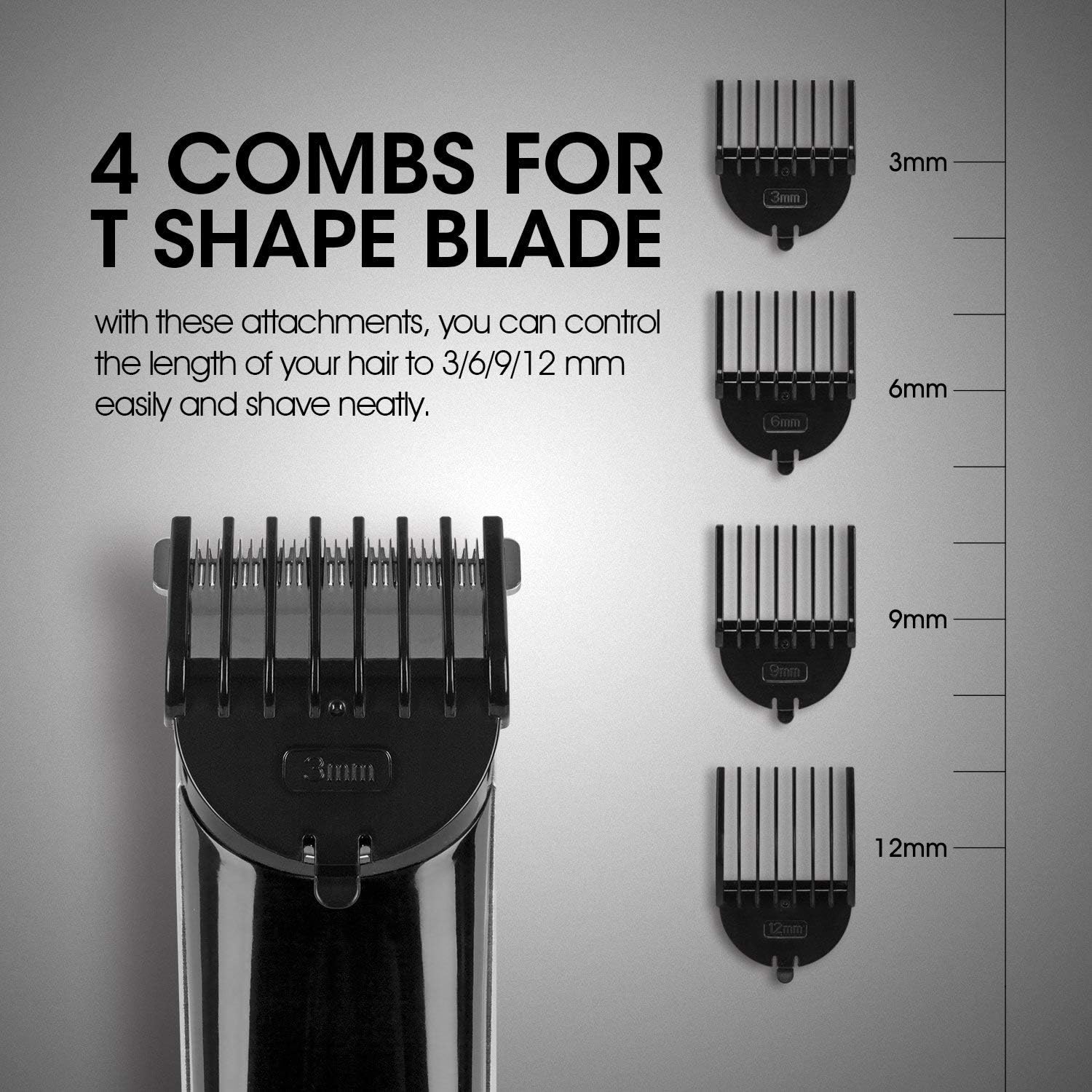
Image 5.3: The T-shape blade shown with four hair guide combs, providing cutting lengths of 3mm, 6mm, 9mm, and 12mm.
6. Operating Instructions
6.1 General Trimming
- Ensure your hair or beard is clean and dry before trimming.
- Select the appropriate blade (U-Shape for beard, T-Shape for hair) and attach the desired guide comb for your preferred length.
- Press the On/Off switch to power on the trimmer.
- Hold the trimmer with the blade flat against the skin and move it slowly against the direction of hair growth.
- For precise edging or detailing, remove the comb and use the blade directly.
- After use, press the On/Off switch to power off the trimmer.

Video 6.1: Demonstration of the HANGSUN HC360 Beard Trimmer and Hair Clippers in use, showcasing its functionality for grooming.

Image 6.1: A user demonstrating the HANGSUN HC360 trimmer for beard grooming, highlighting its precise and skin-friendly blades.
7. Maintenance
7.1 Cleaning the Blades
- Turn off the trimmer and detach the blade.
- Use the provided cleaning brush to remove any loose hairs from the blade and trimmer head.
- The blades are washable. Rinse the detached blade under running water. Ensure the trimmer body does not get wet.
- Allow the blade to air dry completely before reattaching it to the trimmer.
7.2 Blade Care
The steel blades are designed to sharpen themselves as they trim, maintaining their effectiveness. For optimal performance, ensure blades are clean and free of debris.
8. Troubleshooting
If you encounter issues with your HANGSUN HC360 trimmer, refer to the following common solutions:
| Problem | Possible Cause | Solution |
|---|---|---|
| Trimmer does not turn on. | Low battery or not charged. | Charge the trimmer for at least 1.5 hours. |
| Poor trimming performance. | Blades are clogged with hair or not properly attached. | Clean the blades thoroughly and ensure they are securely attached. |
| Trimmer pulls hair. | Blades are dull or clogged. | Clean the blades. If the problem persists, consider replacing the blade head. |
9. Specifications
| Feature | Detail |
|---|---|
| Model Number | HC360 |
| Power Source | Battery Powered, Corded Electric, Rechargeable |
| Battery Type | Lithium-ion |
| Charging Time | Approx. 1.5 hours |
| Runtime | Up to 90 minutes |
| Product Dimensions | 1.38 x 1.77 x 6.5 inches |
| Item Weight | 0.31 Pounds (approx. 4.96 ounces) |
| Color | Black |
10. Warranty and Support
The HANGSUN HC360 Trimmer comes with a one-year warranty against manufacturing defects. For warranty claims, technical support, or further assistance, please contact HANGSUN customer service through your purchase platform or visit the official HANGSUN website.

Image 10.1: Guaranteed One Year Warranty badge.