1. Introduction
This manual provides essential information for the safe and effective use of your Sony FE 16-35mm F2.8 GM wide-angle zoom lens (SEL1635GM). This lens is designed for Sony E-mount cameras, offering a versatile focal length range suitable for various photographic and videographic applications, including landscapes, architecture, and events. Its constant F2.8 maximum aperture ensures consistent exposure and depth of field control across the zoom range.
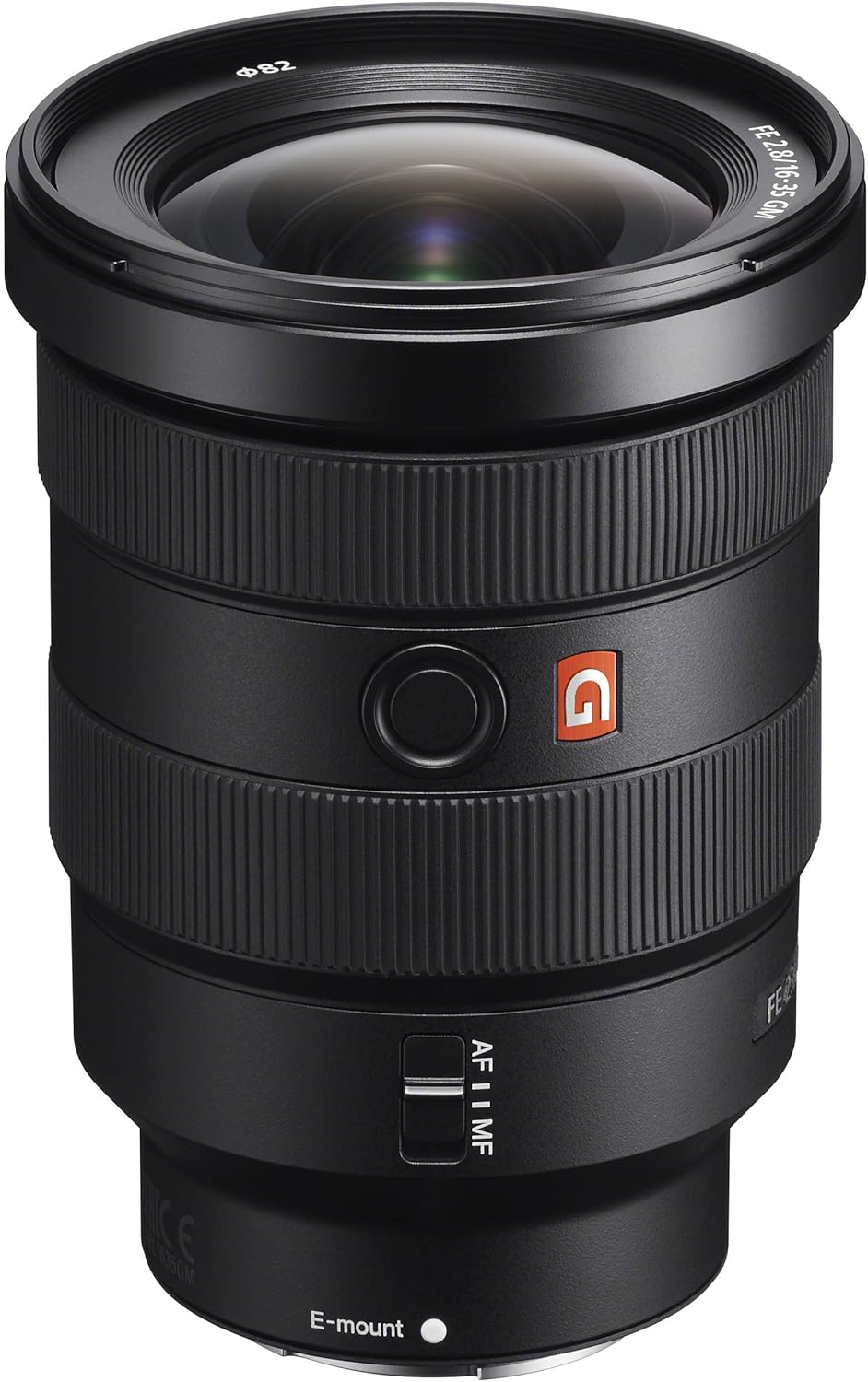
Figure 1: Sony FE 16-35mm F2.8 GM Wide-Angle Zoom Lens (SEL1635GM)
2. Key Features
- Focal Length: 16-35mm wide-angle zoom.
- Maximum Aperture: Constant F2.8 for consistent low-light performance and shallow depth of field.
- Optical Design: Features two XA (extreme aspherical) elements and ED (Extra-low Dispersion) glass for high resolution and reduced aberrations.
- Autofocus: Fast and precise autofocus system for capturing moving subjects.
- Build Quality: Durable construction with dust and moisture resistance.
- Filter Thread: 82mm filter diameter.
3. Package Contents
Verify that all items are present in the package:
- Sony FE 16-35mm F2.8 GM Lens (SEL1635GM)
- Lens Hood (Petal shape, bayonet type)
- Lens Front Cap
- Lens Rear Cap
- Soft Carrying Case
4. Setup and Installation
Attaching the Lens
- Ensure both the camera and lens are powered off.
- Remove the lens rear cap and the camera body cap.
- Align the white index mark on the lens barrel with the white index mark on the camera body.
- Mount the lens by rotating it clockwise until it clicks into place. Do not force the lens.
Attaching the Lens Hood
- Align the red index mark on the lens hood with the red index mark on the lens.
- Insert the lens hood onto the lens and rotate it clockwise until it clicks into place.
- To store the lens hood, attach it in reverse by aligning the red index mark on the hood with the red index mark on the lens, then rotate counter-clockwise until it clicks.

Figure 2: Lens controls including the AF/MF switch and focus hold button.
Video Overview of Lens Features
Video 1: This video provides an overview of the Sony FE 16-35mm F2.8 GM lens, highlighting its key features and controls.
5. Operating Instructions
Focus Mode Switch (AF/MF)
- Slide the switch to AF for autofocus operation. The camera will control focusing.
- Slide the switch to MF for manual focus operation. Rotate the focus ring on the lens to adjust focus.
Focus Hold Button
- Pressing this button while in autofocus mode will lock the focus at the current distance. This is useful for recomposing shots without changing focus.
- This button can also be customized via your camera's menu for other functions.
Aperture Ring
- Rotate the aperture ring to adjust the aperture value.
- The aperture can be set from F2.8 to F22.
- The aperture ring has a click ON/OFF switch. When set to OFF, the aperture ring rotates smoothly, which is ideal for video recording to avoid audible clicks.
Zoom Ring
- Rotate the zoom ring to change the focal length between 16mm and 35mm.
6. Maintenance and Care
Cleaning the Lens
- Use a blower brush to remove dust from the lens surface.
- For stubborn smudges or fingerprints, use a soft, clean microfiber cloth specifically designed for optics, along with a lens cleaning solution. Apply solution to the cloth, not directly to the lens.
- Avoid touching the lens elements with bare hands.
Storage
- Always attach the front and rear lens caps when not in use.
- Store the lens in a cool, dry place away from direct sunlight and extreme temperatures.
- If storing for extended periods, consider using a dehumidifying agent to prevent mold growth.
Weather Resistance
This lens features a dust and moisture-resistant design. While it offers enhanced protection, it is not waterproof. Avoid exposing the lens to heavy rain, splashes, or direct water contact.
7. Troubleshooting
- Lens not recognized by camera: Ensure the lens is securely mounted and the camera is powered on. Clean the lens and camera contacts with a dry cloth.
- Autofocus not working: Check if the AF/MF switch on the lens is set to AF. Ensure the camera's focus mode is set to autofocus.
- Image quality issues (softness, aberrations): Verify that the lens elements are clean. Ensure proper focus and appropriate aperture settings for your shooting conditions.
- Lens not zooming smoothly: Check for any obstructions on the zoom ring. If the issue persists, contact Sony support.
8. Specifications
| Specification | Value |
|---|---|
| Model Number | SEL1635GM |
| Lens Mount | Sony E-mount |
| Focal Length | 16-35mm |
| Maximum Aperture | F2.8 |
| Minimum Aperture | F22 |
| Lens Type | Wide Angle Zoom |
| Lens Construction | 16 elements in 13 groups |
| Minimum Focus Distance | 0.28 m (0.92 ft) |
| Maximum Magnification Ratio | 0.19x |
| Filter Diameter | 82mm |
| Dimensions (Diameter x Length) | 87 x 121 mm (3.43 x 4.76 inches) |
| Weight | 680 g (1.5 lbs) |

Figure 3: Dimensions of the Sony FE 16-35mm F2.8 GM lens.

Figure 4: Diagram illustrating the optical design of the Sony FE 16-35mm F2.8 GM lens, highlighting XA, Aspherical, and ED glass elements.
9. Warranty and Support
For warranty information, please refer to the warranty card included in your product packaging or visit the official Sony support website. For technical assistance, troubleshooting, or service inquiries, please contact Sony customer support.
Online Support: www.sony.com/electronics/support


