
Victrola VJB-125
Contents
Victrola VJB-125 Retro Desktop Jukebox Instruction Manual
Model: VJB-125
Brand: Victrola
Introduction
This instruction manual provides detailed information on the setup, operation, and maintenance of your Victrola VJB-125 Retro Desktop Jukebox. Please read this manual thoroughly before using the product to ensure proper function and to maximize your enjoyment of its features.
Important Safety Information
Always follow basic safety precautions when using this product to reduce the risk of fire, electric shock, and injury to persons. Keep these instructions for future reference.
- Do not expose this unit to rain or moisture.
- Do not block any ventilation openings.
- Ensure the power cord is not pinched or walked on.
- Only use attachments/accessories specified by the manufacturer.
- Unplug this unit during lightning storms or when unused for long periods.
- Refer all servicing to qualified service personnel.
What's in the Box
Upon unpacking, ensure all items listed below are present and in good condition:
- Victrola VJB-125 Retro Desktop Jukebox Unit
- Power Adapter
- Instruction Manual (this document)
Product Overview and Features
The Victrola VJB-125 is a compact desktop jukebox designed to bring a retro aesthetic with modern audio capabilities. Its key features include:
- CD Player: Integrated CD player for standard audio CDs.
- FM Radio: Built-in FM tuner with station presets.
- Bluetooth Connectivity: Wirelessly stream audio from Bluetooth-enabled devices up to 33 feet away.
- Aux-in Jack: 3.5mm auxiliary input for connecting non-Bluetooth audio devices.
- Color Changing LED Lights: Retro-style LED light tubing with multiple color options and modes.
- Compact Design: At 15 inches tall, it fits easily on tabletops or countertops.
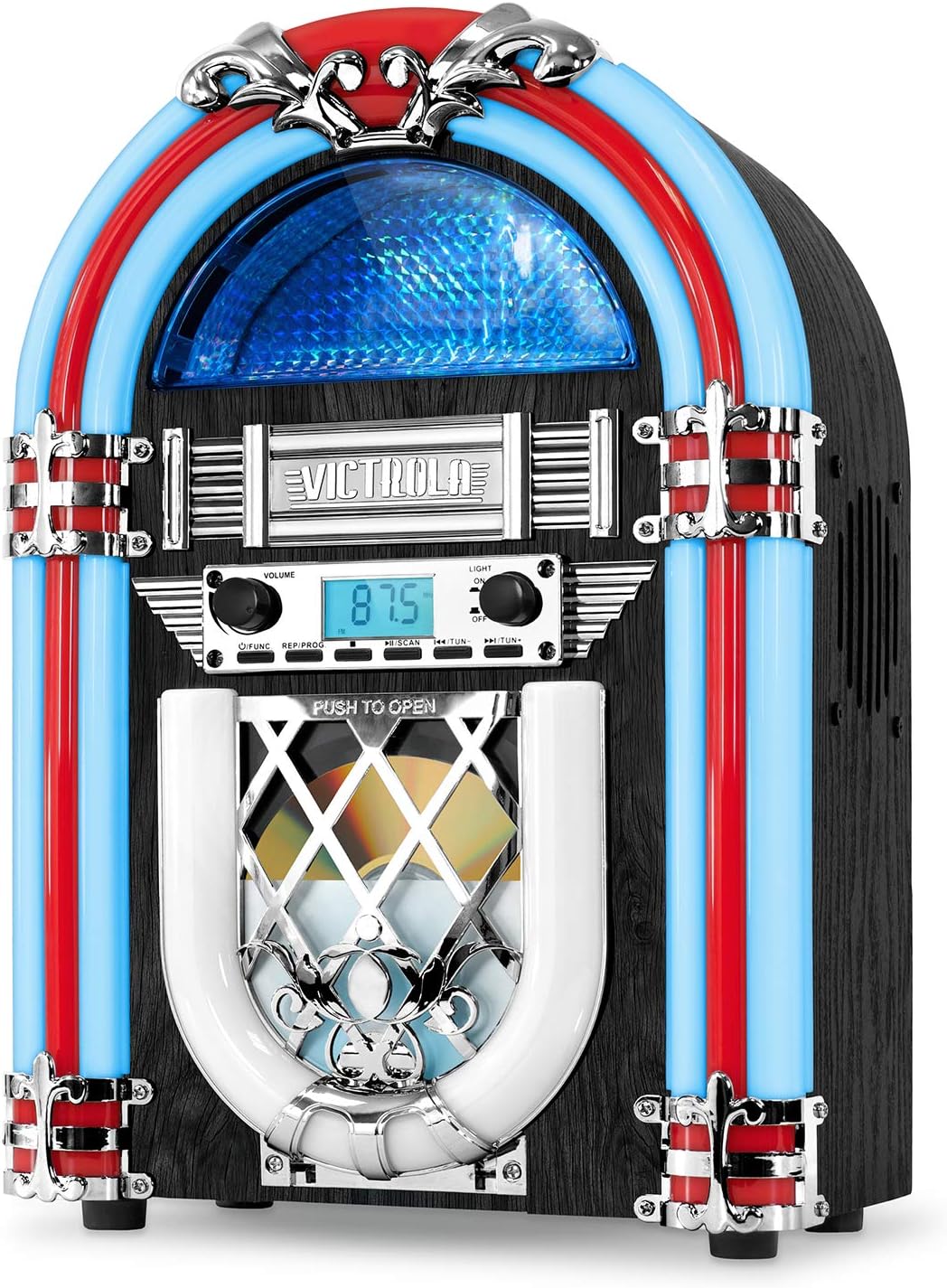
Figure 1: Front view of the Victrola VJB-125 Jukebox, showcasing its retro design with illuminated blue and red light tubes and central display.
Setup
1. Unpacking
Carefully remove the jukebox from its packaging. Retain the packaging materials for future transport or storage.
2. Placement
Place the unit on a flat, stable surface away from direct sunlight, heat sources, and excessive dust or moisture. Ensure adequate ventilation around the unit.
3. Power Connection
Connect the provided power adapter to the DC IN jack on the back of the unit, then plug the adapter into a standard wall outlet (AC 100-240V, 50/60Hz). The unit will enter standby mode.
Operating Instructions
Power On/Off
Press and hold the FUNCTION button for a few seconds to turn the unit ON or OFF. A short press of the FUNCTION button will cycle through the different modes (CD, FM, Bluetooth, AUX).
CD Player Operation
- Press the FUNCTION button until "CD" mode is selected.
- Gently press the "PUSH TO OPEN" panel on the front of the unit to reveal the CD tray.
- Place an audio CD onto the tray with the label side facing up.
- Close the panel. The CD will begin to play automatically.
- Use the PLAY/PAUSE, SKIP FORWARD, and SKIP BACKWARD buttons to control playback.
- Adjust the volume using the VOLUME knob.

Figure 2: A hand demonstrating how to open the "PUSH TO OPEN" panel to access the integrated CD player.
FM Radio Operation
- Press the FUNCTION button until "FM" mode is selected.
- To automatically scan and save available stations, press and hold the SCAN button. The unit will scan and store up to 20 presets.
- To manually tune, use the TUNE +/- buttons.
- To recall saved presets, use the PRESET +/- buttons.
- Adjust the volume using the VOLUME knob.
Bluetooth Pairing and Playback
- Press the FUNCTION button until "BT" (Bluetooth) mode is selected. The display will show "BT" and flash, indicating it's in pairing mode.
- Enable Bluetooth on your external device (e.g., smartphone, tablet).
- Search for "Victrola Jukebox" in your device's Bluetooth settings and select it to pair.
- Once paired, the "BT" indicator will stop flashing, and you can begin playing music from your device.
- Control playback (play/pause, skip) and volume from your connected device or the jukebox's controls.

Figure 3: The Victrola VJB-125 Jukebox displaying "BT" on its screen, indicating Bluetooth mode, with a smartphone nearby showing a successful Bluetooth connection.
Aux-in Usage
- Connect a 3.5mm audio cable (not included) from the AUX OUT jack of your external audio device to the AUX IN jack on the back of the jukebox.
- Press the FUNCTION button until "AUX" mode is selected.
- Play audio from your connected device. The sound will be output through the jukebox's speakers.
- Adjust the volume using the VOLUME knob on the jukebox or the volume control on your external device.
LED Light Control
The jukebox features color-changing LED lights. Use the LIGHT button to cycle through different light modes:
- Cycle Mode: Lights automatically transition through various colors.
- Single Color Mode: Select a static color.
- Lights Off: Turn off the LED lights.

Figure 4: The Victrola VJB-125 Jukebox illuminated with vibrant LED lights, creating a retro ambiance in a dimly lit setting.
Maintenance and Care
- Cleaning: Wipe the unit with a soft, dry cloth. Do not use abrasive cleaners or solvents.
- CD Care: Handle CDs by their edges. Keep them clean and free of scratches.
- Ventilation: Ensure ventilation openings are clear of dust and debris.
- Storage: If storing the unit for an extended period, unplug it from the power outlet and store it in a cool, dry place.
Troubleshooting
| Problem | Possible Cause | Solution |
|---|---|---|
| No power | Power adapter not connected or outlet is not active. | Ensure power adapter is securely plugged into the unit and a working wall outlet. |
| No sound | Volume is too low or incorrect mode selected. | Increase volume. Ensure the correct mode (CD, FM, BT, AUX) is selected for your audio source. |
| CD not playing | CD inserted incorrectly or disc is dirty/damaged. | Ensure CD is inserted label-side up. Clean the CD or try a different disc. |
| Bluetooth not connecting | Jukebox not in pairing mode or device too far. | Ensure jukebox is in "BT" mode and flashing. Move device closer. Forget "Victrola Jukebox" on your device and re-pair. |
| FM radio static | Poor signal reception. | Adjust the unit's position or location for better reception. |
Specifications
| Feature | Detail |
|---|---|
| Model Number | VJB-125 |
| Brand | Victrola |
| Connectivity Technology | Bluetooth, AUX-in |
| Wireless Communication | Bluetooth |
| Bluetooth Range | Up to 33 feet (10 meters) |
| Audio Output Mode | Stereo |
| Power Source | Corded Electric |
| Product Dimensions (L x W x H) | 11 x 6.6 x 15 inches (27.9 x 16.8 x 38.1 cm) |
| Item Weight | 3.9 pounds (1.77 kg) |
| Included Components | Speaker (Jukebox Unit) |
| Special Feature | LED Light |
| Manufacturer | Innovative Technology |
Warranty and Support
Victrola products are designed and manufactured to the highest quality standards. For warranty information or technical support, please refer to the official Victrola website or contact their customer service. A digital version of this user manual may also be available on the manufacturer's support page.
For additional support, you may visit the official Victrola store on Amazon: Victrola Store
A PDF version of the user manual is available here: User Manual (PDF)
Documents and downloads
Ask a question about this manual
Ask about setup, troubleshooting, compatibility, parts, safety, or missing instructions. Manuals+ will review the question and use this page’s manual context to help answer it.