
Maclean MC-751
Maclean MC-751 Monitor Desk Mount User Manual
Model: MC-751 | Brand: Maclean
Product Overview
The Maclean MC-751 is a universal desk mount designed for TV and PC monitors ranging from 13 to 32 inches. It provides an ergonomic solution for your workspace, allowing for adjustable viewing angles to enhance comfort and productivity. This robust mount features a solid metal construction with a high-quality powder coating, ensuring durability and stability for monitors up to 8 kg.
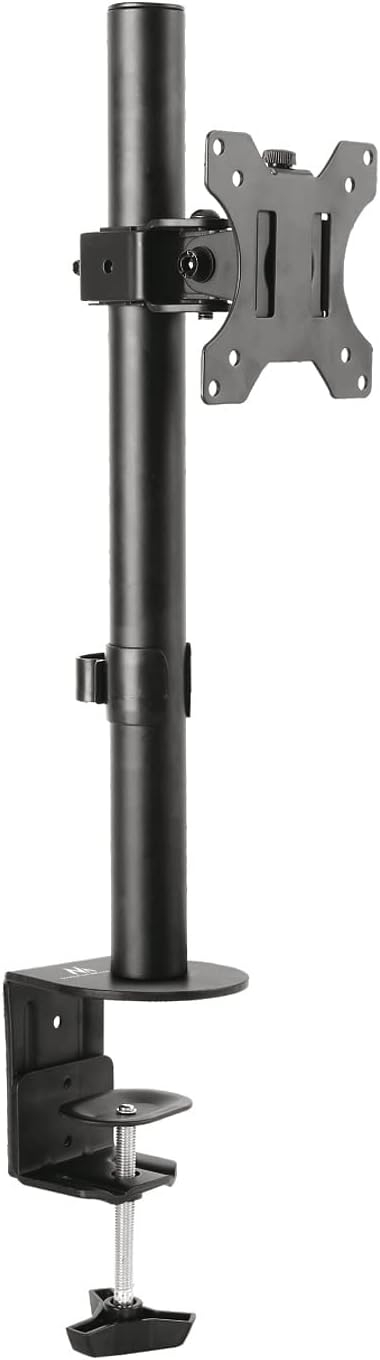
Image: The Maclean MC-751 monitor desk mount, showcasing its black finish and sturdy design with the desk clamp and VESA plate.
Setup and Installation
Before beginning installation, ensure you have all components and tools as listed in the packaging. The MC-751 mount is designed for easy installation using a desk clamp.
Package Contents:
- Monitor Desk Mount Assembly
- Mounting Accessories (screws, washers, spacers)
- Cable Clips
- Instruction Manual (this document)
Installation Steps:
- Attach the Desk Clamp: Secure the desk clamp to the edge of your desk. Ensure the clamp is tightened firmly to provide a stable base for the mount. The clamp supports desk thicknesses from minimum 10mm to maximum 88mm.
- Assemble the Pole and VESA Plate: Insert the main pole into the desk clamp base and secure it. Attach the VESA mounting plate to the pole at your desired height.
- Mount the Monitor: Align your monitor's VESA holes (75x75mm or 100x100mm) with the mounting plate. Use the provided screws and spacers to securely attach the monitor to the plate. Ensure the monitor is centered and stable.
- Cable Management: Utilize the included cable clips to route and organize your monitor cables along the pole, maintaining a tidy workspace.

Image: A detailed view of the desk clamp mechanism and the VESA mounting plate, highlighting the secure attachment points.

Image: Technical diagram illustrating the dimensions of the mount and the VESA hole patterns (75x75mm, 100x100mm) for monitor attachment.
Operating Instructions
The Maclean MC-751 mount offers various adjustments to optimize your viewing experience:
- Tilt Adjustment: The monitor can be tilted ±45 degrees (up/down) to reduce glare and find the optimal viewing angle. Loosen the tilt knob, adjust, and re-tighten.
- Swivel Adjustment: Swivel the monitor ±90 degrees (left/right) to share your screen or adjust for different tasks.
- Rotation Adjustment: Rotate the monitor ±180 degrees to switch between landscape and portrait orientations.
- Height Adjustment: Loosen the collar on the main pole to slide the monitor up or down to your preferred height, then re-tighten.

Image: The Maclean MC-751 monitor mount installed on a desk with a monitor attached, demonstrating its compact and functional design in a typical office setting.
Maintenance
To ensure the longevity and proper functioning of your Maclean MC-751 monitor mount, follow these simple maintenance guidelines:
- Cleaning: Wipe the mount with a soft, dry cloth. For stubborn marks, a slightly damp cloth can be used, followed by drying. Avoid abrasive cleaners or solvents.
- Periodic Check: Periodically check all screws and connections to ensure they remain tight and secure. Re-tighten if necessary.
- Weight Limit: Do not exceed the maximum weight capacity of 8 kg. Overloading can cause damage to the mount and potential injury.
Troubleshooting
If you encounter any issues with your Maclean MC-751 monitor mount, refer to the following common problems and solutions:
| Problem | Possible Cause | Solution |
|---|---|---|
| Monitor sags or tilts unexpectedly. | Tilt mechanism not tightened sufficiently, or monitor weight exceeds capacity. | Ensure the tilt knob is fully tightened. Verify your monitor's weight does not exceed 8 kg. |
| Mount feels unstable on the desk. | Desk clamp not securely fastened. | Re-tighten the desk clamp screw until the mount is firm. Ensure the desk surface is suitable. |
| Difficulty adjusting swivel or rotation. | Connections might be too tight. | Apply a small amount of silicone-based lubricant to the moving parts if resistance is high. Do not use oil-based lubricants. |
Specifications
| Feature | Detail |
|---|---|
| Manufacturer | Maclean |
| Model Number | MC-751 |
| Product Dimensions | 49 x 12 x 11 cm |
| Weight | 2.8 kg |
| Material | Metal |
| Color | Black |
| Screen Size Compatibility | 13 - 32 inches (33.0 - 81.3 cm) |
| Maximum Weight Capacity | 8 kg |
| VESA Compatibility | 75x75mm, 100x100mm |
| Tilt Angle | ±45 degrees |
| Swivel Angle | ±90 degrees |
| Rotation Angle | ±180 degrees |
| Mounting Type | Desk Clamp (min 10mm - max 88mm desk thickness) |
| Included Components | Mounting accessories, manual |
Warranty and Support
Maclean products are designed for durability and performance. For specific warranty information, please refer to the documentation included with your purchase or visit the official Maclean website. For technical support or inquiries, please contact Maclean customer service through their official channels.
You can find more information and contact details on the Maclean Brand Store on Amazon.
Ask a question about this manual
Ask about setup, troubleshooting, compatibility, parts, safety, or missing instructions. Manuals+ will review the question and use this page’s manual context to help answer it.