
Introduction
The Panasonic NN-DS596BYPQ is a versatile 27-liter steam and grill combination oven designed to simplify and enhance your cooking experience. This appliance offers genuine steam cooking, grilling, oven, and microwave functions, allowing for a wide variety of meal preparations. Its powerful steam injection system ensures quick and healthy cooking, preserving the natural flavors of ingredients. The combination cooking capabilities enable efficient and diverse culinary results.

Image: Front view of the Panasonic NN-DS596BYPQ Steam and Grill Combination Oven, showcasing its black finish and control panel.
Important Safety Information
Please read all instructions carefully before using the appliance to ensure safe and proper operation. Keep this manual for future reference.
- Do not attempt to operate this oven with the door open, as this can result in harmful exposure to microwave energy.
- Do not place any object between the oven front face and the door, or allow soil or cleaner residue to accumulate on sealing surfaces.
- Do not operate the oven if it is damaged. It is particularly important that the oven door closes properly and that there is no damage to the door, hinges, or seals.
- Only qualified service personnel should adjust or repair this appliance.
- Ensure the appliance is properly grounded.
- Always use oven mitts when handling hot dishes or accessories.
Setup and Installation
Unpacking
Carefully remove the oven and all packing materials from the carton. Check the oven for any damage, such as dents or a misaligned door. If any damage is observed, do not operate the oven and contact your retailer.
Placement
Place the oven on a flat, stable surface capable of supporting its weight (approximately 20 kg). Ensure adequate ventilation around the appliance. A minimum clearance of 10 cm from the back wall and sufficient space on the sides and top is recommended for proper air circulation and heat dissipation. Avoid placing the oven near heat sources or in areas with high humidity.
The dimensions of the oven are approximately 20.3 cm (D) x 13.8 cm (W) x 9.4 cm (H). Consider these dimensions when selecting a placement location.
Initial Cleaning
Before first use, wipe the interior and exterior surfaces of the oven with a soft, damp cloth. Ensure all accessories, such as the grill tray, are clean. Do not use abrasive cleaners.
Power Connection
Plug the oven into a dedicated, properly grounded electrical outlet. Ensure the voltage and frequency match the specifications listed on the appliance's rating label.
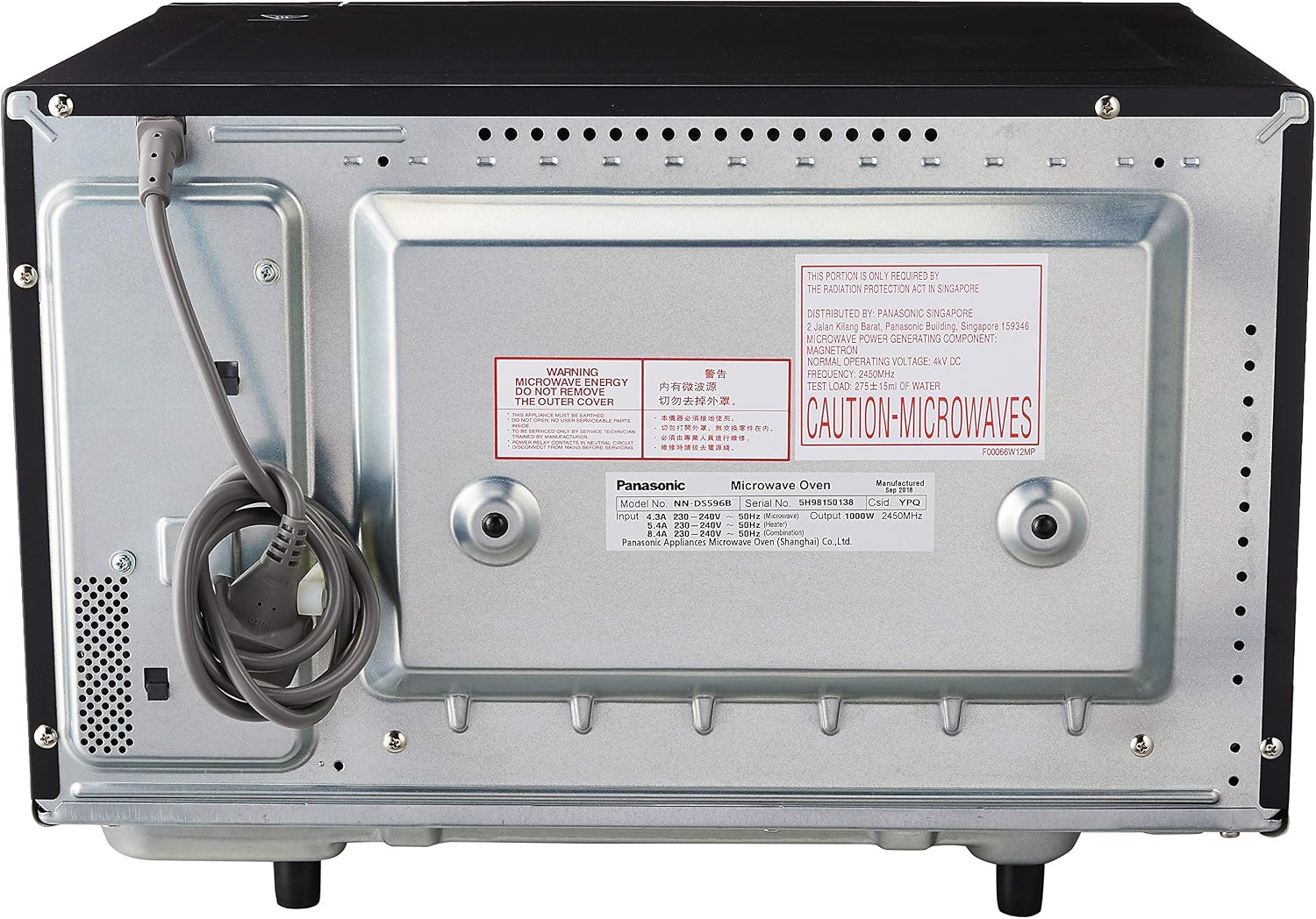
Image: Rear view of the oven, illustrating the power cord connection and important warning labels regarding microwave energy and service.
Operating Instructions
The Panasonic NN-DS596BYPQ features a control panel with a display, a central knob, and various function buttons. Familiarize yourself with these controls before operation.
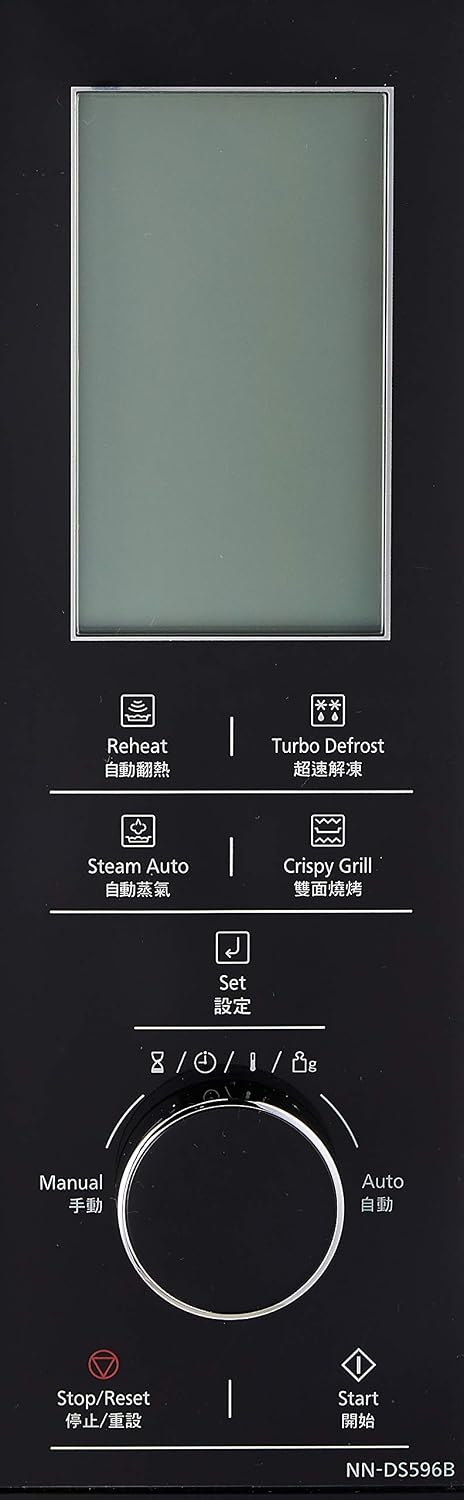
Image: Close-up of the control panel, showing the display, function buttons for Reheat, Turbo Defrost, Steam Auto, Crispy Grill, Set, Manual, Auto, Stop/Reset, and Start, along with the central rotary knob.
Basic Microwave Function
- Place food in a microwave-safe container inside the oven cavity.
- Close the oven door securely.
- Turn the central knob to select the desired microwave power level (if applicable, or select a preset).
- Press the Set button.
- Turn the central knob to set the cooking time.
- Press the Start button to begin cooking.
Note: The user interface requires multiple steps for basic functions. Ensure each step is confirmed before proceeding.
Steam Cooking
The oven utilizes a powerful steam generator for healthy cooking. Ensure the water tank is filled before using steam functions.
- Fill the water tank with fresh water.
- Place food on the appropriate accessory (e.g., grill tray) inside the oven.
- Select the Steam Auto program or a manual steam setting.
- Adjust settings (e.g., time, temperature) using the central knob and Set button.
- Press Start.

Image: Interior view of the oven with the door open, showing the flat cavity design and steam outlets at the top.
Grill Function (Crispy Grill)
The Crispy Grill feature allows browning on both sides without turning food over.
- Place food on the grill tray.
- Select the Crispy Grill function.
- Choose the desired grill level (e.g., Level 1 for highest, Level 3 for lowest) and cooking time.
- Press Start.

Image: Interior view of the oven with the door open, showing the grill rack and tray in position for grilling.
Combination Cooking
This oven allows for simultaneous combination of cooking methods (e.g., microwave + grill, steam + grill). Refer to the full recipe book for specific combinations and settings.
Auto Cooking Programs
The oven includes various auto cooking programs for convenience. These programs are designed for specific food types and quantities. While convenient, some programs may require adjustment based on food density and desired doneness.
- Select the Auto button.
- Turn the central knob to select the desired auto program number.
- Press Set.
- Adjust weight or quantity if prompted.
- Press Start.
Turbo Defrost
Use the Turbo Defrost function for quick and efficient thawing of frozen foods.
- Place frozen food in the oven.
- Press the Turbo Defrost button.
- Turn the central knob to select the food type and weight.
- Press Start.
Maintenance and Cleaning
Regular cleaning and maintenance will ensure the longevity and optimal performance of your oven.
Interior Cleaning
- After Steam Function: Due to condensation, it is essential to wipe down the interior cavity with a soft, dry cloth immediately after using the steam function or cooking high-moisture foods. This minimizes the risk of rust or mineral buildup.
- For general cleaning, wipe the interior with a damp cloth and mild detergent. Rinse with a clean, damp cloth and dry thoroughly.
- Avoid using abrasive cleaners, scouring pads, or sharp objects that could scratch the interior surfaces.
- The flat base of the cavity can be prone to scratches. Consider using a silicone mat to protect the base during microwave use.
Exterior Cleaning
Wipe the exterior surfaces with a soft, damp cloth. For stubborn stains, use a mild detergent. Ensure no water enters the ventilation openings.
Accessory Cleaning
Clean the grill tray and any other accessories with warm, soapy water. Rinse thoroughly and dry before storing or reusing.
Troubleshooting
If you encounter issues with your oven, refer to the following common problems and solutions before contacting service.
| Problem | Possible Cause / Solution |
|---|---|
| Oven does not start | Check if the power cord is securely plugged in. Ensure the door is fully closed. Check your household fuse/circuit breaker. |
| Food is not cooking or heating properly | Ensure correct power level and cooking time are set. Check if the door is properly closed. For oven functions, note that this appliance may take longer to heat compared to conventional ovens. |
| Excessive condensation during steam cooking | This is normal for steam functions. Wipe the interior cavity immediately after use to prevent water accumulation and potential rust. |
| Control panel is difficult to read | The display does not have self-illumination. Ensure adequate room lighting for visibility. |
| Complex user interface / difficult to program | Familiarize yourself with the step-by-step process for each function (e.g., turn knob, press Set, turn knob, press Start). Practice with simple tasks. |
| Clock memory lost after unplugging | The clock memory is retained for approximately 1 hour after unplugging. For longer periods, the clock will need to be reset. |
Specifications
| Feature | Detail |
|---|---|
| Brand | Panasonic |
| Model Number | NN-DS596BYPQ |
| Colour | Black |
| Capacity | 27 Liters |
| Wattage | 1000 watts |
| Material | Stainless Steel, Glass |
| Control Type | Knob |
| Door Style | Dropdown Door |
| Product Dimensions (D x W x H) | 20.3D x 13.8W x 9.4H centimetres |
| Item Weight | 20 Kilograms |
| Special Features | Steam Feature, Temperature Control |
| Included Components | 1 x Microwave Oven |
Warranty and Support
Warranty Information
This Panasonic NN-DS596BYPQ oven comes with a 1 Year Local (Singapore) Manufacturer Warranty. Please retain your proof of purchase for warranty claims. For detailed terms and conditions, refer to the warranty card included with your product or contact Panasonic customer service.
Customer Support
For further assistance, technical support, or service inquiries, please contact Panasonic customer service in your region. You can also visit the official Panasonic website or their brand store for additional resources and contact information.
Visit the Panasonic Store on Amazon.sg for more product information and support.