
FITUEYES TT104201GB
FITUEYES Swivel Universal TV Stand Instruction Manual
Model: TT104201GB
1. Product Overview
The FITUEYES Swivel Universal TV Stand (Model TT104201GB) provides a stable and versatile tabletop solution for your television. Designed for 27 to 55-inch LCD/LED/4K flat-screen TVs weighing up to 88 pounds, this stand features height adjustment, a smooth swivel function, and integrated cable management. Its sleek black tempered glass base offers both stability and a modern aesthetic.

Image: The FITUEYES Swivel Universal TV Stand, showcasing its black tempered glass base and sturdy metal frame with VESA mounting brackets.
2. Safety Information
Please read all instructions carefully before assembly and use. Failure to follow these instructions may result in property damage or personal injury.
- Weight Capacity: Do not exceed the maximum weight capacity of 88 lbs (40 kg). This stand is designed for TVs between 27 and 55 inches.
- VESA Compatibility: Ensure your TV's VESA mounting pattern is compatible (100x100mm to 400x400mm).
- Stability: Always place the TV stand on a flat, stable, and level surface. Avoid placing it on uneven or unstable furniture.
- Children and Pets: Keep children and pets away from the stand during assembly. Do not allow children to climb on or play with the stand or attached TV.
- Cable Management: Utilize the integrated cable management system to prevent tripping hazards and ensure cables are not pinched.
- Moving the Stand: When moving the stand with a TV attached, always do so with at least two people to prevent tipping or injury.
- Inspection: Periodically check all screws and connections to ensure they remain tight and secure.
3. Package Contents
Verify that all components are present before beginning assembly. If any parts are missing or damaged, contact FITUEYES customer service.
| Part | Description | Quantity |
|---|---|---|
| A | Tempered Glass Base | 1 |
| B | Main Support Column | 1 |
| C | TV Mounting Plate | 1 |
| D | TV Brackets | 2 |
| E | Cable Management Clips | 2 |
| F | Hardware Kit (Screws, Washers, Spacers, Allen Key) | 1 Set |
4. Setup and Assembly
Follow these steps carefully for proper assembly. A Phillips head screwdriver is required (not included).
4.1 Attach Main Support Column to Base
- Place the tempered glass base (Part A) on a soft, clean surface to prevent scratches.
- Align the main support column (Part B) with the holes on the glass base. Ensure the cable management opening on Part B faces the rear.
- Secure Part B to Part A using the designated screws from the hardware kit (Part F). Tighten firmly with the provided Allen key.

Image: Illustration showing the main support column being attached to the tempered glass base.
4.2 Attach TV Mounting Plate to Support Column
- Align the TV mounting plate (Part C) with the top of the main support column (Part B).
- Secure Part C to Part B using the appropriate screws from the hardware kit (Part F). Ensure it is centered and level.

Image: Illustration showing the TV mounting plate being attached to the top of the main support column.
4.3 Attach TV Brackets to Your TV
- Carefully lay your TV face-down on a soft, clean surface.
- Identify the VESA mounting holes on the back of your TV.
- Select the correct screws, washers, and spacers from the hardware kit (Part F) that fit your TV's VESA holes. Refer to your TV's manual for VESA size.
- Attach the TV brackets (Part D) to the back of your TV. Ensure the hooks on the brackets face downwards and are positioned correctly to hang on the TV mounting plate (Part C).
- Tighten all screws securely, but do not overtighten.

Image: Illustration showing the TV brackets being attached to the back of a television.
4.4 Mount TV to Stand
- With assistance, carefully lift the TV with the attached brackets.
- Hook the TV brackets (Part D) onto the TV mounting plate (Part C). Ensure the TV is securely seated.
- Locate the safety lock screws on the bottom of the TV brackets and tighten them to prevent the TV from accidentally lifting off the stand.
4.5 Cable Management
Once the TV is mounted, route all cables through the cable management clips (Part E) on the main support column to keep them organized and out of sight.

Image: Diagram highlighting features including cable management, 2.5mm iron plate, safety lock, 8mm tempered glass, plastic protective cover, and non-slip rubber pads.
5. Operating Instructions
5.1 Height Adjustment
The TV mounting brackets offer 2 levels of height adjustment, and the main support column provides 3 levels of height options, allowing for a total of 6 height settings. To adjust the height:
- Carefully remove the TV from the mounting plate (ensure safety locks are disengaged).
- Adjust the position of the TV mounting plate on the main support column, or adjust the TV brackets on the TV itself, to achieve the desired height.
- Re-mount the TV and secure the safety locks.

Image: Diagram illustrating the six possible height adjustments for the TV stand, showing measurements for each level.
5.2 Swivel Function
The TV stand allows for a smooth 40-degree swivel (20 degrees left and 20 degrees right) to optimize your viewing angle. To swivel the TV, gently rotate the television screen to the desired direction. No tools are required for this adjustment.
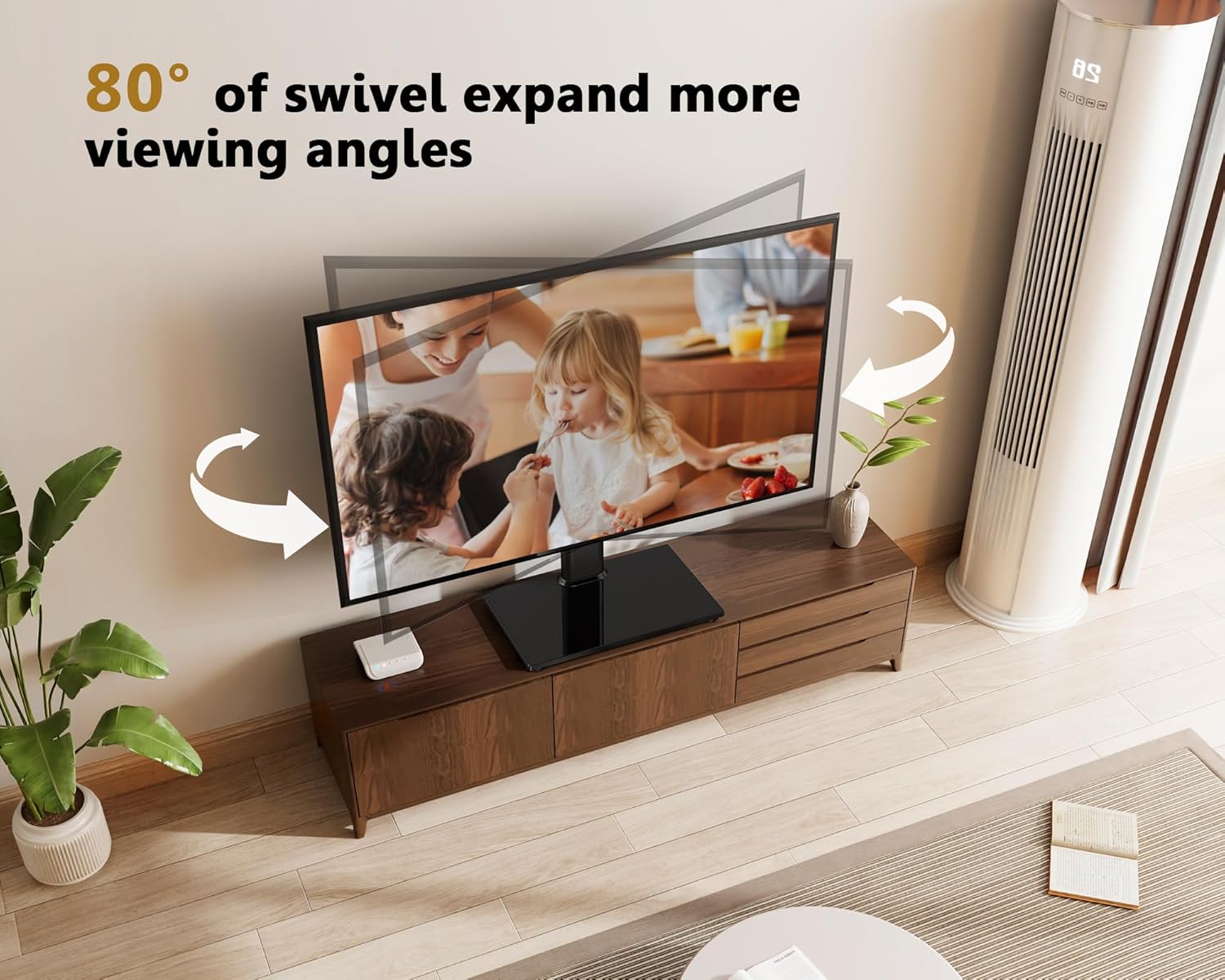
Image: A TV mounted on the stand, demonstrating its 80-degree swivel capability (40 degrees left and 40 degrees right) for flexible viewing angles.
6. Maintenance
- Cleaning: Use a soft, dry cloth to clean the stand. For the tempered glass base, a glass cleaner can be used. Avoid abrasive cleaners or solvents.
- Hardware Check: Periodically (e.g., every 6 months) check all screws and bolts to ensure they are tight and secure. Loose connections can compromise stability.
- Avoid Overloading: Do not place items heavier than the specified weight capacity on the stand or its base.
7. Troubleshooting
| Problem | Possible Cause | Solution |
|---|---|---|
| Stand is wobbly/unstable. | Loose screws; uneven surface; TV too heavy. | Ensure all screws are tightened. Place stand on a flat, level surface. Verify TV weight is within limits. |
| TV does not fit the stand. | Incorrect VESA pattern; TV size/weight exceeds limits. | Check your TV's VESA pattern against the stand's compatibility (100x100mm to 400x400mm). Confirm TV size (27-55 inches) and weight (max 88 lbs). |
| Cable management clips won't fit. | Misalignment or tight fit. | Ensure clips are oriented correctly. Apply firm, even pressure. If extremely tight, a rubber mallet can be used gently. |
| TV cannot swivel. | Obstruction; stand not assembled correctly. | Check for objects blocking the swivel path. Ensure the main support column and mounting plate are correctly aligned and not overtightened in a way that restricts movement. |
8. Specifications
- Model: TT104201GB
- Compatible TV Sizes: 27 - 55 inches
- Weight Capacity: Up to 88 lbs (40 kg)
- VESA Compatibility: 100x100mm, 200x100mm, 200x200mm, 300x200mm, 300x300mm, 400x200mm, 400x300mm, 400x400mm
- Swivel Angle: ±20 degrees (40 degrees total)
- Height Adjustment: 6 levels
- Base Material: 8mm Black Tempered Glass
- Frame Material: Alloy Steel
- Product Dimensions: Approximately 3.54 x 18.19 x 11.57 inches (L x W x H, varies with height setting)
- Item Weight: 9.53 pounds
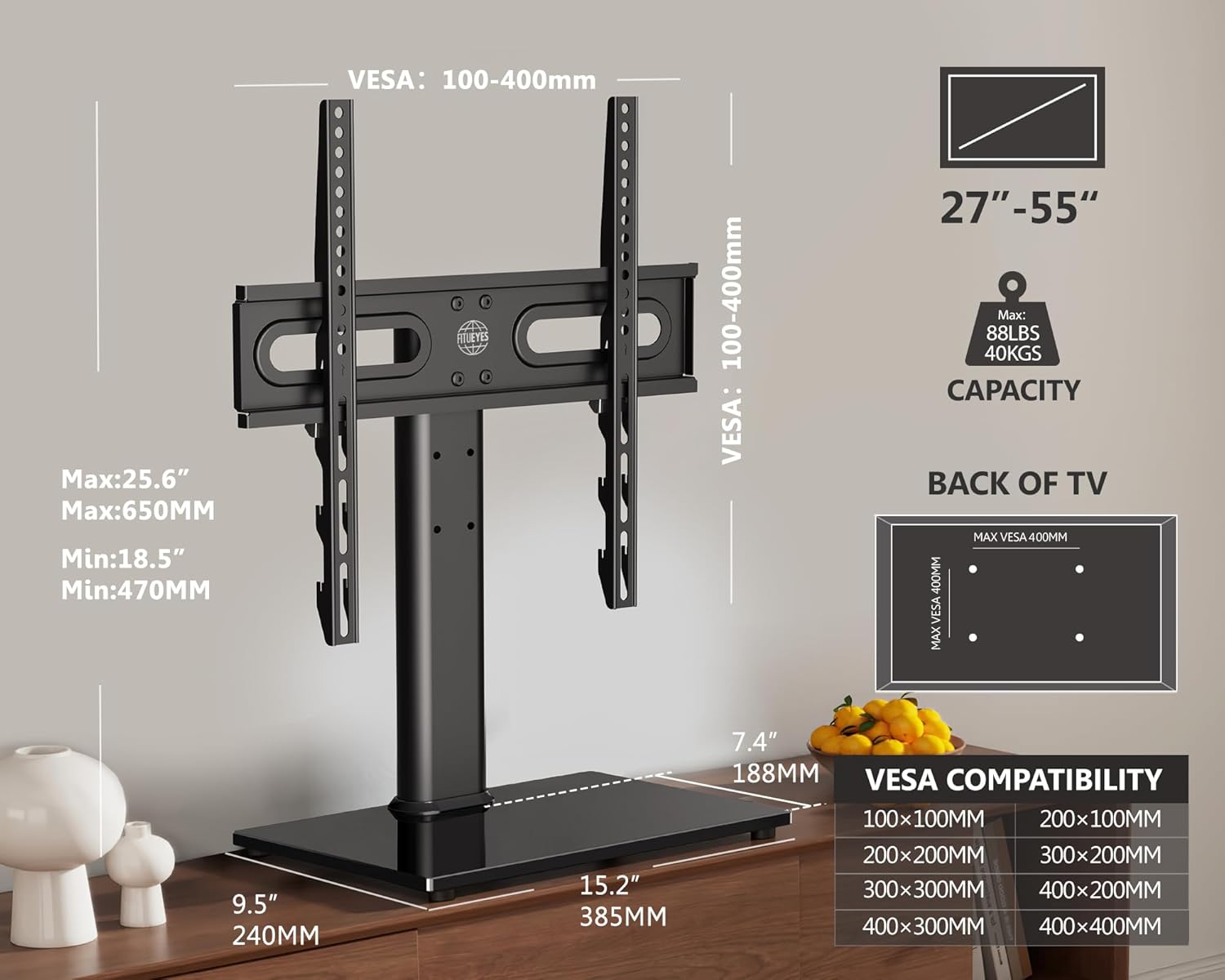
Image: Detailed diagram showing VESA compatibility ranges (100-400mm), supported TV sizes (27-55 inches), maximum capacity (88 lbs/40 kgs), and overall dimensions of the stand.
9. Warranty and Support
FITUEYES provides friendly customer service and standard mounting hardware to make installation as easy and convenient as possible. For any problems or inquiries regarding your FITUEYES Swivel Universal TV Stand, please feel free to contact us.
Please refer to the product packaging or the official FITUEYES website for specific warranty terms and contact information.
Contact Information:
- Visit the FITUEYES Store on Amazon for more information and support.