
1. Introduction
The Fusion MS-RA70 Marine Stereo is designed to provide high-quality audio for marine environments. This manual provides essential information for the proper installation, operation, and maintenance of your device.

Figure 1: Front view of the Fusion MS-RA70 Marine Stereo, showing the control knob, buttons, and monochrome LCD display.
2. Product Features
- DIN-Sized Cutout Compatibility: Designed to be retrofitted into existing DIN-sized cutouts, eliminating the need for dashboard modifications.
- Optically Bonded Monochrome LCD: Features a bright 2.6-inch display for clear visibility in various lighting conditions.
- Multi-Zone Technology: Allows independent adjustment of audio levels in up to two distinct audio zones.
- Fusion-Link Integration: Enables wireless control of your music from compatible smart devices or Garmin watches.
- IPX7 Water-Resistant: Rated for protection against water immersion, ensuring durability in marine environments.
- 4-Ohm Stable Stereo: Supports connection of up to six speakers.
- Potted and Sealed Design: Internal components are fully potted, and connections feature rubber gaskets for enhanced water resistance.
- NMEA 2000 Compatible: Connects to NMEA 2000 networks for integrated audio control via compatible Multi-Function Displays (MFDs).
- Connectivity: Includes Bluetooth and USB for versatile audio source options.
- Tuner: AM/FM radio bands supported.
3. What's in the Box
Upon unpacking, ensure all the following components are present:
- MS-RA70 Marine Stereo Unit
- DIN Mounting Plate
- Four 8-gauge, Self-Tapping Screws
- Power and Speaker Wiring Harness
- Auxiliary-in, Line-out, and Subwoofer-out Wiring Harnesses
- Documentation (this manual)
4. Installation
4.1 Mounting Options
The MS-RA70 offers flexible mounting solutions:
- Surface Mount: The unit can be directly mounted to a flat surface using the provided screws.
- Back Mount: For a cleaner, flush-mounted appearance, the unit can be back-mounted. The design allows the front face to sit flush with the mounting surface.
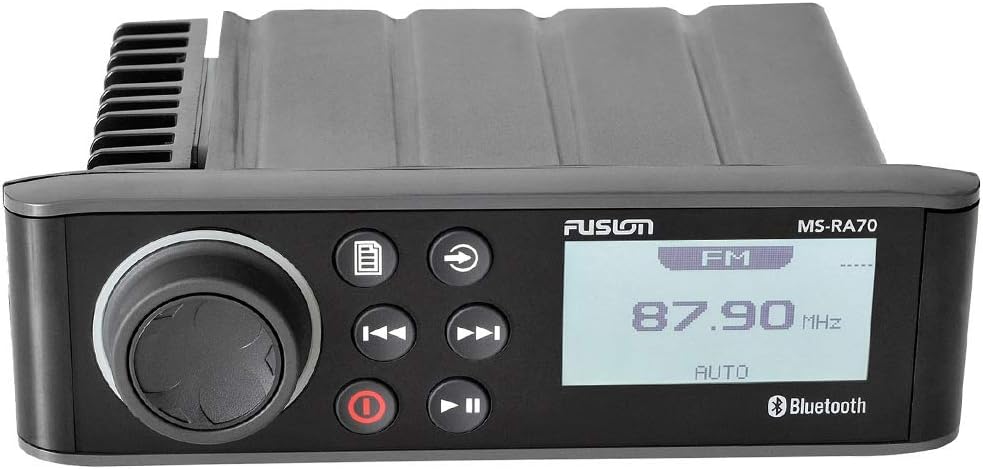
Figure 2: Side view of the Fusion MS-RA70, illustrating its compact design suitable for various mounting configurations.
4.2 Wiring Connections
All wiring harnesses are designed with rubber gaskets to ensure a watertight seal when connected to the unit. The fuse holder also includes a rubber cap for protection.
- Power and Speaker Harness: Connects to your boat's power supply and up to six speakers.
- Pre-Out Harness: Used for connecting external amplifiers, subwoofers, and setting up multiple audio zones.
- NMEA 2000 Cable: Connects the stereo to a compatible NMEA 2000 network, allowing control from networked MFDs.

Figure 3: Rear view of the Fusion MS-RA70, showing the various ports for power, speakers, auxiliary input, line-out, subwoofer-out, and NMEA 2000 connections.
Video 1: A product overview video demonstrating the Fusion MS-RA70 Marine Stereo and its included wiring harnesses and mounting accessories. This video highlights the unit's compact size and various connection points, including the sealed fuse holder and rubber-gasketed harnesses, emphasizing its marine-grade design.
5. Operation
5.1 Basic Controls
The front panel features a rotary knob for volume control and menu navigation, along with dedicated buttons for power, source selection, play/pause, and track skipping.
5.2 Audio Sources
- Bluetooth: Connect your compatible smart device wirelessly to stream audio.
- USB: Connect a USB device for audio playback.
- AM/FM Radio: Tune into your favorite radio stations.
- Auxiliary Input: Connect external audio devices via the auxiliary input.
5.3 Multi-Zone Audio
Utilize the multi-zone feature to control audio levels independently in two separate areas of your vessel. This allows for customized listening experiences in different zones.
5.4 Fusion-Link App Control
Download the Fusion-Link app on your compatible smart device (smartphone or Garmin watch) to gain wireless control over your stereo's functions, including source selection, volume, and zone control.
5.5 NMEA 2000 Integration
For integrated marine systems, connect the MS-RA70 to your NMEA 2000 network. This enables control of the stereo directly from compatible Multi-Function Displays (MFDs) on your boat, providing a centralized control point for navigation and entertainment.
6. Maintenance
The Fusion MS-RA70 is built for the marine environment with its IPX7 water-resistant and potted design. Regular maintenance is minimal but important for longevity:
- Cleaning: Wipe the unit with a soft, damp cloth to remove salt residue, dirt, or grime. Avoid abrasive cleaners or solvents.
- Connection Checks: Periodically inspect all wiring connections for corrosion or looseness. Ensure rubber gaskets and caps are properly seated to maintain water resistance.
- Software Updates: Check the Garmin/Fusion website for any available software updates to ensure optimal performance and access to new features.
7. Troubleshooting
If you encounter issues with your MS-RA70, refer to the following common troubleshooting steps:
- No Power:
- Check the power connection and ensure it is secure.
- Verify the fuse is intact. Replace if blown.
- Ensure the boat's battery has sufficient charge.
- No Audio Output:
- Confirm the correct audio source is selected.
- Check speaker connections for proper wiring and secure fit.
- Verify volume levels for both the main unit and individual zones.
- Ensure external amplifiers (if used) are powered on and functioning.
- Bluetooth Connectivity Issues:
- Ensure Bluetooth is enabled on both the stereo and your smart device.
- Unpair and re-pair the device.
- Move the smart device closer to the stereo to reduce interference.
- Display Not Working:
- Perform a soft reset by turning the unit off and on.
- Check power connections.
For persistent issues, contact Garmin/Fusion customer support.
8. Specifications
| Feature | Specification |
|---|---|
| Brand | Garmin (Fusion) |
| Model Number | 010-01516-01 |
| UPC | 753759210755 |
| Power Output | 4 x 50W (Speaker Maximum Output Power) |
| Display Type | 2.6" Optically Bonded Monochrome LCD |
| Connectivity | Bluetooth, USB, NMEA 2000 |
| Tuner Technology | AM/FM |
| Water Resistance | IPX7 |
| Audio Zones | 2 |
| Item Weight | 1.23 Pounds |
| Enclosure Material | Plastic |
9. Warranty and Support
The Fusion MS-RA70 Marine Stereo comes with a 1-year limited warranty from the manufacturer, Garmin.
For warranty claims, technical support, or additional product information, please visit the official Garmin or Fusion website or contact their customer service directly.