
Aux ASW-18B2INV/SS
Aux ASW-18B2INV/SS Air Conditioner User Manual
Model: ASW-18B2INV/SS
Introduction
This manual provides detailed instructions for the installation, operation, and maintenance of your Aux ASW-18B2INV/SS Air Conditioner. Please read this manual thoroughly before using the unit to ensure proper operation and to prevent damage.
The Aux ASW-18B2INV/SS is an advanced air conditioning unit with a capacity of 18,000 BTU, designed for areas ranging from 17 to 24 square meters. It features a smart remote control, self-cleaning function, programmable on/off timer, anti-fungus mode, and automatic restart after power interruptions.
Important Safety Instructions
Always follow basic safety precautions when using electrical appliances to reduce the risk of fire, electric shock, and injury to persons.
- Ensure the power supply matches the unit's requirements.
- Do not operate the unit with wet hands.
- Do not insert objects into the air outlet.
- Keep children away from the unit.
- Unplug the unit before cleaning or maintenance.
- Only qualified personnel should perform installation or repairs.
Product Components
The Aux ASW-18B2INV/SS Air Conditioner package includes the following main components:
- Indoor Unit
- Outdoor Unit
- Remote Control
- User Manual (this document)
- Installation Kit (pipes, cables, etc.)

Figure 1: Front view of the Aux ASW-18B2INV/SS indoor unit. This image shows the sleek, silver-colored front panel with the Aux logo and a digital display on the right side.
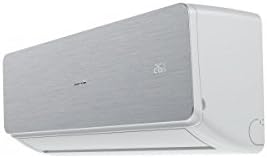
Figure 2: Angled view of the Aux ASW-18B2INV/SS indoor unit, highlighting its depth and side profile. The digital display is visible on the right side.
Setup and Installation
Installation of the Aux ASW-18B2INV/SS Air Conditioner should only be performed by a qualified and certified technician. Improper installation can lead to electric shock, fire, water leakage, and other hazards.
Pre-Installation Checklist:
- Verify power supply voltage and circuit breaker capacity.
- Ensure adequate space for air circulation around both indoor and outdoor units.
- Check for proper drainage for condensate water.
- Confirm all components are present and undamaged.
Wi-Fi Connectivity Setup:
The unit supports Wi-Fi connectivity via the AC Free APP. To set up:
- Download the "AC Free" application from your smartphone's app store.
- Follow the in-app instructions to register an account and add your Aux ASW-18B2INV/SS unit.
- Ensure your Wi-Fi network is stable and within range of the unit.
Operating Instructions
Using the Remote Control:
The smart remote control allows for comprehensive management of the air conditioner's functions. It features a built-in sensor that helps the unit automatically select the optimal operating mode for comfort.
- Power Button: Turns the unit on or off.
- Mode Button: Cycles through operating modes (Cool, Heat, Fan, Dry, Auto).
- Temperature Adjustment: Use + and - buttons to set desired temperature.
- Fan Speed: Adjusts fan speed (Low, Medium, High, Auto).
- Timer Button: Sets programmable on/off times for energy saving.
- Sleep Mode: Activates a quiet, energy-efficient mode for nighttime.
- Anti-Fungus Mode: Engages a special operation mode to prevent mold growth.
Automatic Restart Function:
In the event of a power outage, the unit will automatically restart with the last saved settings once power is restored, ensuring continuous comfort without manual intervention.
Maintenance
Regular maintenance ensures optimal performance and extends the lifespan of your air conditioner. Always unplug the unit before performing any maintenance.
Air Filter Cleaning:
The unit is equipped with a dust filter. Clean the air filter every two weeks or more frequently depending on usage and air quality.
- Open the front panel of the indoor unit.
- Remove the air filters.
- Clean the filters with a vacuum cleaner or wash them with lukewarm water and mild detergent.
- Rinse thoroughly and allow to dry completely in a shaded area before reinserting.
Self-Cleaning Function:
The self-cleaning feature helps prevent bacteria proliferation by removing dust particles from the evaporator. Refer to your remote control or app for instructions on activating this function.
Seasonal Maintenance:
It is recommended to have a qualified technician perform a comprehensive check-up of the unit annually, especially before the peak cooling season.
Troubleshooting
Before contacting customer support, please refer to the following common issues and their solutions:
| Problem | Possible Cause | Solution |
|---|---|---|
| Unit does not turn on. | No power supply; circuit breaker tripped; remote control batteries dead. | Check power connection; reset circuit breaker; replace remote control batteries. |
| Insufficient cooling/heating. | Dirty air filter; blocked air intake/outlet; wrong mode selected; room too large. | Clean air filter; clear obstructions; select correct mode; ensure unit capacity matches room size. |
| Unusual noise. | Loose parts; foreign object inside; unit not level. | Check for loose parts; remove foreign objects; ensure unit is level. If noise persists, contact service. |
| Water leakage. | Blocked drain hose; improper installation. | Clear drain hose; contact a qualified technician for inspection. |
Specifications
| Feature | Detail |
|---|---|
| Model | ASW-18B2INV/SS |
| Brand | Aux |
| Cooling Capacity | 18,000 British Thermal Units (BTU) |
| Recommended Area | 17 to 24 m² |
| Control Method | App (Wi-Fi), Remote Control, Touch |
| Special Features | Dust Filter, Smart Remote Control, Self-Cleaning, Programmable On/Off, Anti-Fungus Mode, Automatic Restart |
| Power Source | Corded Electric |
| Product Dimensions | 39.5 x 92 x 60.5 cm |
| Item Weight | 3000 Grams (3 kg) |
| Assembly Required | No (for user, installation by professional) |
| Batteries Required | No (for main unit, remote control may need batteries) |
Warranty Information
The Aux ASW-18B2INV/SS Air Conditioner comes with a Limited Warranty. Please refer to the warranty card included with your product for specific terms, conditions, and duration of coverage. Keep your purchase receipt as proof of purchase for warranty claims.
The warranty typically covers manufacturing defects and malfunctions under normal use. It does not cover damage caused by improper installation, misuse, neglect, unauthorized repairs, or natural disasters.
Customer Support
If you encounter issues that cannot be resolved using the troubleshooting guide, or require professional assistance, please contact Aux customer support.
For service requests, please have your model number (ASW-18B2INV/SS) and purchase date ready.
Contact information (e.g., phone number, website) would typically be provided here by the manufacturer. Please refer to your product packaging or official Aux website for the most current contact details.
Related documentsASW-18B2INV/SS


Ask a question about this manual
Ask about setup, troubleshooting, compatibility, parts, safety, or missing instructions. Manuals+ will review the question and use this page’s manual context to help answer it.