
Introduction
This manual provides essential instructions for the safe and effective use of your TODO Mini Exercise Bike Pedal Exerciser. Please read this manual thoroughly before operation and retain it for future reference.
Safety Information
- Consult a physician before starting any exercise program.
- Use the exerciser on a flat, stable surface.
- Ensure all parts are securely assembled before use.
- Keep children and pets away from the device during operation.
- Do not stand on the pedals.
- Stop exercising immediately if you feel pain, dizziness, or discomfort.
- Maximum user weight recommendation: 400 Pounds.
Package Contents
Please verify that all components are present before assembly:
- Main Unit (with LCD Monitor)
- Front Stabilizer Bar
- Rear Stabilizer Bar
- Pedals (Left and Right)
- Assembly Hardware (Bolts, Washers, Nuts)
- Wrench
- Allen Key
- Chair Strap (for stability)
Assembly Instructions
Follow these steps to assemble your TODO Mini Exercise Bike:
- Attach Stabilizer Bars: Securely attach the front and rear stabilizer bars to the main unit using the provided bolts, washers, and nuts. Use the wrench to tighten them firmly.

Image: Step-by-step illustration showing how to attach the front and rear stabilizer bars to the main body of the pedal exerciser using screws and a wrench.
- Install Pedals: Identify the left (L) and right (R) pedals. Screw the pedals into their corresponding crank arms on the main unit. The left pedal typically screws counter-clockwise, and the right pedal clockwise. Use the wrench to tighten them securely.

Image: Close-up view of a hand using a wrench to tighten a pedal onto the crank arm of the mini exercise bike. The pedal is labeled 'L' for left.
- Check Stability: Ensure all connections are tight and the unit is stable before use.
Video: Assembly Guide
Video: A detailed demonstration of how to assemble the pedal exerciser, including attaching the base supports and pedals. This video is provided by the seller and is relevant to the product.
Operating Instructions
Using the Exerciser
The TODO Mini Exercise Bike can be used for both leg and arm exercises.
For Leg Exercise:
- Place the exerciser on a flat, stable surface in front of your chair.
- Sit comfortably in a chair. For added stability, use the included strap to secure the exerciser to your chair legs.
- Place your feet into the pedal straps, ensuring they are snug but not too tight.
- Begin pedaling at a comfortable pace.
For Arm Exercise:
- Place the exerciser on a stable table or desk.
- Sit comfortably in a chair in front of the table.
- Place your hands into the pedal straps, ensuring a secure grip.
- Begin rotating the pedals with your arms.
Video: Leg and Arm Exercise Demonstration
Video: A demonstration showing how to use the pedal exerciser for both leg exercises while seated and arm exercises on a tabletop. This video is provided by the seller and is relevant to the product.
Adjusting Resistance
The resistance can be adjusted by rotating the tension knob located on the front of the unit.
- Turn the knob clockwise (+) to increase resistance for a more challenging workout.
- Turn the knob counter-clockwise (-) to decrease resistance for an easier workout.
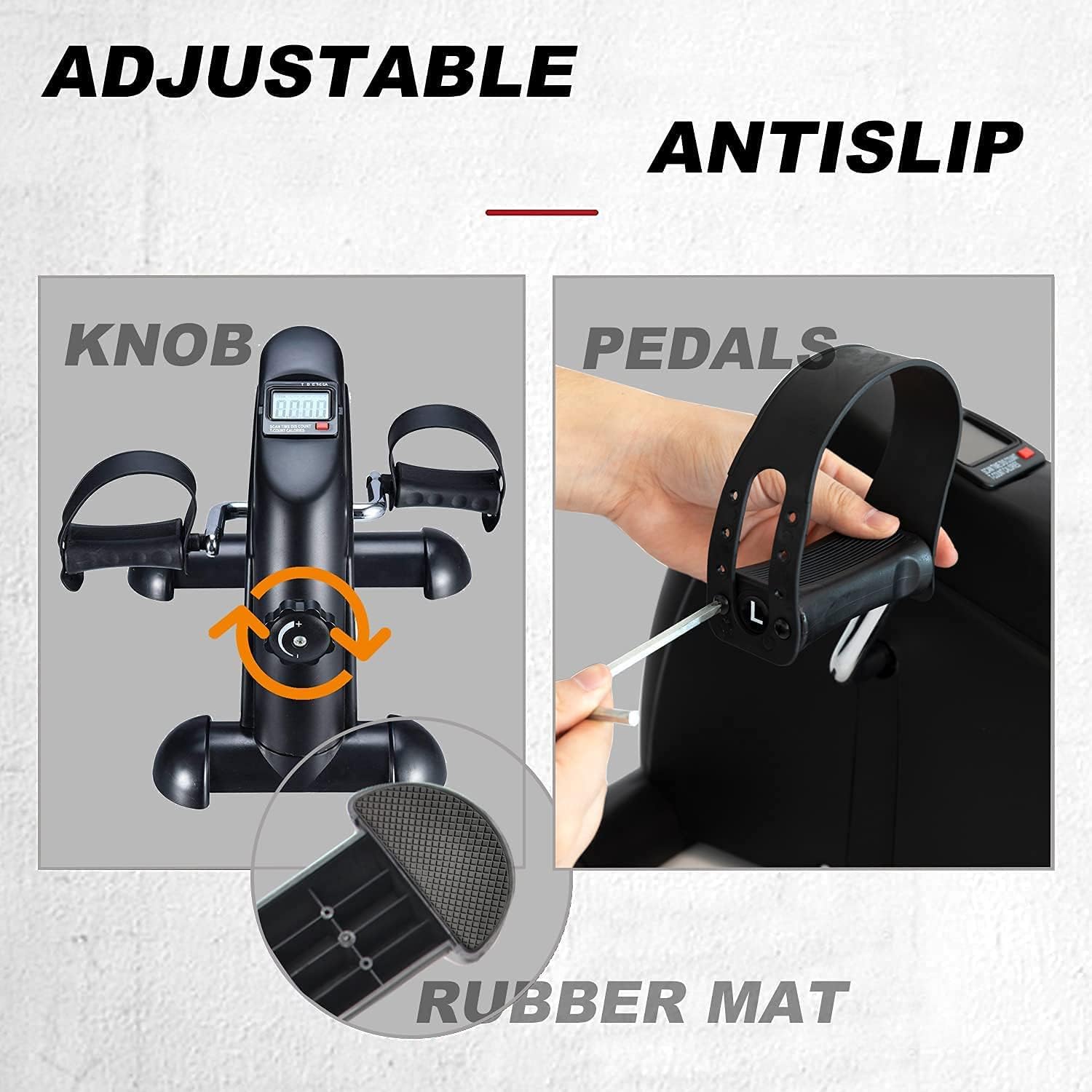
Image: A close-up of the resistance knob on the mini exercise bike, showing the plus and minus symbols for increasing and decreasing resistance.
LCD Monitor Functions
The multifunction LCD monitor displays various workout data:
- Time: Duration of your current exercise session.
- Distance (km): Estimated distance covered.
- Count (number of turns): Total pedal revolutions.
- Total Counts: Cumulative pedal revolutions since last reset.
- Calories Burned: Estimated calories burned.
To Switch Data: Short press the red button on the monitor.
To Reset Data: Long press the red button to reset all data to zero (except Total Counts).

Image: A close-up of the LCD monitor on the mini exercise bike, showing digital readouts for time, distance, count, total count, and calories burned.
Maintenance
- Cleaning: Wipe down the unit with a damp cloth after each use. Avoid abrasive cleaners.
- Storage: Store the exerciser in a cool, dry place away from direct sunlight. Its compact design allows for easy storage under a desk or in a closet.
- Battery Replacement: The LCD monitor is powered by 1 AAA battery. Replace the battery when the display becomes dim or unresponsive.
- Lubrication: Periodically check for any squeaking or stiffness in the pedals or crank arms. Apply a small amount of silicone-based lubricant if necessary.
Troubleshooting
Common Issues and Solutions
- Unit slides during use:
- Solution: Ensure the exerciser is placed on a non-slip surface. Use the provided chair strap to secure the unit to your chair legs.
- Pedals feel stiff or make noise:
- Solution: Check if pedals are securely tightened. Apply a small amount of silicone lubricant to the pedal axles if needed.
- LCD monitor not displaying:
- Solution: Check and replace the AAA battery. Ensure the battery is inserted with correct polarity.
- Resistance adjustment not working:
- Solution: Ensure the tension knob is properly engaged and not stripped. If the issue persists, contact customer support.
Specifications
| Feature | Specification |
|---|---|
| Brand | TODO |
| Model | Mini Exercise Bike Pedal Exerciser |
| Color | Black |
| Material | Metal |
| Product Dimensions | 34.92 x 40.64 x 32 cm |
| Item Weight | 5 kg (11.02 Pounds) |
| Maximum Weight Recommendation | 400 Pounds |
| Display Type | LCD |
| Monitor Functions | Time, Distance (km), Count, Total Counts, Calories Burned |
| Number of Resistance Levels | Adjustable (via knob) |
| Power Source | Battery Powered (1 AAA battery included) |
Warranty and Support
Warranty Information
This product comes with a 1-year warranty against non-man-made damage. Please retain your proof of purchase for warranty claims.
Customer Support
For any questions, issues, or warranty claims, please contact TODO customer service.
- 24-hour online customer service is available to assist you.
- A 10-day free use period allows for returns or exchanges without reason.
Contact Information: Refer to your purchase documentation or the seller's page on Amazon for the most current contact details.

Image: Graphic illustrating customer service availability, warranty period, and return policy.