
Lemax Multi-Color Fireworks (Model #74256) User Manual
Battery Operated (4.5V) Decorative Accessory
Introduction
This manual provides essential information for the safe and proper use of your Lemax Multi-Color Fireworks decorative accessory, Model #74256. Please read these instructions carefully before setup and operation, and retain them for future reference.
Safety Information
- This product is intended for indoor decorative use only.
- Keep out of reach of small children and pets.
- Do not expose to water or excessive moisture.
- Use only the specified battery type (3 x AA 1.5V) or a compatible Lemax Power Adaptor (not included).
- Do not mix old and new batteries, or different types of batteries.
- Remove batteries if the product is not used for an extended period.
- Ensure proper ventilation if using an AC adaptor.
Package Contents
Verify that all components are present:
- 1 x Lemax Multi-Color Fireworks Unit (Model #74256)
- 1 x Instruction Manual (this document)
Note: Batteries (3 x AA 1.5V) and an optional Lemax Power Adaptor are not included.
Setup
- Unpacking: Carefully remove the Multi-Color Fireworks unit from its packaging.
- Battery Installation:
Locate the battery compartment on the base of the unit. Open the compartment cover. Insert three (3) AA 1.5V batteries, ensuring correct polarity (+/-) as indicated inside the compartment. Close the battery compartment cover securely.
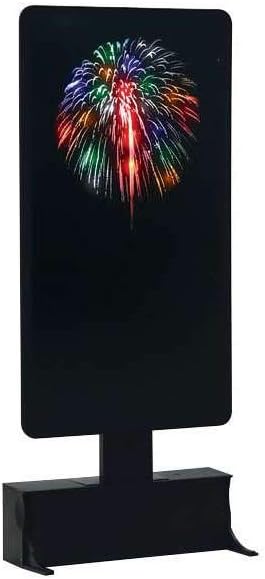
Figure 1: Lemax Multi-Color Fireworks unit. The base houses the battery compartment and controls.
- Optional AC Adaptor (not included): If using a Lemax Power Adaptor, connect it to the designated port on the unit and then to a standard electrical outlet. Ensure the adaptor is compatible with the product's voltage requirements (4.5V).
- Placement and Stability: Place the unit on a flat, stable surface. The unit is designed with small legs on the base for enhanced stability. Ensure these legs are properly extended or positioned to prevent tipping, as the unit can be top-heavy.

Figure 2: Lemax Multi-Color Fireworks unit displayed within a village setting.
Operating Instructions
- Power On/Off: Locate the On/Off switch on the base of the unit. Slide the switch to the "On" position to activate the fireworks effect and exterior lights. Slide the switch to the "Off" position to power down the unit.
- Fireworks Effect: Once powered on, the unit will display a multi-color fireworks animation, simulating ascending and bursting fireworks. The exterior lights will also illuminate.
- Optimal Viewing: For the best visual experience, operate the unit in a dimly lit environment.
Maintenance
- Cleaning: Wipe the unit with a soft, dry cloth. Do not use abrasive cleaners or solvents.
- Battery Replacement: When the fireworks effect or lights dim, it is time to replace the batteries. Follow the battery installation steps in the "Setup" section.
- Storage: Store the unit in its original packaging or a protective container in a cool, dry place when not in use.
Troubleshooting
| Problem | Possible Cause | Solution |
|---|---|---|
| Unit does not turn on. |
|
|
| Fireworks effect is dim or inconsistent. |
|
|
Specifications
- Model Number: 74256
- Power Source: 3 x AA 1.5V batteries (not included) or Lemax Power Adaptor (4.5V, not included)
- Product Dimensions: 11.06 x 5.31 x 1.65 inches (28.1 x 13.5 x 4.2 cm)
- Item Weight: 0.16 ounces (4.5 grams)
- Year Released: 2017
- Features: Multi-color fireworks animation, exterior lights, On/Off switch.
Warranty and Support
For warranty information or technical support, please refer to the contact information provided by your retailer or visit the official Lemax website. Keep your proof of purchase for any warranty claims.
Official Product Videos
No official seller-provided product videos are available for this item based on the provided data.