1. Product Overview
The Yaskawa V1000 is a compact, high-performance AC microdrive designed for a wide range of industrial applications. It offers precise motor control, energy efficiency, and ease of use. This manual provides essential information for the safe and effective operation of your V1000 AC Drive.
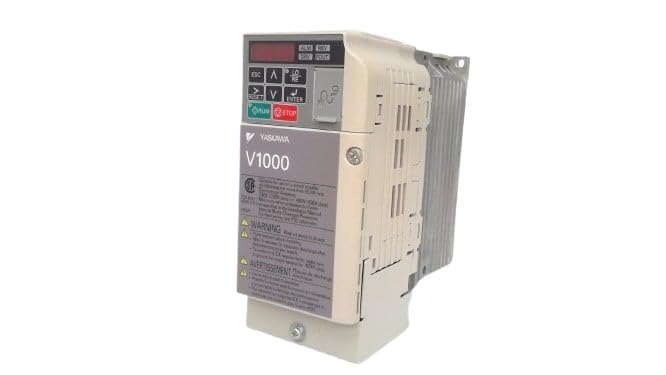
Figure 1: Front view of the Yaskawa V1000 AC Drive (Model CIMR-VU2A0006FAA). This image shows the drive's compact design, control panel with display and buttons, and ventilation fins on the side.
2. Safety Information
WARNING: Risk of electric shock. Ensure power is disconnected before installation or maintenance.
Read this manual thoroughly before installing, operating, or performing maintenance on the V1000 AC Drive. Failure to follow these instructions may result in serious injury or equipment damage.
2.1 General Safety Precautions
- Only qualified personnel should install, operate, and maintain this equipment.
- Do not operate the drive with damaged cables or if the enclosure is open.
- Ensure proper grounding according to local electrical codes.
- Verify input voltage matches the drive's specifications.
- Do not touch internal components immediately after power-off, as residual voltage may be present. Wait for the charge lamp to extinguish.
2.2 Environmental Considerations
- Install the drive in a clean, dry, and well-ventilated area.
- Avoid direct sunlight, excessive dust, corrosive gases, and vibrations.
- Operating temperature range: 0°C to 50°C (32°F to 122°F).
3. Setup
Proper installation and wiring are crucial for the safe and reliable operation of the V1000 AC Drive.
3.1 Mounting
Mount the drive vertically on a flat, stable surface. Ensure adequate clearance for ventilation around the drive (minimum 50mm above and below, 25mm on sides).
3.2 Wiring
Refer to the wiring diagram provided in the full product manual for detailed connections. Key connections include:
- Power Input (R/L1, S/L2, T/L3): Connect the 3-phase 200-240V AC power supply.
- Motor Output (U, V, W): Connect to the motor terminals.
- Ground (PE): Connect to a reliable earth ground.
- Control Terminals: For external control signals (e.g., run/stop, speed reference, fault output).
Always use appropriate wire gauges and circuit protection devices as specified in local electrical codes and the drive's technical specifications.
4. Operating the V1000 AC Drive
The V1000 drive can be operated via its integrated control panel or external control signals.
4.1 Control Panel Overview
The control panel features a digital display and several buttons:
- ESC: Escape/Back button.
- UP/DOWN Arrows: Navigate menus, adjust parameters.
- LEFT/RIGHT Arrows: Shift cursor, change digits.
- ENTER: Confirm selection, enter parameter edit mode.
- RUN: Start motor operation.
- STOP: Stop motor operation.
4.2 Basic Operation Steps
- Power On: Apply power to the drive. The display will illuminate.
- Parameter Setup: Configure essential parameters such as motor data (voltage, current, frequency), acceleration/deceleration times, and control mode (V/f, vector control). Refer to the parameter list in the detailed manual.
- Start Command: Press the RUN button on the control panel or activate the external run command.
- Speed Adjustment: Adjust the motor speed using the UP/DOWN arrows (if in local control mode) or via external speed reference.
- Stop Command: Press the STOP button or deactivate the external stop command.
5. Maintenance
Regular maintenance ensures the longevity and optimal performance of your V1000 AC Drive.
5.1 Routine Checks
- Daily: Check for unusual noises, vibrations, or odors. Verify display for error codes.
- Monthly: Inspect cooling fans for proper operation and cleanliness. Clean dust from ventilation openings.
- Annually: Check terminal connections for tightness. Inspect wiring for signs of wear or damage. Measure input/output voltages and currents.
5.2 Cleaning
Use a soft, dry cloth to clean the exterior of the drive. For internal cleaning (only by qualified personnel with power disconnected), use compressed air to remove dust from heat sinks and circuit boards.
Always disconnect power and wait for the charge lamp to extinguish before performing any maintenance.
6. Troubleshooting
This section provides common issues and their potential solutions. For complex problems, consult a qualified technician or Yaskawa support.
| Problem | Possible Cause | Solution |
|---|---|---|
| Drive does not power on. | No input power; Blown fuse. | Check power supply; Replace fuse (after identifying cause). |
| Motor does not run. | No run command; Incorrect wiring; Motor fault. | Verify run command; Check motor and drive wiring; Inspect motor. |
| Overcurrent fault (OC). | Motor overload; Short circuit; Rapid acceleration. | Reduce load; Check motor/cables for shorts; Increase acceleration time. |
| Overvoltage fault (OV). | High input voltage; Rapid deceleration. | Check input voltage; Increase deceleration time; Install braking resistor if needed. |
7. Specifications
Key technical specifications for the Yaskawa V1000 AC Drive (CIMR-VU2A0006FAA):
- Model: CIMR-VU2A0006FAA
- Series: V1000 AC Drive
- Input Voltage: 200-240V AC, 3-Phase
- Output Voltage: 240V AC
- Rated Output Current: 6.0A (Heavy Duty) / 5.0A (Normal Duty)
- Rated Motor Power: 1 HP (0.75 kW)
- Manufacturer: YASKAWA ELECTRIC
- Date First Available: February 14, 2025
8. Warranty and Support
For detailed warranty information, please refer to the official Yaskawa warranty statement or contact your authorized Yaskawa distributor.
For technical support, service, or to obtain a full copy of the V1000 technical manual, please visit the official Yaskawa website or contact their customer service department.
Yaskawa Electric Corporation
Website: www.yaskawa.com


