
1. Introduction
The Cellink NEO Battery Pack is a smart power bank designed to provide extended battery life for your dash cam, ensuring continuous recording even when your vehicle is parked. Featuring LiFePO4 (Lithium Iron Phosphate) technology, it offers reliable performance and quick charging. This manual provides essential information for setting up, operating, and maintaining your Cellink NEO.

Image: The Cellink NEO Battery Pack, a compact black device with the brand logo.
2. What's Included
Please verify that all components are present in the package:
- Cellink NEO Battery Pack
- Power Input Hardwire Cable
- Power Input 12V Cigarette Plug
- Velcro Strips
- Add-a-Fuse Kit (1x Mini, 1x ATO, 1x Micro2)
- Cellink NEO User Manual
- Spliced Hardwire Kit
- 1 Year of Warranty Information

Image: All components included with the Cellink NEO Battery Pack, neatly arranged.
3. Product Overview
3.1 Physical Features
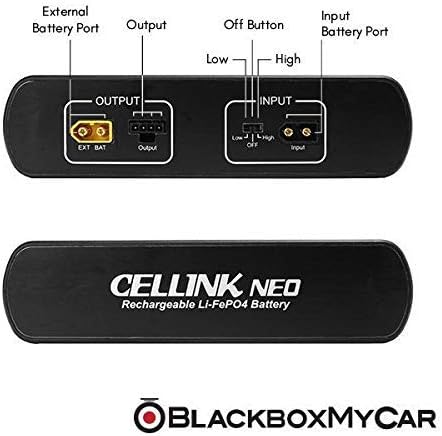
Image: Top-down view of the Cellink NEO showing External Battery Port, Output, Off Button (Low/High), and Input Battery Port.
- External Battery Port: For connecting an optional extended battery pack.
- Output: Connects to your dash cam.
- Off Button (Low/High): Power switch with different output settings.
- Input Battery Port: For connecting the power input cable (hardwire or cigarette adapter).

Image: Close-up of the input port and power switch on the Cellink NEO.
3.2 Key Features
- Integrated Smartphone App: Monitor battery status, charging/discharging, remaining life, and full charge time via Bluetooth.
- Long Battery Life: 76.8Wh capacity provides 24-48 hours of continuous power for your dash cam.
- Fast Charging: Achieves a full charge in approximately 45 minutes with a hardwire connection.
- Thinkware Compatibility: Specifically designed for seamless integration with Thinkware dashcams for parking mode with motion detection.
- Dual Input Options: Flexible installation with either hardwire or cigarette adapter charging.
Video: An overview of the Cellink NEO Extended Battery Pack, showcasing its features and how it connects to a dash cam. This video is provided by BlackboxMyCar, the seller.
4. Setup
4.1 Installation Options
The Cellink NEO offers two primary methods for power input: hardwiring directly to your vehicle's electrical system or using the provided cigarette adapter.
- Hardwire Connection: Provides faster charging (approx. 45 minutes for full charge) and a cleaner, more permanent installation. Add-a-Fuses are included for convenience.
- Cigarette Adapter: A simpler plug-and-play option for easy setup.
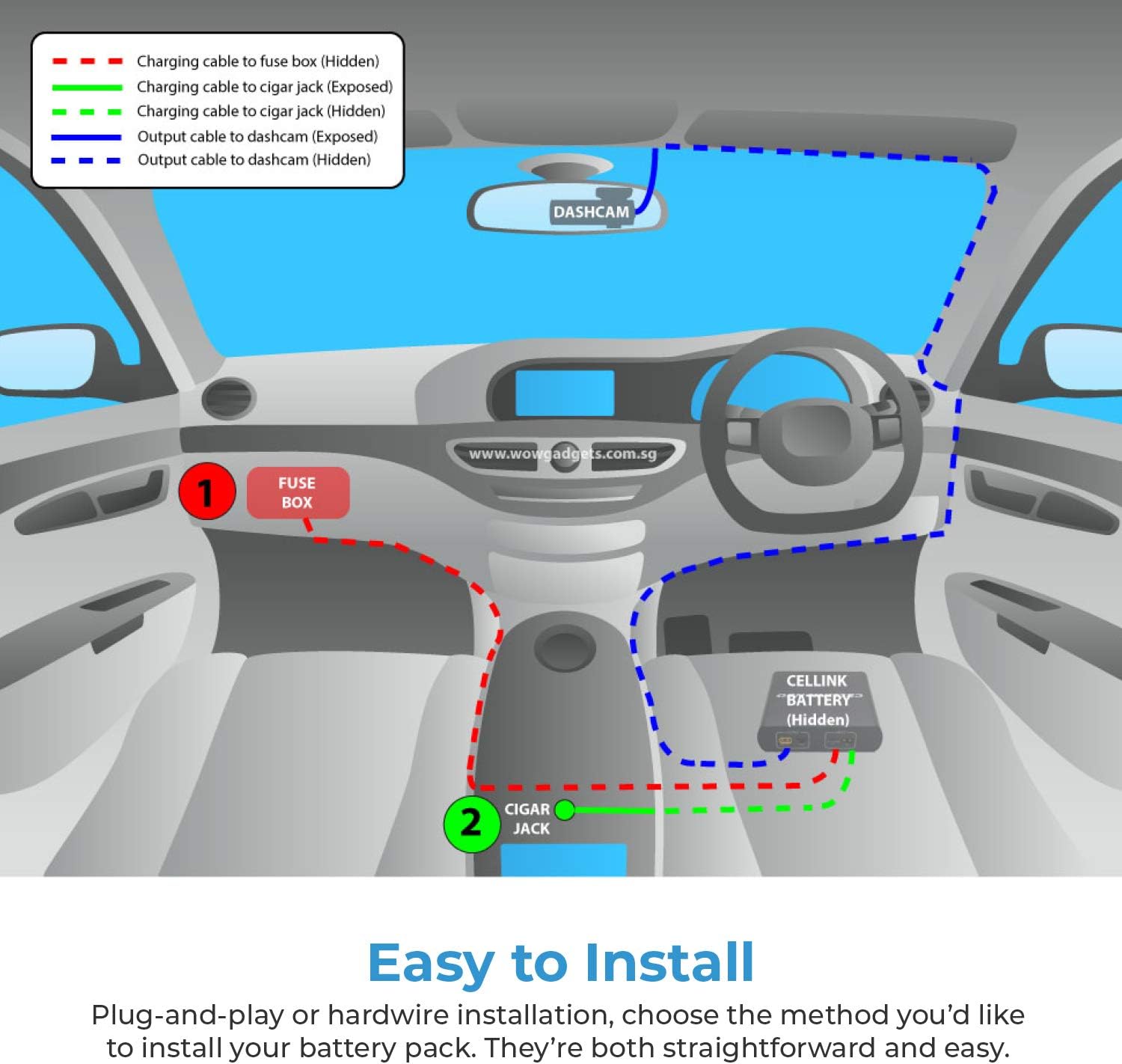
Image: Diagram illustrating two installation methods: hardwiring to the fuse box (red dashed line) or using the cigar jack (green solid line), with output to the dashcam (blue dashed line).
4.2 Connecting to Dash Cam
Connect the appropriate output cable from the Cellink NEO to your dash cam. Ensure a secure connection to provide uninterrupted power.
4.3 Clean Routing & Installation
The unit is designed with connectors and switches on the bottom, allowing for easier cable routing and a cleaner, more discreet installation within your vehicle.

Image: The bottom of the Cellink NEO showing input and output ports, designed for clean cable management.
5. Operating
5.1 Smartphone App Integration
The Cellink NEO features Bluetooth technology, allowing you to connect to a dedicated smartphone app (available on iOS App Stores and Google Play Store). This app provides real-time information about your battery pack.

Image: A smartphone displaying the Cellink NEO app interface, showing battery percentage, charging status, and estimated remaining time.
5.2 Monitoring Battery Status
Through the app, you can quickly view:
- Overall battery percentage.
- Whether the unit is charging or discharging.
- Remaining battery life for your dash cam.
- Time required to fully charge the battery.
5.3 Parking Mode
The Cellink NEO is designed to enable and enhance parking mode functionality for compatible dash cams, especially Thinkware models. This allows for motion detection recording while your vehicle is stationary, providing continuous surveillance.
6. Maintenance
6.1 Battery Care
The Cellink NEO utilizes LiFePO4 (Lithium Iron Phosphate) battery cells, known for their stability and longevity. To maximize battery lifespan, avoid extreme temperatures and ensure regular charging cycles.
6.2 Charging Practices
For optimal performance, ensure the battery is fully charged before extended parking periods. The fast-charging capability (45 minutes with hardwire) allows for quick top-ups during your commute.

Image: The Cellink NEO battery pack next to a smartphone displaying its charging status, highlighting its fast-charging capability.
7. Troubleshooting
If you encounter issues with your Cellink NEO, consider the following:
- No Power to Dash Cam: Check all cable connections between the Cellink NEO and your dash cam. Ensure the power input cable is securely connected and receiving power from the vehicle.
- Battery Not Charging: Verify the power input connection (cigarette adapter or hardwire) is functional. Check vehicle's power source.
- App Connectivity Issues: Ensure Bluetooth is enabled on your smartphone and the Cellink NEO is within range. Restart the app and try reconnecting.
- Reduced Battery Life: Confirm dash cam settings are optimized for parking mode power consumption. Battery performance can vary based on dash cam model and usage.
8. Specifications
| Manufacturer | Cellink |
| Brand | BlackboxMyCar |
| Model | NEO |
| Item Weight | 4.07 pounds |
| Product Dimensions | 14.1 x 2.4 x 7.5 inches |
| Batteries | 1 Lithium Metal batteries required |
| Voltage | 12 Volts |
| ASIN | B071D9D7J9 |
| Date First Available | February 27, 2017 |
9. Warranty & Support
The Cellink NEO Battery Pack comes with a 1-year warranty. For any issues, questions, or support needs, please refer to the contact information provided by BlackboxMyCar or visit their official support channels.

