
1. Introduction
The Mobiclinic Neptuno Transit Wheelchair is designed to provide convenient and safe transportation for individuals with limited mobility over short distances. Its lightweight aluminum frame and foldable design make it an ideal solution for transfers and travel. This manual provides essential information for the safe assembly, operation, maintenance, and troubleshooting of your Mobiclinic Neptuno Transit Wheelchair.

2. Safety Guidelines
Please read and understand all safety information before using the wheelchair. Failure to do so may result in injury or damage to the product.
- Weight Capacity: Do not exceed the maximum weight capacity of 100 kg (220 lbs).
- Supervision: This is a transit wheelchair and requires an attendant to push and maneuver it. It is not designed for self-propulsion.
- Brakes: Always engage the hand brakes when the wheelchair is stationary, especially when transferring the user in or out. Ensure brakes are functioning correctly before each use.
- Safety Belt: Always secure the adjustable safety belt when the user is seated in the wheelchair to prevent accidental falls.
- Uneven Surfaces: Exercise extreme caution on uneven terrain, inclines, or declines. Avoid sudden movements.
- Obstacles: Be aware of obstacles and doorways. The wheelchair has a total width of 49 cm, allowing it to pass through standard doorways of 62.5 cm or wider.
- Maintenance: Regularly inspect all components for wear, damage, or loose parts. Do not use the wheelchair if any part is damaged.
3. Setup and Unfolding
Follow these steps to safely unfold and prepare your Mobiclinic Neptuno Transit Wheelchair for use:
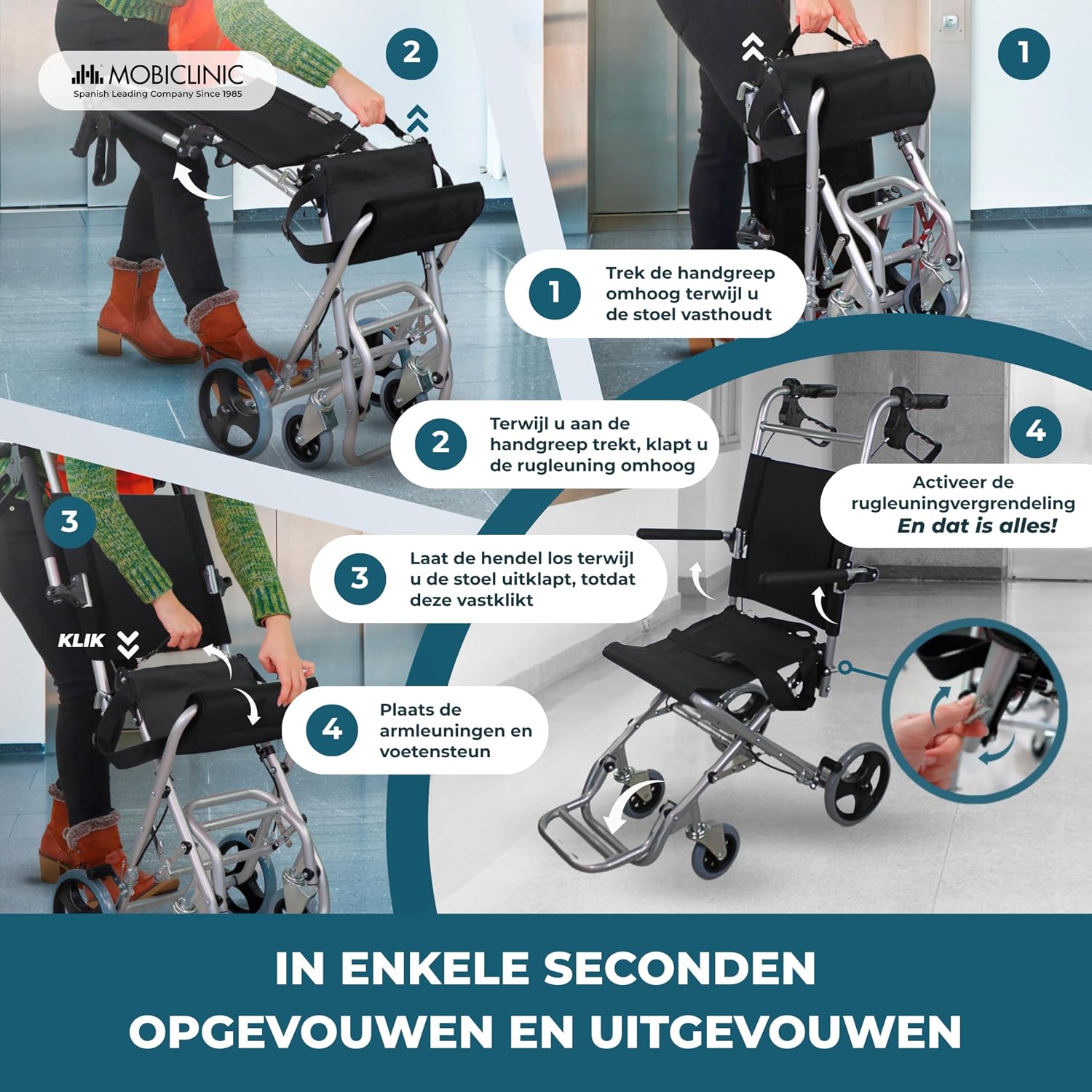
- Unfold the Frame: Hold the handle and pull upwards while holding the seat. The wheelchair frame will begin to open.
- Secure the Backrest: Once the frame is partially open, release the handle and push the backrest upwards until it locks into place.
- Engage Backrest Lock: Activate the backrest locking mechanism to ensure it is securely upright.
- Position Armrests and Footrests: Lower the foldable armrests and extend the footrests to their operational position. Ensure they are securely locked.

For a visual demonstration of the unfolding process and feature adjustments, please refer to the product video below.
Video 1: Mobiclinic Neptuno Wheelchair Setup and Features. This video demonstrates the unfolding process, adjustment of armrests and footrests, use of the safety belt, and operation of the hand brakes.
4. Adjustments
The Mobiclinic Neptuno wheelchair features adjustable components for user comfort and safety.
4.1. Foldable Armrests
The armrests can be folded up or down to facilitate transfers or to reduce the overall width for narrow passages. Simply lift or lower them as needed. Ensure they are securely in place before use.
4.2. Foldable Footrests
The footrests can be folded up for easier entry and exit from the wheelchair, or for compact storage. To extend, pull them down until they lock into position. To fold, lift them upwards. Always ensure the user's feet are properly placed on the footrests during transit.
5. Operating the Wheelchair
Proper operation ensures the safety and comfort of the user.
5.1. Using the Safety Belt
Once the user is seated, fasten the adjustable safety belt across their lap. Ensure it is snug but comfortable, providing security without restricting movement. Always use the safety belt during transit.

5.2. Hand Brakes
The wheelchair is equipped with hand brakes on the push handles for the attendant. To engage the brakes, squeeze the levers towards the handles. To lock the brakes for parking, push the levers down until they click into place. To release, pull the levers back up. Always engage the parking brakes when the wheelchair is stationary or when transferring the user.

5.3. Maneuvering
Push the wheelchair smoothly and steadily. Use the handles to steer and navigate. Be mindful of the user's comfort and surroundings. When encountering small obstacles or thresholds, tilt the wheelchair slightly backward by pressing down on the foot lever (tipping lever) at the rear to lift the front wheels, then gently push over the obstacle.
6. Folding and Storage
The Mobiclinic Neptuno wheelchair is designed for easy folding and compact storage, making it convenient for transport in car trunks or small spaces.
- Fold Footrests and Armrests: Ensure the footrests are folded upwards and the armrests are folded down or removed if detachable.
- Release Backrest Lock: Disengage the backrest locking mechanism.
- Fold the Seat: Push the seat upwards from the front edge, allowing the frame to collapse inwards.
- Secure the Fold: Ensure all parts are neatly folded and secured. The wheelchair should stand upright when folded.


Refer to Video 1 for a visual guide on folding the wheelchair.
7. Maintenance
Regular maintenance ensures the longevity and safe operation of your wheelchair.
- Cleaning: Clean the aluminum frame with a damp cloth and mild detergent. The nylon seat and backrest can be wiped clean with a damp cloth. Avoid abrasive cleaners.
- Inspection: Periodically check all bolts, screws, and fasteners to ensure they are tight. Inspect the wheels for wear and tear, and ensure they rotate freely. Check the brakes for proper function and adjustment.
- Storage: Store the wheelchair in a dry place, away from direct sunlight and extreme temperatures.
8. Troubleshooting
Below are common issues and their potential solutions:
| Problem | Possible Cause | Solution |
|---|---|---|
| Wheelchair difficult to push | Wheels are dirty or obstructed; bearings need lubrication. | Clean wheels and axles. Apply a silicone-based lubricant to moving parts if necessary. |
| Brakes not engaging properly | Brake cables are loose or worn; brake pads are worn. | Inspect brake cables and pads. Tighten cables if loose. If pads are worn, contact customer support for replacement. |
| Difficulty folding/unfolding | Mechanism is stiff or obstructed; locking pins are not fully disengaged. | Ensure all locking pins are released. Check for any obstructions in the folding mechanism. Apply a small amount of lubricant to hinges if stiff. |
| Squeaking noises | Loose joints or dry moving parts. | Identify the source of the noise. Tighten any loose fasteners. Apply lubricant to pivot points. |
If you encounter issues not listed here or if the suggested solutions do not resolve the problem, please contact Mobiclinic customer support.
9. Technical Specifications
Here are the detailed specifications for the Mobiclinic Neptuno Transit Wheelchair:
| Feature | Specification |
|---|---|
| Model Number | QA-00359/06 |
| Brand | Mobiclinic |
| Material | Aluminum frame, Nylon seat |
| Color | Black |
| Unfolded Dimensions (D x W x H) | 96 cm x 49.1 cm x 93 cm (37.8 in x 19.3 in x 36.6 in) |
| Folded Dimensions (W x D x H) | 49.1 cm x 31 cm x 68 cm (19.3 in x 12.2 in x 26.8 in) |
| Net Weight | 7.3 kg (16.1 lbs) |
| Maximum Supported Weight | 100 kg (220 lbs) |
| Seat Width | 49 cm (19.3 in) |
| Seat Height | 46 cm (18.1 in) |
| Seat Depth | 50.8 cm (20 in) |
| Front Wheel Size | 12 cm (4.7 in) |
| Rear Wheel Size | 20 cm (7.9 in) |

10. Warranty and Customer Support
Mobiclinic S.L. stands behind the quality of its products. This Mobiclinic Neptuno Transit Wheelchair comes with a standard manufacturer's warranty against defects in materials and workmanship under normal use. Please refer to the warranty card included with your purchase for specific terms and conditions.
For any questions, technical assistance, or warranty claims, please contact Mobiclinic customer support:
- Website: www.mobiclinic.com
- Email: support@mobiclinic.com
- Phone: Please check the Mobiclinic website for regional contact numbers.