
1. Introduction
The GOLDEN BLUE GM8903 Digital Anemometer is a precision instrument designed for measuring air velocity, air quantity, and air temperature. Its split-type sensor allows for operation in confined spaces, and the extendable handle provides versatility for various applications. This device is suitable for use in diverse industries including electric power, steel, and petrochemical sectors.
2. Key Features
- Split-type Digital Air Flow Anemometer design.
- Measures Air Velocity, Air Quantity, and Air Temperature.
- Displays Maximum, Average, and Current air velocity.
- Selectable temperature units: Celsius (°C) or Fahrenheit (°F).
- Data Hold function to freeze current readings.
- USB Interface for data connectivity.
- Backlight display for improved visibility in low-light conditions.
- Manual and Automatic power shut-off options.
- Wind chill indication.
- Low battery indication.
- Maximum and Minimum reading display.
3. Package Contents
Upon unpacking, please verify that all items listed below are present and in good condition:
- 1 x GM8903 Digital Anemometer Unit
- 1 x Hot Wire Probe (with extendable handle)
- 1 x USB Cable
- 1 x Instruction Manual
- 1 x Software CD (for USB interface)
- 1 x Carrying Case

Figure 3.1: All components included in the GOLDEN BLUE GM8903 Digital Anemometer package.
4. Product Overview
The GM8903 consists of a main display unit and a separate hot wire probe. Familiarize yourself with the components and controls before operation.
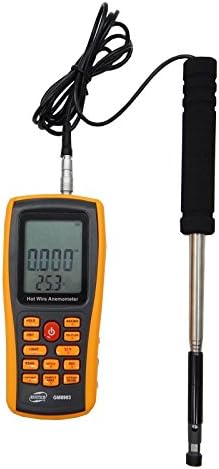
Figure 4.1: The GM8903 Digital Anemometer with the hot wire probe connected.

Figure 4.2: Detailed view of the control panel and display.

Figure 4.3: The GM8903 unit without its protective casing.

Figure 4.4: The GM8903 and accessories stored in the carrying case.
5. Setup
5.1 Battery Installation
- Locate the battery compartment on the back of the main unit.
- Open the compartment cover.
- Insert four (4) 1.5V AAA batteries, ensuring correct polarity.
- Close the battery compartment cover securely.
5.2 Connecting the Hot Wire Probe
- Identify the connector port on the top of the main unit.
- Align the connector of the hot wire probe cable with the port.
- Gently push and twist the connector until it is firmly seated.
5.3 USB Interface Connection
To connect the anemometer to a computer for data transfer or analysis:
- Install the provided software from the CD onto your computer.
- Connect one end of the USB cable to the anemometer's USB port.
- Connect the other end of the USB cable to an available USB port on your computer.
- Follow the software instructions for data logging and analysis.
6. Operating Instructions
6.1 Power On/Off
- Press the POWER button to turn the unit on.
- To turn off manually, press and hold the POWER button.
- The unit also features an automatic power shut-off function to conserve battery life.
6.2 Measurement Modes
The GM8903 can measure air velocity, air quantity, and air temperature simultaneously. The primary display will show air velocity, while temperature is typically shown on a secondary display line.
6.3 Unit Selection
- Press the UNIT button to cycle through air velocity units: m/s, Ft/min, Knots, Km/hr, Mph.
- Press the C/F button to switch between Celsius (°C) and Fahrenheit (°F) for temperature readings.
6.4 Data Hold
Press the HOLD button to freeze the current reading on the display. Press it again to release the hold function.
6.5 Maximum/Minimum/Average Readings
Use the MAXIMUM button to view the maximum recorded air velocity. Further presses may cycle through minimum and average readings, depending on the specific model's firmware.
6.6 Backlight
Press the LIGHT button to activate the display backlight for better visibility in dark environments. Press again to turn it off.
6.7 Wind Chill Indication
The device may display a wind chill indicator under certain conditions, providing an estimate of the perceived temperature due to wind.
6.8 Low Battery Indication
A low battery icon will appear on the display when the battery power is running low. Replace the batteries promptly to ensure accurate measurements.
7. Maintenance
7.1 Cleaning
- Wipe the main unit and probe with a soft, dry cloth.
- Do not use abrasive cleaners or solvents, as they may damage the plastic casing or sensor.
- Keep the hot wire sensor clean and free from dust or debris to ensure accurate readings.
7.2 Storage
- When not in use for extended periods, remove the batteries to prevent leakage.
- Store the anemometer and its accessories in the provided carrying case in a cool, dry place, away from direct sunlight and extreme temperatures.
8. Troubleshooting
- No Power: Check battery installation and ensure batteries are not depleted. Replace if necessary.
- Inaccurate Readings: Ensure the hot wire probe is clean and unobstructed. Verify that the probe is securely connected to the main unit.
- Display Not Working: Check for low battery indication. If the issue persists after battery replacement, contact customer support.
- USB Connection Issues: Ensure the software is correctly installed and the USB cable is properly connected. Refer to the software manual for specific troubleshooting steps.
9. Specifications
| Parameter | Specification |
|---|---|
| Model | GM8903 |
| Measuring Items | Air velocity, Air temperature, Air quantity |
| Air Velocity Measuring Range | 0 ~ 30 m/s |
| Air Temperature Measuring Range | 0 ~ 45 °C (32 ~ 113 °F) |
| Air Quantity Measuring Range | 0 ~ 999900 m³/min |
| Resolution (Air Velocity) | 0.001 m/s |
| Resolution (Air Temperature) | 0.1 °C |
| Units of Velocity | m/s, Ft/min, Knots, Km/hr, Mph |
| Air Temperature Measuring Accuracy | ±2 °C |
| Air Velocity Measuring Accuracy | ±3% ±0.1 dgts |
| Unit Dimensions | 76.8 x 38 x 170.4 mm |
| Power Supply | 4 x 1.5V AAA Batteries |
| Material | Alloy Steel (probe components) |
| Item Weight | 0.6 Kilograms (approx. 1.32 pounds) |
| UPC | 760970428326 |
10. Warranty and Support
For warranty information or technical support, please refer to the contact details provided on the product packaging or the manufacturer's official website. Keep your purchase receipt as proof of purchase.