
Introduction
The Everest SM-770 Plus USB Gaming Mouse is designed for an enhanced gaming and computing experience. It features a powerful 3200 DPI optical sensor, providing precise and responsive tracking. The ergonomic design with a soft-touch surface ensures comfort during extended use. This manual will guide you through the installation, operation, and maintenance of your new gaming mouse.

Figure 1: Top view of the Everest SM-770 Plus USB Gaming Mouse, showcasing its ergonomic design and green lightning pattern.
Package Contents
Verify that all items are present in the package:
- Everest SM-770 Plus USB Gaming Mouse
- User Manual (this document)
- Warranty Certificate

Figure 2: Retail packaging of the Everest SM-770 Plus USB Gaming Mouse.
Setup
The Everest SM-770 Plus USB Gaming Mouse is a plug-and-play device, requiring no additional driver installation for basic functionality on most operating systems.
- Unpack the Mouse: Carefully remove the mouse from its packaging.
- Connect to Computer: Locate an available USB port on your computer. Insert the USB connector of the mouse firmly into the USB port.
- System Recognition: Your operating system should automatically detect and install the necessary drivers. This process may take a few moments.
- Ready for Use: Once the installation is complete, the mouse is ready for immediate use.
Operating Instructions
The Everest SM-770 Plus features multiple buttons for enhanced control and efficiency.
Button Functions
- Left Click Button: Primary action button.
- Right Click Button: Secondary action button, typically for context menus.
- Scroll Wheel: Used for scrolling through documents and web pages. Can also function as a middle click button.
- DPI Function Button: Adjusts the mouse sensitivity (DPI).
- Forward Button: Navigates forward in web browsers or file explorers.
- Backward Button: Navigates backward in web browsers or file explorers.
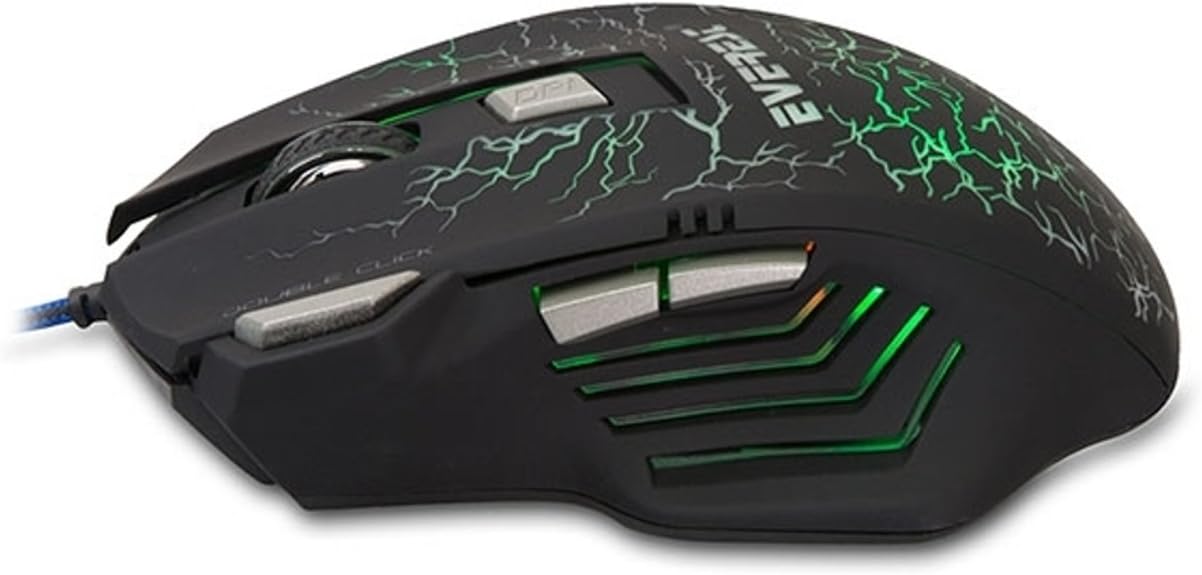
Figure 3: Side view of the mouse, showing the forward and backward buttons.
DPI Adjustment
The DPI (Dots Per Inch) button allows you to change the sensitivity of the mouse cursor. This mouse supports four adjustable DPI levels:
- 1000 DPI
- 1200 DPI
- 1600 DPI
- 3200 DPI
Press the DPI button, located behind the scroll wheel, to cycle through these sensitivity settings. Each press will switch to the next DPI level, allowing you to find the optimal speed for your tasks or games.
Maintenance
Proper maintenance ensures the longevity and optimal performance of your gaming mouse.
- Cleaning: Use a soft, dry cloth to wipe the surface of the mouse. For stubborn dirt, slightly dampen the cloth with water. Avoid using harsh chemicals or abrasive materials.
- Sensor Care: Keep the optical sensor on the underside of the mouse clean and free from dust or debris. Use a cotton swab or compressed air if necessary.
- Cable Management: Avoid sharp bends or excessive pulling on the USB cable to prevent damage.
- Storage: When not in use, store the mouse in a clean, dry environment away from extreme temperatures.
Troubleshooting
If you encounter issues with your Everest SM-770 Plus USB Gaming Mouse, refer to the following common problems and solutions:
| Problem | Solution |
|---|---|
| Mouse is not responding. |
|
| Cursor movement is erratic or jumpy. |
|
| DPI button is not changing sensitivity. |
|
Specifications
| Feature | Detail |
|---|---|
| Brand | Everest |
| Model Number | SM-770 |
| Connectivity Technology | USB (Wired) |
| Movement Detection Technology | Optical |
| DPI Levels | 1000 / 1200 / 1600 / 3200 DPI |
| Color | Black |
| Product Dimensions | 16.3 x 22.2 x 5.1 cm |
| Product Weight | 260 grams |
| Power Source | AC 100-240V, 50/60Hz (via USB) |
| Voltage | 5 Volt |
| Operating System Compatibility | Windows, Mac, Linux (Basic functionality) |
| Country of Origin | China |
Warranty and Support
The Everest SM-770 Plus USB Gaming Mouse comes with a warranty. Please refer to the separate warranty certificate included in your product package for detailed information regarding warranty terms, conditions, and duration.
For technical support or further assistance, please contact your retailer or the official Everest support channels. Contact information can typically be found on the product packaging or the manufacturer's website.
