1. Product Overview
The JVC 32-inch LED HD TV, Model SI32H, offers an optimal viewing experience with its LED technology and HD resolution (1366 x 768). Designed for excellent picture quality and immersive sound, this television is equipped with multiple connectivity options including HDMI ports for versatile use.
Key features include:
- HD Resolution: 1366 x 768 pixels
- Two HDMI Inputs
- One Digital Audio Output (coaxial)
- One Audio Input (RCA)
- USB Port for media playback
- Wi-Fi Connectivity
2. Setup Guide
2.1 Unpacking the TV
Carefully remove the TV and all accessories from the packaging. Ensure all components are present:
- JVC 32-inch LED HD TV
- Remote Control (with 2 AA batteries included)
- Table Stand (2 pieces)
- Screws for stand assembly
- Power Cord
2.2 Attaching the Table Stand
Place the TV face down on a soft, clean surface to prevent screen damage. Align the stand pieces with the corresponding slots on the bottom of the TV and secure them with the provided screws.

Figure 2.2.1: Front view of the JVC 32-inch TV with the table stand installed.

Figure 2.2.2: Side view illustrating the TV's profile with the table stand.
2.3 Connecting Cables
Connect the power cord to the TV's power input and then to a wall outlet. Connect your external devices (e.g., cable box, Blu-ray player, gaming console) to the appropriate input ports on the back of the TV.

Figure 2.3.1: Rear view of the JVC TV, highlighting the location of various input and output ports.

Figure 2.3.2: Detailed close-up of the TV's rear panel, showing HDMI, USB, Coaxial, and RCA ports.
2.4 Initial Power On and Setup
After connecting all cables, press the power button on the TV or the remote control. The TV will guide you through the initial setup process, including language selection, channel scanning, and network connection (if applicable for smart features).
3. Operating Instructions
3.1 Remote Control Overview
Familiarize yourself with the remote control for easy navigation and control of your JVC TV.

Figure 3.1.1: The JVC TV remote control, showing button layout for power, volume, channel, input, and menu navigation.
3.2 Basic Functions
- Power On/Off: Press the Power button.
- Volume Control: Use the VOL +/- buttons.
- Channel Selection: Use the CH +/- buttons or number pad.
- Input Source: Press the SOURCE button to cycle through HDMI, AV, USB, and other inputs.
- Menu Navigation: Use the MENU button and arrow keys to access and navigate the TV settings.
3.3 Picture and Sound Settings
Access the TV's menu to adjust picture modes (e.g., Standard, Dynamic, Movie), brightness, contrast, color, and sharpness. For sound, select audio modes (e.g., Standard, Music, Movie) and adjust bass, treble, and balance.
3.4 Connectivity
The TV supports Wi-Fi connectivity for accessing smart features and online content. Navigate to the network settings in the menu to connect to your home Wi-Fi network.
4. Maintenance
4.1 Cleaning the TV
To clean the screen, gently wipe it with a soft, lint-free cloth. For stubborn marks, slightly dampen the cloth with water or a screen-cleaning solution. Avoid using harsh chemicals or abrasive materials. For the TV body, use a dry, soft cloth.
4.2 Remote Control Care
Keep the remote control dry and clean. If the remote is not used for an extended period, remove the batteries to prevent leakage.
5. Troubleshooting
| Problem | Possible Cause | Solution |
|---|---|---|
| No Power | Power cord disconnected; outlet issue. | Ensure power cord is securely plugged in. Test the outlet with another device. |
| No Picture, but Sound is Present | Incorrect input source selected; faulty cable. | Press the SOURCE button to select the correct input. Check cable connections. |
| No Sound, but Picture is Present | Volume muted or too low; external audio system issue. | Press the MUTE button or increase volume. Check audio connections to external devices. |
| Remote Control Not Working | Dead batteries; obstruction; incorrect pairing. | Replace batteries. Remove any obstructions between remote and TV. |
6. Specifications
| Model | SI32H |
| Screen Size | 32 inches (82 cm diagonal) |
| Display Technology | LED |
| Resolution | HD (1366 x 768 pixels) |
| Refresh Rate | 60 Hz |
| Aspect Ratio | 16:9 |
| HDMI Ports | 2 |
| USB Ports | 1 |
| Audio Input | RCA |
| Digital Audio Output | Coaxial |
| Connectivity | Wi-Fi |
| Mounting Type | Table Stand (included) |
| Dimensions (W x D x H) | 71 x 10 x 41 cm (27.95 x 3.94 x 16.14 inches) |
| Weight | 5.1 kg (11.24 lbs) |
| Batteries Required | 2 AA (included) |
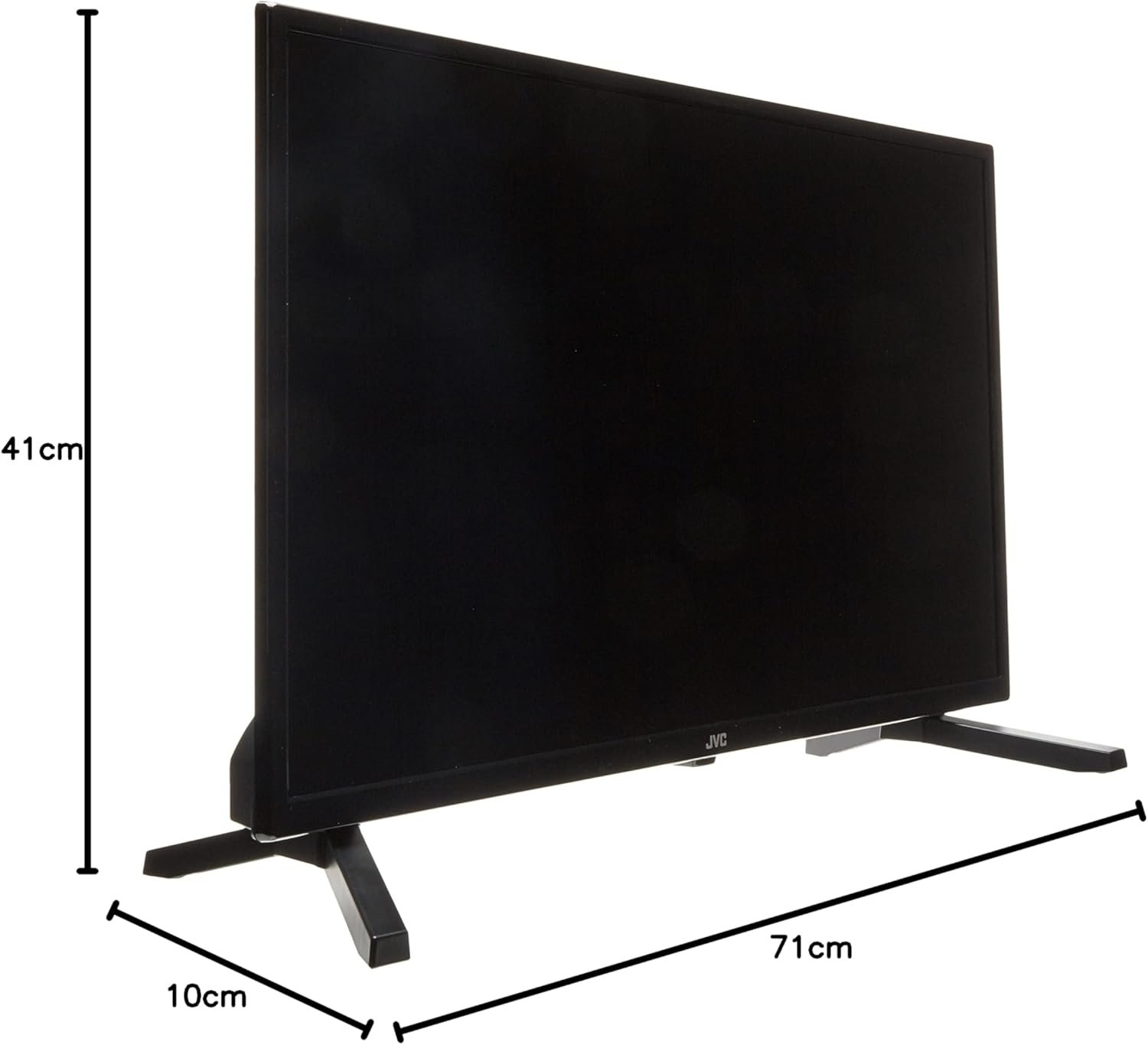
Figure 6.1: Dimensions of the JVC 32-inch TV (Width: 71cm, Depth: 10cm, Height: 41cm).
7. Warranty and Support
For warranty information and technical support, please refer to the warranty card included with your product or visit the official JVC website. Keep your purchase receipt as proof of purchase for any warranty claims.
For further assistance, you may contact JVC customer service through their official channels.


