
1. Product Overview
This manual provides essential instructions for the safe and effective use of the Norton Vitrified Mounted Point, Model 61463624544. This abrasive tool is engineered for precision grinding and finishing applications. It features a 3/4 inch diameter, 1/8 inch thickness, and a W200 shape, composed of fine-grade aluminum oxide with a 90 grit. The spindle diameter is 1/8 inch, and it is designed to operate at a maximum speed of 50930 RPM.
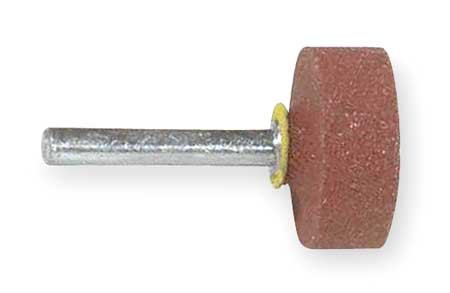
An image showing the Norton Vitrified Mounted Point. It consists of a cylindrical abrasive head, reddish-brown in color, attached to a metallic spindle. A small yellow ring is visible at the base of the abrasive head where it meets the spindle.
2. Safety Information
Always prioritize safety when operating abrasive tools. Failure to follow these guidelines may result in injury or damage to the tool or workpiece.
- Eye Protection: Always wear ANSI-approved safety glasses or a face shield to protect against flying debris.
- Hearing Protection: Use earplugs or earmuffs, especially during prolonged operation, to prevent hearing damage.
- Hand Protection: Wear appropriate gloves to protect hands from abrasions and vibrations.
- Respiratory Protection: If grinding generates significant dust, wear a dust mask or respirator.
- Tool Inspection: Before each use, inspect the mounted point for cracks, chips, or excessive wear. Do not use damaged tools.
- RPM Compatibility: Ensure the operating speed of your power tool does not exceed the maximum RPM specified for this mounted point (50930 RPM).
- Secure Workpiece: Always secure the workpiece firmly to prevent movement during grinding.
- Proper Ventilation: Work in a well-ventilated area to disperse dust and fumes.
3. Setup
Proper installation is crucial for safe and effective operation.
- Select Compatible Tool: Ensure your power tool (e.g., die grinder) has a collet or chuck compatible with a 1/8 inch spindle diameter.
- Clean Spindle and Collet: Before insertion, ensure both the mounted point's spindle and the tool's collet are clean and free of debris.
- Insert Spindle: Insert the mounted point's spindle into the collet of your power tool. Ensure at least 3/4 of the spindle length is securely gripped by the collet.
- Tighten Securely: Tighten the collet nut firmly using the appropriate wrenches. Do not overtighten, but ensure there is no wobble or play in the mounted point.
- Test Run: Before applying to a workpiece, briefly run the tool at a low speed in a safe direction to check for proper balance and secure mounting.
4. Operating Instructions
Follow these steps for optimal performance and safety during operation.
- Start Tool: Turn on your power tool, allowing it to reach its operating speed before making contact with the workpiece.
- Apply Light Pressure: Begin grinding with light, consistent pressure. Excessive force can lead to premature wear, overheating, and potential breakage of the mounted point.
- Maintain Consistent Contact: Move the mounted point smoothly and consistently across the workpiece surface to ensure even material removal and a uniform finish.
- Avoid Overheating: Periodically lift the mounted point from the workpiece to allow it to cool, especially when working on heat-sensitive materials. Overheating can degrade the abrasive bond.
- Direction of Rotation: Be aware of the direction of rotation and how it affects material removal and debris trajectory.
- Finish Pass: For a finer finish, reduce pressure and use a lighter touch on the final passes.
- Turn Off Tool: When finished, turn off the power tool and wait for the mounted point to come to a complete stop before setting the tool down or changing accessories.
5. Maintenance
Proper maintenance extends the life of your mounted point and ensures consistent performance.
- Cleaning: After each use, clean any accumulated debris or swarf from the mounted point using a brush or compressed air.
- Inspection: Regularly inspect the abrasive head for signs of wear, such as glazing (a smooth, shiny surface), loading (material embedded in the abrasive), or cracks.
- Dressing: If the mounted point becomes glazed or loaded, it may require dressing to expose fresh abrasive grains. Use a suitable dressing stick or tool for this purpose.
- Storage: Store mounted points in a dry, cool place, away from moisture and extreme temperatures. Protect them from impact to prevent damage.
- Disposal: Dispose of worn or damaged mounted points responsibly according to local regulations.
6. Troubleshooting
Refer to the table below for common issues and their potential solutions.
| Problem | Possible Cause | Solution |
|---|---|---|
| Poor surface finish | Mounted point is glazed or loaded; excessive pressure; incorrect grit for application. | Dress the mounted point; reduce pressure; use a finer grit if necessary. |
| Excessive wear of mounted point | Too much pressure; incorrect RPM (too high or too low); grinding too dry. | Reduce pressure; verify RPM is within recommended range; consider coolant if applicable. |
| Vibration or chatter | Mounted point not securely tightened; bent spindle; unbalanced point; worn collet. | Re-tighten collet; inspect spindle for damage; replace mounted point; inspect/replace collet. |
| Overheating of workpiece | Excessive pressure; prolonged contact; insufficient cooling. | Reduce pressure; use intermittent contact; allow workpiece to cool; consider coolant. |
7. Specifications
Detailed technical specifications for the Norton Vitrified Mounted Point, Model 61463624544.
| Attribute | Value |
|---|---|
| Item | Vitrified Mounted Point |
| Model Number | 61463624544 |
| Manufacturer | NORTON |
| Diameter | 3/4 inch |
| Thickness | 1/8 inch |
| Shape | W200 |
| Grade | Fine |
| Abrasive Material | Aluminum Oxide |
| Grit | 90 |
| Spindle Diameter | 1/8 inch |
| Maximum RPM | 50930 |
| Series | I2 |
| ASIN | B0716K5DWT |
| Country of Origin | Mexico (subject to change) |
8. Warranty and Support
For specific warranty information or technical support regarding your Norton Mounted Point, please contact Norton directly through their official website or customer service channels. Keep your purchase receipt and product model number (61463624544) readily available when seeking support.
Manufacturer: NORTON
Website: Visit the Norton Store on Amazon


