
BUNN FPG-2 DBC (36400.0000)
Bunn FPG-2 DBC French Press Grinder User Manual
Model: FPG-2 DBC (36400.0000)
1. Introduction
This manual provides comprehensive instructions for the safe and efficient operation, maintenance, and troubleshooting of your Bunn FPG-2 DBC French Press Grinder. This commercial-grade grinder is designed for precise portion control and features dual 3 lb. hoppers, multi-batch settings, a digital touchpad, and an LCD readout, making it ideal for various coffee grinding needs, including French Press.
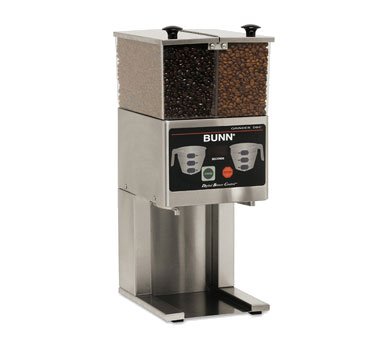
This image shows the Bunn FPG-2 DBC French Press Grinder. It features a stainless steel base with a control panel, topped by two clear hoppers for coffee beans. One hopper contains dark roasted beans, and the other contains lighter roasted beans, indicating its dual hopper capability.
2. Safety Instructions
Please read all safety instructions carefully before operating the grinder to prevent injury or damage to the unit.
- Electrical Safety: Ensure the grinder is connected to a properly grounded electrical outlet with the correct voltage (120V/60/1, 4amps, NEMA 5-15P). Do not operate with a damaged cord or plug.
- Moving Parts: Keep hands, hair, and clothing away from moving parts during operation. Never insert fingers or utensils into the grinding chamber or hoppers while the machine is running.
- Hot Surfaces: The motor and grinding components may become hot during prolonged use. Allow the unit to cool before cleaning or performing maintenance.
- Cleaning: Disconnect power before cleaning. Do not immerse the grinder in water or other liquids. Use a damp cloth for exterior cleaning.
- Supervision: This appliance is not intended for use by persons with reduced physical, sensory, or mental capabilities, or lack of experience and knowledge, unless they have been given supervision or instruction concerning use of the appliance by a person responsible for their safety.
- Intended Use: Use this grinder only for grinding whole roasted coffee beans. Do not attempt to grind other substances.
3. Setup
- Unpacking: Carefully remove the grinder from its packaging. Retain packaging for future transport or storage.
- Placement: Place the grinder on a stable, level, and dry surface. Ensure adequate ventilation around the unit.
- Hopper Installation: Ensure the dual hoppers are securely seated on top of the grinder.
- Power Connection: Plug the power cord into a grounded 120V/60Hz electrical outlet.
- Initial Cleaning: Before first use, wipe down the exterior with a damp cloth. Run a small amount of sacrificial coffee beans through the grinder to season the burrs and remove any manufacturing residue. Discard these initial grounds.
4. Operating Instructions
- Fill Hoppers: Lift the hopper lids and fill each hopper with whole roasted coffee beans. The grinder features dual 3 lb. hoppers.
- Select Hopper: Use the digital touchpad to select which hopper (left or right) you wish to grind from.
- Adjust Grind Setting: The FPG-2 DBC is designed for French Press grind. If adjustable, use the grind adjustment knob (if present, typically located near the grinding chamber) to fine-tune the coarseness. Refer to the LCD readout for current settings.
- Set Batch Size: Utilize the multi-batch settings via the digital touchpad to select the desired portion size. The LCD readout will display the selected batch.
- Position Container: Place your coffee container or French Press funnel under the grinding chute. The grinder is designed to accept a gourmet funnel.
- Start Grinding: Press the grind button on the digital touchpad. The grinder will automatically dispense the selected portion of coffee grounds.
- Repeat: Repeat steps as needed for additional batches.
Note: For optimal performance and consistent grind, ensure hoppers are not overfilled and burrs are clean.
5. Maintenance
Regular cleaning and maintenance will ensure the longevity and optimal performance of your grinder.
- Daily Cleaning:
- Unplug the grinder.
- Brush away any loose coffee grounds from the grinding chute and surrounding areas using a soft brush.
- Wipe the exterior surfaces with a damp cloth. Do not use abrasive cleaners.
- Weekly Cleaning (or as needed):
- Unplug the grinder.
- Empty the hoppers of any remaining coffee beans.
- Remove the hoppers and clean them with warm, soapy water. Rinse thoroughly and dry completely before reattaching.
- Access the grinding burrs (refer to specific model instructions for burr removal if necessary) and clean them with a stiff brush or vacuum to remove built-up coffee oils and fine particles.
- Reassemble all parts securely.
- Burr Replacement: Over time, grinding burrs will wear down. Consult the manufacturer's guidelines or a qualified service technician for burr inspection and replacement.
6. Troubleshooting
| Problem | Possible Cause | Solution |
|---|---|---|
| Grinder does not turn on. | No power supply. | Check if the power cord is securely plugged into a live outlet. Check circuit breaker. |
| Grinder runs but no coffee dispenses. | Hoppers are empty or beans are jammed. | Refill hoppers. Carefully clear any bean jams from the grinding chamber (unplug first). |
| Inconsistent grind. | Worn burrs or burrs need cleaning. | Clean the grinding burrs. If problem persists, burrs may need replacement. |
| Grinder makes unusual noise. | Foreign object in grinding chamber or motor issue. | Immediately unplug the unit. Inspect the grinding chamber for foreign objects. If none found, contact customer support. |
7. Specifications
| Feature | Detail |
|---|---|
| Model | FPG-2 DBC (36400.0000) |
| Brand | BUNN |
| Description | French Press Grinder, portion control, dual 3 lb. hoppers, multi-batch settings, stainless decor, digital touchpad & LCD readout, accept gourmet funnel. |
| Electrical Requirements | 120V/60/1, 4amps, NEMA 5-15P |
| Color | Stainless |
| Item Weight | 0.01 ounces (Note: This weight seems incorrect for a commercial grinder, likely a data entry error in source. Actual weight would be significantly higher.) |
| Manufacturer | Bunn |
| First Available Date | April 20, 2017 |
8. Warranty and Support
For information regarding the product warranty, please refer to the warranty card included with your purchase or visit the official BUNN website. For technical support, parts, or service inquiries, please contact BUNN customer service directly.
BUNN Official Website: www.bunn.com
Ask a question about this manual
Ask about setup, troubleshooting, compatibility, parts, safety, or missing instructions. Manuals+ will review the question and use this page’s manual context to help answer it.