
1. Product Overview
The ECCPP HYQ12BDM keyless entry remote is a replacement unit designed to function identically to your vehicle's original remote. It provides convenient access and security features for compatible Toyota models. This unit includes all necessary electronics and a battery, and has been pretested to ensure quality and functionality.
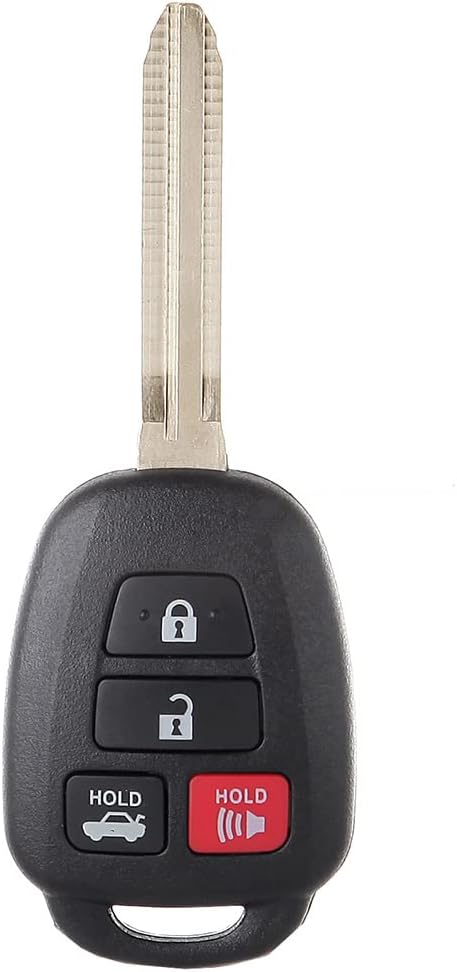
Image 1: Front view of the ECCPP HYQ12BDM keyless entry remote with its integrated key blade.
2. Compatibility and Fitment
This keyless entry remote is compatible with the following vehicle models:
- 2012-2014 Toyota Camry 2.5L
- 2012-2014 Toyota Camry 3.5L
- 2016 Toyota Corolla
The interchange part numbers for this replacement unit are: HYQ12BDM, 2AOKM-TY5, and 8907002880. Please verify these numbers against your original remote or vehicle specifications to ensure proper fitment.

Image 2: Visual representation of the keyless entry remote and compatible vehicles, emphasizing high-quality replacement.
3. Key Fob Button Functions
The key fob features four buttons, each with a specific function:
- Lock Button: Locks all vehicle doors.
- Unlock Button: Unlocks all vehicle doors.
- Trunk/Tail Box Release (HOLD): Press and hold to open the trunk or tail box.
- Panic/Search Button (HOLD): Press and hold to activate the vehicle's alarm system, assisting in locating your vehicle.

Image 3: Diagram illustrating the function of each button on the key fob.
4. Product Features and Specifications
The ECCPP keyless entry remote is designed with durability and functionality in mind. Key features include:
- Sturdiness & Anti-fall Design: Constructed with premium quality materials for long-lasting durability.
- Scratch Resistant & Original Functions: Maintains aesthetic appeal and performs all original functions.
- Smooth Surface & Durability: Ergonomic design for comfortable handling and extended lifespan.
- Circuit Board Inside: Contains the necessary electronic components for remote operation.
- Strong Signal Sensitivity: Ensures reliable communication with your vehicle.
Technical Specifications:
| Battery Model | CR2016 |
| Number of Buttons | 4 |
| Material | ABS & Metal (Plastic) |
| Frequency | 315MHz |
| OEM Part Numbers | HYQ12BDM, 2AOKM-TY5, 8907002880 |

Image 4: Exploded view highlighting the internal circuit board and key features like durability and signal strength.

Image 5: Visual summary of product parameters including battery type, number of buttons, material, and frequency.
5. Programming Instructions
This keyless entry remote may require programming to function with your vehicle. The process can vary depending on the vehicle model and year. Please note the following:
- Self-Programming (if applicable): Some vehicles allow for self-programming. Please visit programyourfob.com to check for specific programming instructions for your vehicle's make and model.
- Professional Programming Required: This vehicle is not on-board programmable and requires a qualified professional to program smart key remote fobs.
- Locate an automotive locksmith in your area.
- If your vehicle is still mobile, driving to the locksmith may be more cost-effective than a mobile service.
- The locksmith will use specialized computer equipment to program the smart key remote fob to your vehicle.
- Key Blade Cutting: The included key blade is uncut. You will need to find a local locksmith to cut the key blade to match your vehicle's ignition.
Important Note:
If you are unable to find programming information for your specific vehicle on the website, or if your vehicle has been modified with an electronic system, professional assistance from a locksmith or dealer is recommended.

Image 6: Visual guide outlining the general steps for key fob programming, emphasizing professional assistance for certain vehicles.
Video 1: An instructional video demonstrating the process of programming or using car keys, provided by Keylessbest.
6. Maintenance
To ensure the longevity and optimal performance of your ECCPP keyless entry remote, consider the following maintenance tips:
- Battery Replacement: The key fob uses a CR2016 battery. If the remote's range decreases or it stops responding, the battery may need replacement. Refer to a professional for assistance if you are unsure how to replace it.
- Protection: Avoid exposing the key fob to extreme temperatures, direct sunlight for prolonged periods, or moisture.
- Avoid Physical Damage: Protect the key fob from drops or impacts, which can damage internal components.
7. Troubleshooting
If you encounter issues with your keyless entry remote, consider these common troubleshooting steps:
- Remote Not Responding:
- Check the battery. A weak or dead battery is a common cause.
- Ensure you are within range of the vehicle.
- Verify the remote is correctly programmed to your vehicle. If unsure, re-attempt programming via programyourfob.com or consult a locksmith.
- Key Blade Not Working:
- Ensure the key blade has been properly cut by a qualified locksmith.
- Intermittent Functionality:
- This could indicate a weak battery or interference. Try replacing the battery.
- If the issue persists, professional diagnosis by a locksmith or dealer may be necessary.
Note:
Some user reviews indicate issues with programming or longevity. If self-programming attempts fail, or if the remote stops working after a short period, professional assistance is strongly advised.
8. Customer Support
For any questions or concerns regarding your ECCPP keyless entry remote, please contact our customer service representatives. We are dedicated to addressing your inquiries promptly.
You can also visit the ECCPP Store on Amazon for more product information and support.