
Introduction
This manual provides comprehensive instructions for the proper use, setup, and maintenance of your Neewer Camera Backpack Bag. Please read this manual thoroughly before using the product to ensure optimal performance and longevity.
Product Overview
The Neewer Camera Backpack Bag is designed to protect and transport your camera equipment. It features a durable, waterproof exterior and a shockproof interior with customizable partitions. The bag is suitable for DSLR and mirrorless cameras, multiple lenses, flashes, and various accessories.

Image: Front, side, and interior views of the Neewer Camera Backpack Bag, highlighting its compact design and internal organization. Dimensions are visible on the side view.
Key features include:
- Waterproof Exterior: Provides protection against moisture.
- Shockproof Interior: Padded compartments safeguard delicate equipment.
- Customizable Partitions: Adjustable dividers allow for flexible organization.
- External Tripod Holder: Securely carries a tripod or monopod.
- Multiple Pockets: Offers additional storage for small items.
Setup
1. Adjusting Interior Dividers
The backpack features a fully customizable interior with hook-and-loop fastened dividers. To adjust:
- Open the main compartment zipper.
- Carefully detach the desired divider from the interior lining.
- Reattach the divider in a new position to create compartments that fit your specific camera body, lenses, and accessories. Ensure the dividers are firmly pressed against the lining for secure attachment.

Image: Examples of interior configurations, demonstrating how the customizable dividers can be arranged to accommodate different camera setups, including DSLR bodies, multiple lenses, and flashes.
2. Adjusting Shoulder Straps
The shoulder straps are adjustable to ensure a comfortable fit. Loosen or tighten the straps using the buckles located at the bottom of each strap until the backpack rests comfortably on your back.
3. Attaching a Tripod/Monopod
A dedicated holder on the side of the backpack allows for secure attachment of a tripod or monopod:
- Place the base of the tripod/monopod into the mesh pocket on the side of the bag.
- Secure the upper part of the tripod/monopod using the adjustable strap located above the mesh pocket. Fasten the buckle and tighten the strap to prevent movement during transport.
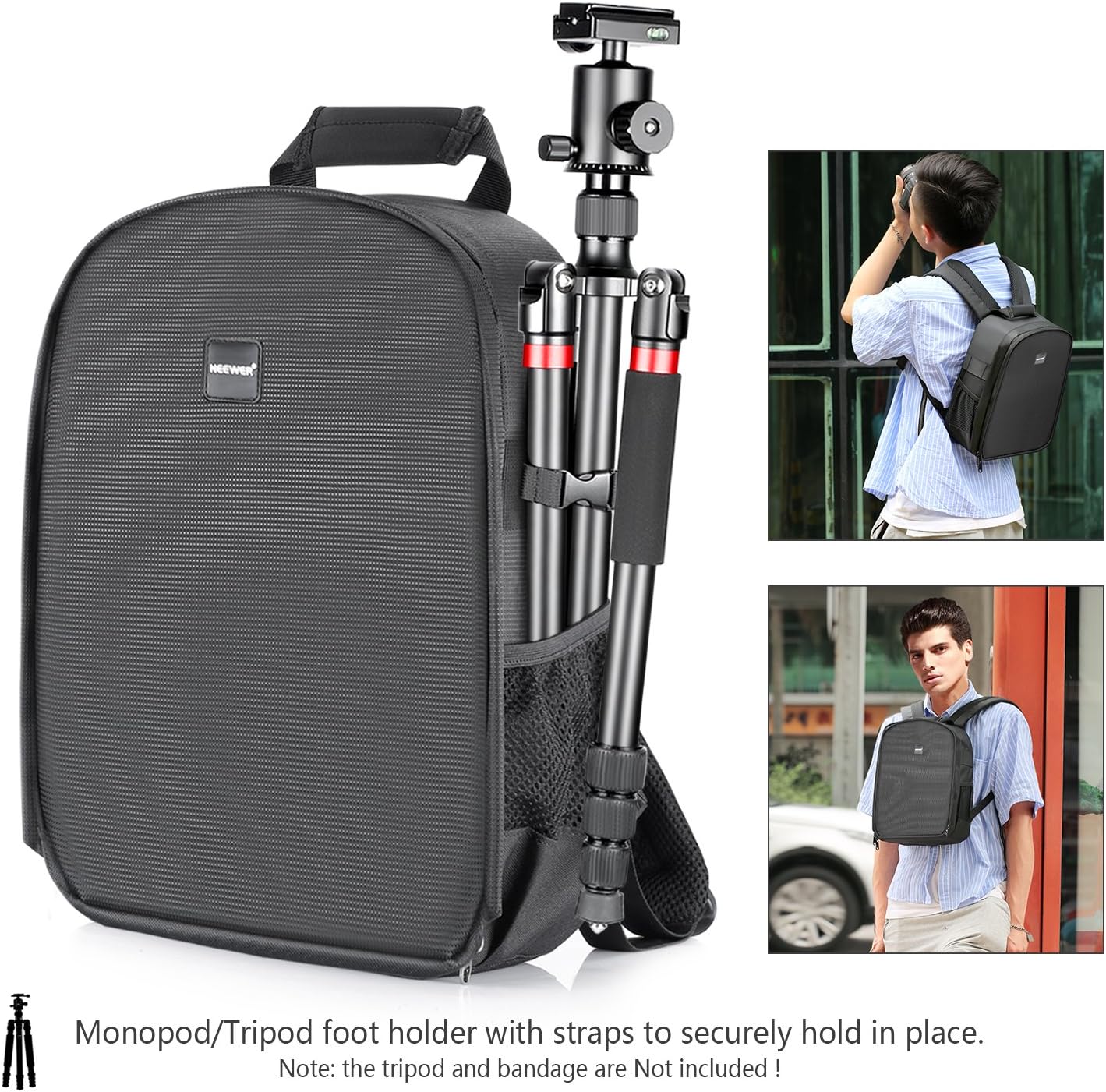
Image: The Neewer Camera Backpack demonstrating the side tripod/monopod holder with a tripod securely fastened by the mesh pocket and adjustable strap.
Operating Instructions
1. Loading Equipment
After configuring the interior dividers, carefully place your camera body, lenses, and other accessories into their designated compartments. Ensure that all items fit snugly to prevent shifting and potential damage during transport.
2. Securing the Bag
Close all zippers completely. If present, fasten any external buckles or straps to further secure the contents and maintain the bag's compact form.
3. Carrying the Backpack
Use the adjustable shoulder straps for comfortable carrying. For short distances, the top carry handle can be used. Always ensure the bag is properly balanced when carrying heavy equipment.
Maintenance
Cleaning
To clean the exterior of the backpack, wipe with a damp cloth and mild soap. Do not use harsh chemicals or abrasive cleaners. Allow the bag to air dry completely before storing or using. For the interior, use a soft brush or vacuum cleaner to remove dust and debris.
Water Resistance
The bag features a waterproof exterior. While designed to protect against light rain and splashes, it is not intended for submersion. In heavy rain, consider using an additional rain cover for maximum protection.
Troubleshooting
Zipper Stiffness
If zippers become stiff, apply a small amount of zipper lubricant or wax to the teeth. Avoid forcing the zipper, as this can cause damage.
Loose Dividers
Ensure that all hook-and-loop dividers are firmly pressed against the interior lining. If dividers consistently detach, reposition them to ensure maximum contact with the hook-and-loop material.
Discomfort While Carrying
Adjust the shoulder straps to distribute weight evenly. Ensure the bag is not overloaded beyond its intended capacity. For prolonged carrying, consider taking breaks.
Specifications
| Feature | Detail |
|---|---|
| Brand | NEEWER |
| Model Number | 10087322 |
| UPC | 191073015845 |
| Closure Type | Buckle |
| Capacity | 20 liters |
| Strap Type | Adjustable |
| Pocket Description | Utility Pocket |
| Handle Type | Carry Handle |
| Number of Compartments | 7 |
| Water Resistance Level | Waterproof |
| Color | Orange (Interior) |
| Item Dimensions (L x W x H) | 11.8" x 5.5" x 14.6" (30cm x 14cm x 37cm) |
| Size | Medium |
| Material Type | Nylon |
| Shell Type | Soft |
Warranty Information
Please refer to the manufacturer's official website or the product packaging for detailed warranty information regarding your Neewer Camera Backpack Bag.
Support
For further assistance, technical support, or inquiries about your Neewer Camera Backpack Bag, please visit the official NEEWER website or contact their customer support department directly.