
1. Introduction
This manual provides detailed instructions for the safe and efficient use of your CORE 1000 Lumen Rechargeable LED Lantern. Please read this manual thoroughly before operating the device and retain it for future reference. This lantern is designed for various outdoor and emergency lighting needs, offering powerful illumination and a convenient power bank function.
2. Product Features
- Brightness: Up to 1000 lumens of light output.
- Rechargeable Battery: Equipped with two lithium-ion batteries, providing extended runtimes.
- Power Bank Function: USB output port allows charging of small electronic devices.
- Adjustable Light Levels: Dimmable light settings for various needs.
- Integrated Cord Storage: USB charging cord stores conveniently in the lantern base.
- Durable Design: Engineered to withstand minor impacts and light moisture exposure.
3. Safety Information
- Do not look directly into the LED light when operating at high brightness to avoid eye strain.
- Keep the lantern away from extreme temperatures, open flames, and water immersion. This product is not water resistant.
- Do not attempt to disassemble or modify the lantern. This may void the warranty and pose a safety risk.
- Ensure the charging port cover is securely closed when not in use to protect against dust and moisture.
- Store in a cool, dry place when not in use for extended periods.
4. Setup
Upon unpacking, inspect the lantern for any visible damage. Ensure all components, including the integrated USB charging cable, are present.

5. Charging the Lantern
The lantern is powered by two internal lithium-ion batteries. Before first use, fully charge the lantern.
- Locate the USB charging cord stored in the bottom compartment of the lantern. Gently open the cover to access the cord.
- Plug the micro-USB end of the cable into the charging port on the back of the lantern.
- Connect the standard USB-A end of the cable to a compatible USB wall adapter (not included) or a powered USB port.
- The charging indicator light will illuminate to show charging status. A full charge typically takes several hours.
- Once fully charged, disconnect the cable and securely close the port cover and bottom compartment.


6. Operating the Lantern
The lantern features a single power button for controlling illumination.
- Power On/Off: Press the power button once to turn the lantern on to its maximum 1000 lumen brightness. Press the button again to turn it off.
- Dimming Function: While the lantern is on, press and hold the power button. The light will gradually dim. Release the button when the desired brightness level is reached. To increase brightness, press and hold the button again.

Watch this video for a demonstration of the CORE 1000 Lumen Rechargeable Lantern's features and operation:
Video 1: Overview of the CORE 1000 Lumen Rechargeable Lantern, demonstrating its features, charging capabilities, and light settings.
7. Using as a Power Bank
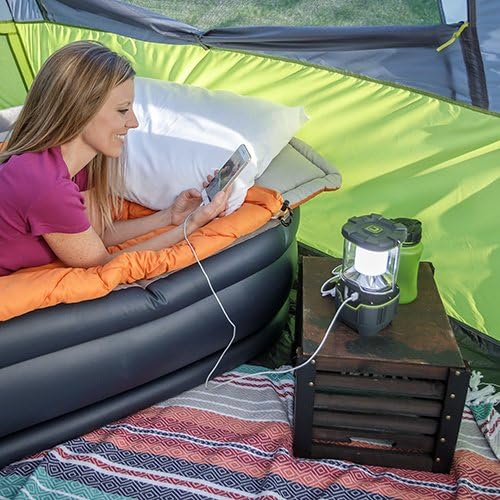
The CORE 1000 Lumen Lantern can also serve as a power bank to charge small electronic devices.
- Open the charging port cover on the back of the lantern.
- Connect your device's charging cable (not included) to the USB output port on the lantern.
- Connect the other end of the cable to your electronic device. The lantern will begin charging your device.
- Monitor your device's charging status. Disconnect when charging is complete.
- Ensure the port cover is securely closed after use.
8. Maintenance
- Cleaning: Wipe the lantern with a soft, damp cloth. Do not use abrasive cleaners or immerse in water.
- Storage: Store the lantern in a dry, cool place. For long-term storage, it is recommended to charge the battery every 3-6 months to maintain battery health.
- Battery Care: The internal lithium-ion batteries are not user-replaceable. Do not attempt to remove them.
9. Troubleshooting
| Problem | Possible Cause | Solution |
|---|---|---|
| Lantern does not turn on. | Battery is depleted. | Charge the lantern fully. |
| Lantern does not charge. | Charging cable not properly connected or power source is faulty. | Ensure cable is securely connected to both the lantern and the power source. Try a different USB adapter or port. |
| Device not charging from lantern. | Lantern battery low or device cable faulty. | Ensure the lantern is sufficiently charged. Try a different charging cable for your device. |
| Light output is weak. | Battery is low or dimming function is active. | Charge the lantern. Press and hold the power button to increase brightness. |
10. Specifications
| Feature | Detail |
|---|---|
| Model Number | 40033 |
| Brightness | 1000 Lumens (Maximum) |
| Light Source Type | CREE LED |
| Power Source | Battery Powered (2 Lithium Ion batteries included) |
| Battery Life (High) | Approximately 6.5 Hours |
| Item Weight | 1.6 Pounds |
| Item Dimensions (LxWxH) | 10 x 7 x 6 inches |
| Water Resistance Level | Not Water Resistant |
| Mounting Type | Tabletop Mount (Integrated hanging handle also available) |
| UPC | 817427016671 |

11. Warranty and Support
This CORE 1000 Lumen Rechargeable LED Lantern comes with a 1-Year Limited Warranty. For warranty claims or technical support, please contact CORE customer service. Keep your proof of purchase for warranty validation.
For further assistance, visit the official CORE website or contact their customer support channels.


