
Introduction
This manual provides detailed instructions for the safe and proper installation, operation, and maintenance of your Maclean MC-741 Full Motion TV Wall Mount. The Maclean MC-741 is a versatile and adjustable mount designed for televisions between 13 and 42 inches, supporting weights up to 25 kg and VESA patterns up to 200x200 mm. Please read all instructions carefully before beginning installation. If you have any questions, please contact customer support.
Safety Information
- Weight Capacity: Do not exceed the maximum weight capacity of 25 kg (55 lbs). Exceeding this limit may result in serious injury or property damage.
- Screen Size: This mount is designed for TVs between 13 and 42 inches. While larger TVs may fit VESA patterns, ensure they do not exceed the weight limit.
- VESA Compatibility: Ensure your TV's VESA mounting pattern (distance between mounting holes on the back of the TV) is compatible with the mount (75x75, 100x100, 200x100, 200x200 mm).
- Wall Type: This mount is intended for installation on solid concrete walls, brick walls, or wood stud walls. Do not install on drywall alone.
- Professional Installation: If you are unsure about the installation process or the suitability of your wall, consult a qualified professional installer.
- Tools: Use appropriate tools for installation. Always wear safety glasses.
- Children: Keep children away from the installation area.
Package Contents
Please verify that all components are present and undamaged before installation. If any parts are missing or defective, contact customer support.

Image: All components of the Maclean MC-741 TV Wall Mount, including the articulated arm, VESA mounting plate, wall anchors, lag bolts, and various TV mounting screws and washers.
- Wall Plate Assembly with Articulating Arm
- TV VESA Plate
- Mounting Hardware Kit (screws, washers, wall anchors)
- Instruction Manual

Image: Detailed view of the included mounting hardware: various sizes of screws for TV attachment, washers, and wall anchors with corresponding lag bolts for wall installation.
Specifications
| Model Number | MC-741 |
| Compatible Screen Sizes | 13" - 42" |
| Maximum Weight Capacity | 25 kg (55 lbs) |
| VESA Compatibility | 75x75, 100x100, 200x100, 200x200 mm |
| Swivel Angle | Up to 180° (90° left/right) |
| Tilt Angle | ±3° (up/down) |
| Distance from Wall | 59 mm - 228 mm (2.3" - 9") |
| Material | Metal with powder coating |
| Color | Black |
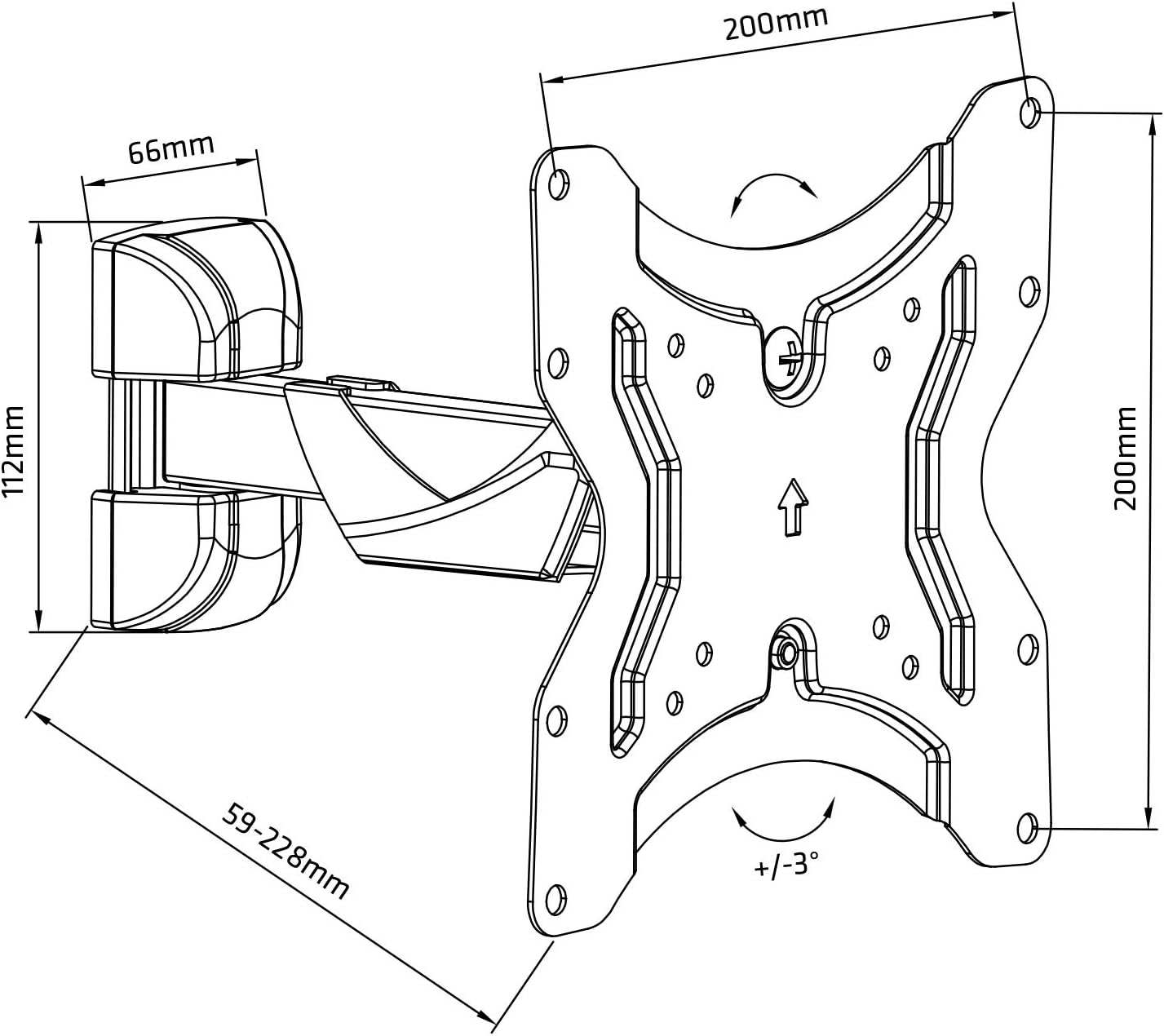
Image: Technical drawing illustrating the dimensions and adjustable ranges of the Maclean MC-741 mount, including VESA pattern, arm extension, and tilt/swivel capabilities.
Setup and Installation
Tools Required: Pencil, Stud Finder (for wood studs), Drill, Level, Phillips Head Screwdriver, Socket Wrench or Adjustable Wrench.
- Prepare the TV:
- Carefully place your TV face down on a soft, clean surface to prevent screen damage.
- Locate the VESA mounting holes on the back of your TV.
- Attach the TV VESA plate to the back of your TV using the appropriate screws and washers from the hardware kit. Ensure the screws are tightened securely but do not overtighten.
- Determine Mounting Location:
- Decide on the desired height and position for your TV.
- For wood stud installation, use a stud finder to locate the center of a wood stud. Mark the drilling points for the wall plate.
- For concrete or brick wall installation, mark the drilling points directly on the wall.
- Install the Wall Plate:
- Hold the wall plate assembly against the wall at the marked location and use a level to ensure it is perfectly horizontal.
- Mark the exact positions for drilling.
- Drill pilot holes at the marked locations. The drill bit size will depend on your wall type and the provided anchors/lag bolts.
- For concrete/brick, insert the plastic wall anchors into the drilled holes.
- Secure the wall plate assembly to the wall using the lag bolts. Tighten firmly.

Image: Rear view of the Maclean MC-741 mount, highlighting the wall plate and the articulating arm mechanism, ready for wall attachment.
- Mount the TV:
- With assistance, carefully lift the TV (with the VESA plate attached) and align it with the articulating arm of the wall mount.
- Secure the TV VESA plate to the articulating arm using the provided screws and nuts. Ensure all connections are tight and secure.
- Final Check:
- Gently test the stability of the mounted TV.
- Ensure all screws and bolts are securely fastened.
Operating Instructions
The Maclean MC-741 mount offers flexible positioning for your TV.
- Swivel Adjustment: Gently push or pull the TV to the desired left or right angle. The mount allows for up to 180° swivel (90° to each side), depending on TV size and wall clearance.
- Tilt Adjustment: The TV can be tilted up or down by ±3°. Loosen the tilt adjustment knob/screws (if applicable, refer to specific diagram in physical manual), adjust to the desired angle, and then re-tighten to secure the position.
- Extension/Retraction: The articulating arm allows you to extend the TV away from the wall (up to 228 mm) or push it closer to the wall (minimum 59 mm). Gently pull or push the TV to achieve the desired distance.
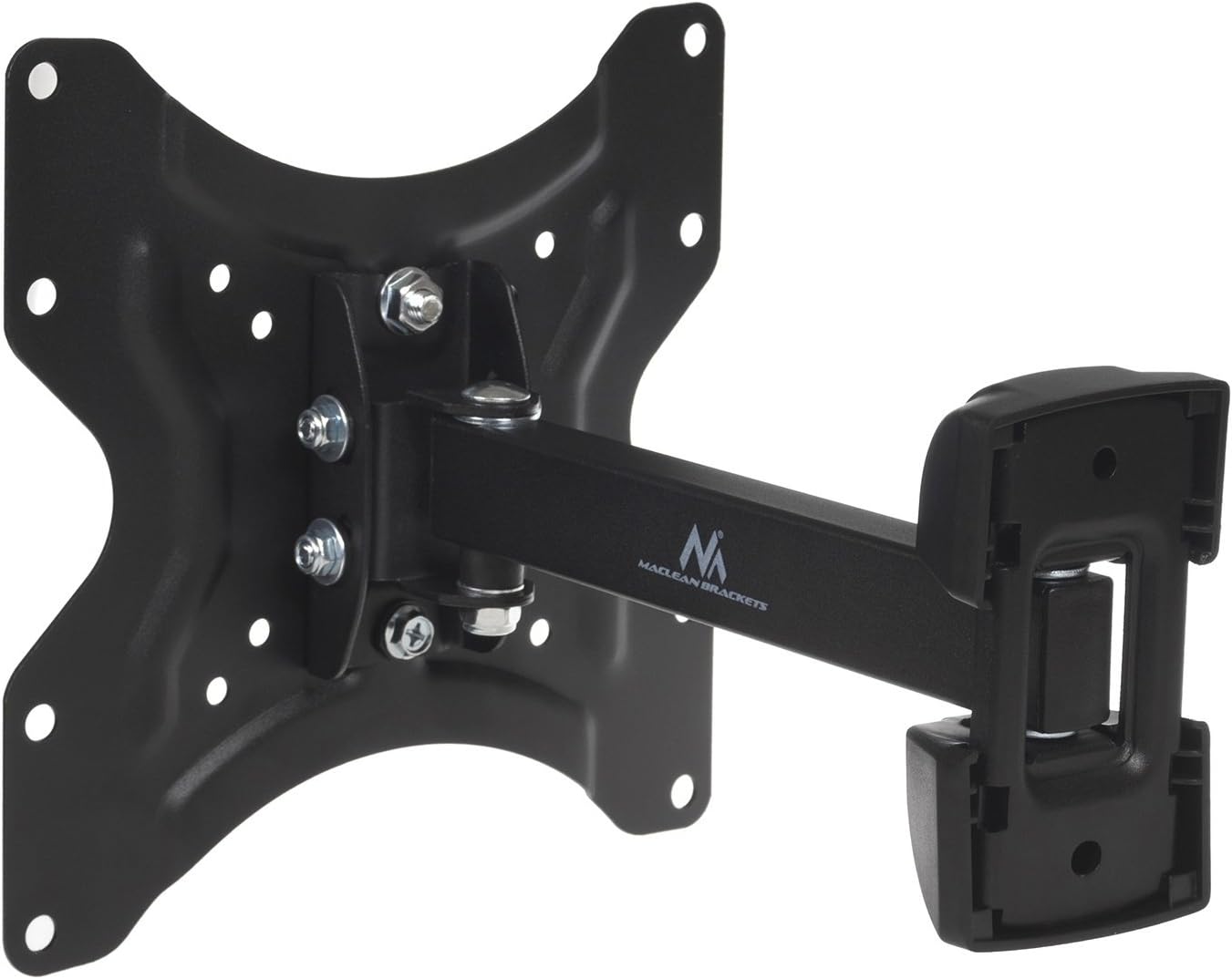
Image: The Maclean MC-741 mount shown in an extended and swiveled position, demonstrating its full motion capabilities.

Image: The Maclean MC-741 mount in its fully retracted position, close to the wall, showcasing its compact design.
Maintenance
- Regular Inspection: Periodically check all screws and bolts to ensure they remain tight. Over time, vibrations or frequent adjustments can cause fasteners to loosen.
- Cleaning: Clean the mount with a soft, dry cloth. Avoid abrasive cleaners or solvents that could damage the finish.
- Lubrication: The moving parts of the mount are designed for smooth operation and generally do not require lubrication. If movement becomes stiff, consult customer support.
Troubleshooting
| Problem | Possible Cause | Solution |
|---|---|---|
| TV is not level | Wall plate not installed level; TV not horizontally adjusted. | Ensure wall plate is level during installation. The mount allows for ±3° horizontal adjustment; use this feature to fine-tune the TV's level. |
| Mount feels unstable | Loose fasteners; incorrect wall type; TV exceeds weight limit. | Check and tighten all screws and bolts. Verify wall type suitability. Ensure TV weight is within the 25 kg limit. If issues persist, consult a professional. |
| Difficulty adjusting swivel/tilt | Friction points are too tight; mechanism needs adjustment. | Check for any adjustment screws that might be overtightened. Loosen slightly to allow movement, then re-tighten to hold position. Do not force movement. |
Warranty and Support
Maclean offers a lifetime guarantee on this product, ensuring high quality and reliability.

Image: Maclean branding and key features, including a lifetime guarantee, certified quality, and inclusion of all mounting materials.
For technical assistance, warranty claims, or missing parts, please contact Maclean customer support through your retailer or the official Maclean website. Please have your model number (MC-741) and purchase information ready.
Manufacturer: Centrumelektroniki
Country of Origin: China