Introduction
This user manual provides essential information for the safe and efficient operation, maintenance, and troubleshooting of your Cecotec Zurich Massage Recliner Chair. Please read this manual thoroughly before using the product and retain it for future reference.
The Cecotec Zurich Massage Recliner Chair is designed to provide a relaxing massage experience with its 8 vibration motors and lumbar heat function. It features multiple recline positions and is controlled via a remote with various massage programs and intensity levels.
Important Safety Instructions
To reduce the risk of electric shock, burns, fire, and injury, please observe the following precautions:
- Always unplug the chair from the electrical outlet immediately after use and before cleaning.
- Do not use while bathing or in a shower.
- Do not place or store the chair where it can fall or be pulled into a tub or sink.
- Do not immerse in water or other liquid.
- Never use pins or other metallic fasteners with this appliance.
- Close supervision is necessary when this appliance is used by, on, or near children, invalids, or disabled persons.
- Use this appliance only for its intended use as described in this manual. Do not use attachments not recommended by the manufacturer.
- Never operate this appliance if it has a damaged cord or plug, if it is not working properly, if it has been dropped or damaged, or dropped into water.
- Keep the cord away from heated surfaces.
- Never drop or insert any object into any opening.
- Do not operate where aerosol (spray) products are being used or where oxygen is being administered.
- To disconnect, turn all controls to the OFF position, then remove plug from outlet.
- This appliance is designed for household use only.
Product Components
The Cecotec Zurich Massage Recliner Chair consists of the following main components:
- Recliner Chair Base
- Backrest
- Seat Cushion
- Armrests
- Footrest/Legrest Mechanism
- Remote Control
- Power Adapter
- Side Storage Pocket

Figure 1: Front-side view of the Cecotec Zurich Massage Recliner Chair. This image shows the chair in its upright position, highlighting its black faux leather upholstery and general design.
Setup and Assembly
The Cecotec Zurich Massage Recliner Chair requires minimal assembly. Follow these steps to set up your chair:
- Unpack Components: Carefully remove all components from the packaging. Ensure all parts listed in the "Product Components" section are present.
- Attach Backrest: Align the metal brackets on the backrest with the corresponding slots on the chair base. Slide the backrest down firmly until it clicks into place.
- Connect Cables: Locate the power cable from the chair and connect it to the power adapter. Then, plug the power adapter into a standard electrical outlet.
- Remote Control Connection: The remote control is typically pre-connected. Ensure its cable is securely plugged into the chair's control unit.
- Positioning: Place the chair on a flat, stable surface, ensuring there is enough space behind and in front of the chair for full recline.
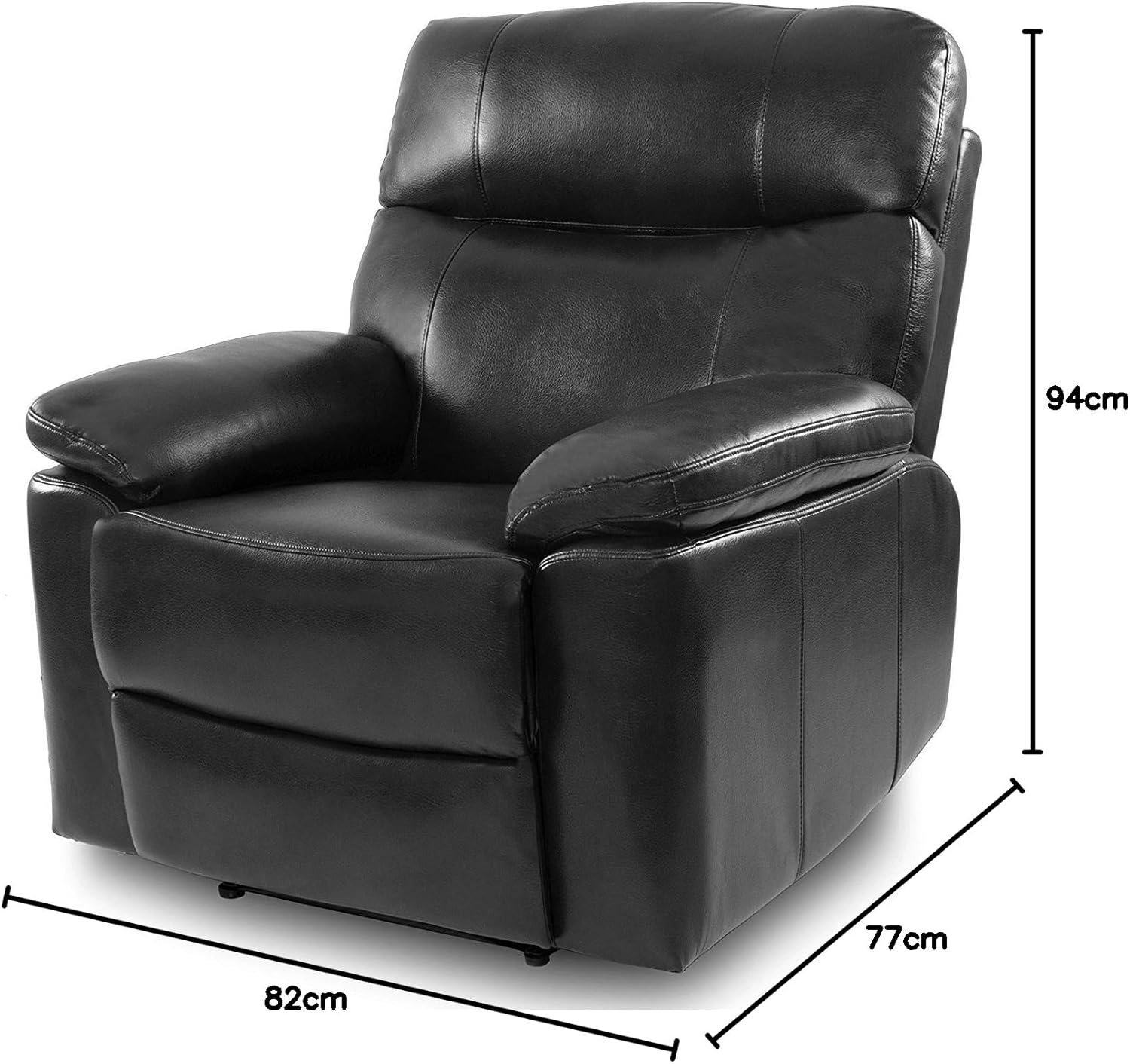
Figure 2: Dimensions of the Cecotec Zurich Massage Recliner Chair. This image illustrates the chair's width (82cm), depth (77cm), and height (94cm) in its upright position, crucial for planning placement.
Operating Instructions
Your Cecotec Zurich Massage Recliner Chair is operated using the wired remote control. Familiarize yourself with the remote's functions:
Reclining Function
- To Recline: Push back gently on the backrest while simultaneously pushing forward on the armrests. The footrest will elevate, and the backrest will recline.
- To Return Upright: Push down on the footrest with your legs and lean forward. The chair will return to its upright position.

Figure 3: The Cecotec Zurich Massage Recliner Chair in a reclined position with the footrest extended. This demonstrates the chair's full recline capability, providing a visual of its extended footprint.
Massage Functions
The remote control allows you to select from 10 massage programs and 10 intensity levels.
- Power Button: Press to turn the massage function ON/OFF.
- Program Selection: Use the 'Program' button to cycle through the 10 available massage programs. Each program offers a different vibration pattern.
- Intensity Adjustment: Use the '+' and '-' buttons to increase or decrease the massage intensity across 10 levels.
- Timer Function: Set the massage duration using the 'Timer' button. The timer can be set from 1 to 99 minutes. The chair will automatically shut off after the set time.
Lumbar Heat Function
Activate the lumbar heat function by pressing the 'Heat' button on the remote control. The heat will concentrate in the lower back area, providing soothing warmth. Press the button again to turn off the heat.
Care and Maintenance
Proper care and maintenance will extend the life of your Cecotec Zurich Massage Recliner Chair.
- Cleaning:
- Before cleaning, always unplug the chair from the power outlet.
- Wipe the faux leather upholstery with a soft, damp cloth. Do not use harsh chemicals, abrasive cleaners, or solvents, as these can damage the material.
- For spills, blot immediately with a clean, dry cloth.
- Dust the chair regularly with a dry cloth.
- Storage: If storing the chair for an extended period, ensure it is clean and dry. Store in a cool, dry place away from direct sunlight and extreme temperatures.
- Mechanism Check: Periodically check all screws and bolts to ensure they are tight. Do not overtighten.
- Avoid Overloading: Do not exceed the maximum weight capacity of the chair (refer to specifications).

Figure 4: Close-up detail of the black faux leather upholstery. This image highlights the texture and stitching of the chair's material, useful for understanding cleaning and care instructions.
Troubleshooting Guide
Before contacting customer support, please refer to the following common issues and their solutions:
| Problem | Possible Cause | Solution |
|---|---|---|
| Chair does not power on. | Not plugged in; power outlet issue; damaged power cord/adapter. | Ensure power cord is securely plugged into the chair and a working electrical outlet. Check the outlet with another device. Inspect the power cord for damage. |
| Massage function not working. | Massage function not activated; remote control issue; motor malfunction. | Press the 'Power' button on the remote. Ensure the remote control cable is securely connected. If the issue persists, contact customer support. |
| Heat function not working. | Heat function not activated; internal heating element issue. | Press the 'Heat' button on the remote. Allow a few minutes for the heat to become noticeable. If no heat is felt, contact customer support. |
| Chair does not recline smoothly. | Obstruction; mechanism needs lubrication; loose components. | Check for any objects obstructing the reclining mechanism. Ensure all assembly bolts are tight. If the issue persists, contact customer support. |
Product Specifications
| Feature | Detail |
|---|---|
| Model Number | V1701115 |
| Brand | Cecotec |
| Dimensions (Upright) | 77P x 82l x 94H cm (approx. 77 x 82 x 94 cm) |
| Weight | 38 kg (approx. 83.7 lbs) |
| Material | Faux Leather (PU), Metal Frame |
| Massage Motors | 8 vibration motors |
| Massage Programs | 10 |
| Intensity Levels | 10 |
| Heat Function | Lumbar heat |
| Timer | 1-99 minutes, automatic shutdown |
| Assembly Required | Minimal |
Warranty Information
Cecotec products are manufactured to the highest quality standards. For specific warranty terms and conditions applicable to your Cecotec Zurich Massage Recliner Chair, please refer to the warranty card included with your purchase or visit the official Cecotec website. Keep your proof of purchase for warranty claims.
Customer Support
If you encounter any issues not covered in the troubleshooting guide or require further assistance, please contact Cecotec customer support:
- Website: Visit the official Cecotec website for FAQs, support resources, and contact forms. www.cecotec.com
- Email/Phone: Refer to the contact information provided on the Cecotec website or in your product packaging for direct support.
When contacting support, please have your model number (V1701115) and purchase date ready.


