
1. Important Safety Instructions
Please read all instructions carefully before operating this appliance and retain for future reference. Failure to follow these instructions may result in electric shock, fire, or serious personal injury.
- Ensure the power supply voltage matches the rating label on the appliance.
- Do not immerse the appliance, cord, or plug in water or other liquids.
- Unplug from the outlet when not in use, before filling/emptying water, and before cleaning.
- Do not operate with a damaged cord or plug, or after the appliance malfunctions or has been damaged in any manner.
- Keep the appliance out of reach of children.
- Do not block air inlets or outlets.
- Use only clean water in the water tank.
- Place the appliance on a stable, level surface.
- Do not use outdoors or in wet environments.
2. Product Overview
The Mistral MAC1600R is an evaporative air cooler designed to provide a natural and efficient cooling experience for indoor spaces up to 25 square meters (269 sq ft). It utilizes a non-compressor system, cooling and humidifying the air by passing warm air through a water-soaked honeycomb cooling media.
2.1 Components
- Main Unit (Air Cooler)
- Remote Control
- Power Cord
- Water Tank (16 Liters capacity)
- Honeycomb Cooling Media
- Control Panel with LED Display
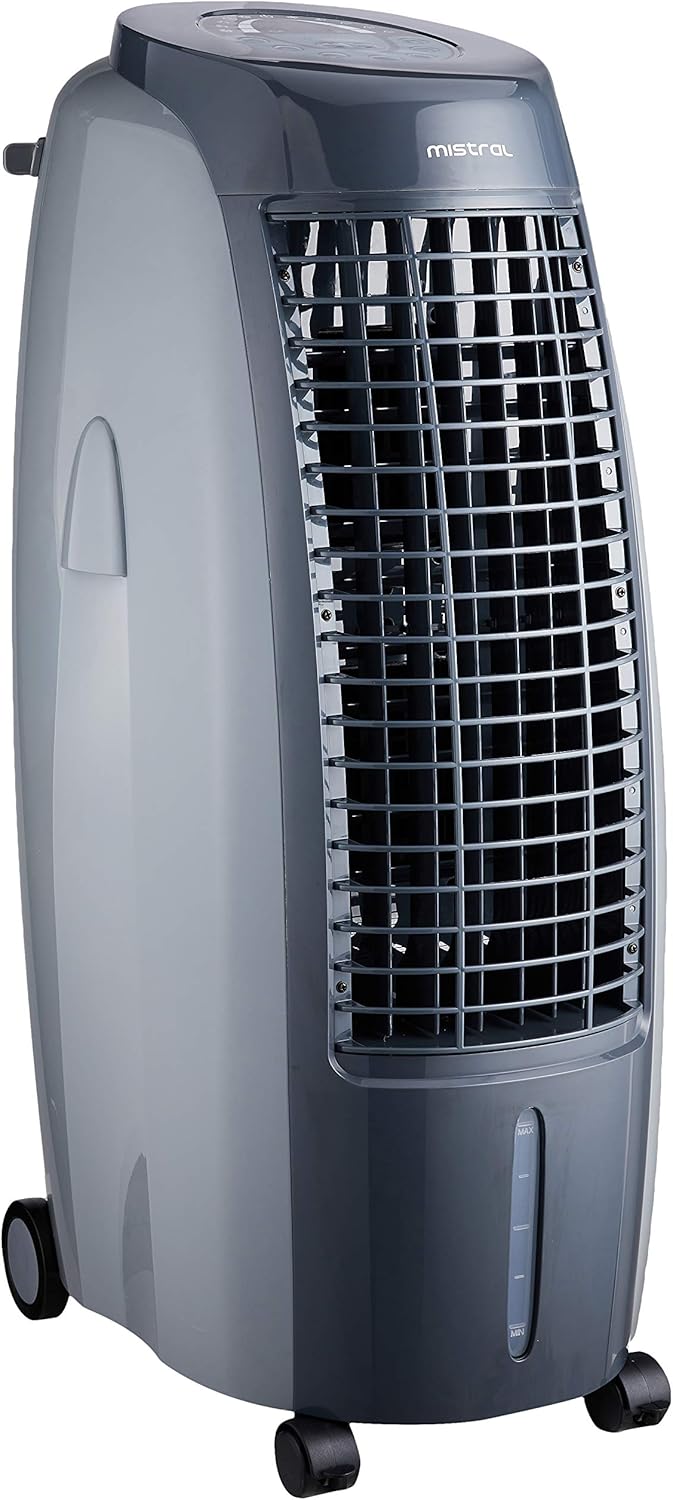
Figure 1: Front view of the Mistral MAC1600R Air Cooler, showing the air outlet grille and water level indicator.

Figure 2: Rear view of the Mistral MAC1600R Air Cooler, displaying the honeycomb cooling media filter and the removable water tank.
3. Setup Instructions
- Unpacking: Carefully remove the air cooler from its packaging. Retain all packaging materials for future storage or transport.
- Placement: Position the air cooler on a firm, level surface. Ensure there is adequate space around the unit for proper airflow (at least 20 cm from walls or furniture).
- Fill Water Tank:
- Pull out the water tank from the bottom rear of the unit.
- Fill the tank with clean, cool water. Do not exceed the "MAX" water level indicator. For enhanced cooling, ice packs or ice cubes can be added to the water tank.
- Carefully push the water tank back into its position until it clicks securely.
- Power Connection: Plug the power cord into a suitable electrical outlet.
4. Operating Instructions
The Mistral MAC1600R can be operated using either the control panel on top of the unit or the provided remote control.
4.1 Control Panel

Figure 3: Detailed view of the MAC1600R control panel with various function buttons and LED display.
- ON/OFF: Press to turn the unit on or off.
- Speed: Cycles through fan speeds: Low, Medium, High.
- Mode: Selects operating modes: Normal, Natural, Sleep.
- Cool: Activates the evaporative cooling function. The water pump will start.
- Ionizer: Activates the built-in ionizer for air purification.
- Timer: Sets the operating timer from 1 to 24 hours.
- Left & Right OSC (Oscillation): Activates horizontal oscillation of the air louvers.
- Up & Down OSC (Oscillation): Activates vertical oscillation of the air louvers.
4.2 Remote Control

Figure 4: The remote control for the Mistral MAC1600R, featuring buttons for power, speed, mode, timer, cool, and oscillation.
The remote control duplicates all functions available on the main control panel. Ensure the remote control is pointed towards the unit's receiver for proper operation. Requires batteries (not included, typically AAA).
4.3 Operating Modes
- Normal Mode: Constant fan speed as selected.
- Natural Mode: Simulates natural breeze by varying fan speeds.
- Sleep Mode: Gradually reduces fan speed and operates quietly for comfortable sleep.
5. Maintenance
Regular maintenance ensures optimal performance and extends the lifespan of your air cooler. Always unplug the unit before performing any maintenance.
5.1 Cleaning the Exterior
- Wipe the exterior surfaces with a soft, damp cloth.
- Do not use abrasive cleaners or solvents.
5.2 Cleaning the Water Tank
- Empty the water tank regularly, especially if the unit will not be used for an extended period.
- Remove the water tank and clean it with mild soap and water. Rinse thoroughly.
- Allow the tank to air dry completely before reinserting.
5.3 Cleaning the Honeycomb Cooling Media
- The honeycomb cooling media should be cleaned periodically, depending on usage and water quality.
- Remove the rear filter panel to access the honeycomb media.
- Rinse the honeycomb media under running water to remove dust and mineral deposits. Do not use harsh chemicals.
- Allow the media to dry completely before reassembling.
6. Troubleshooting
If you encounter issues with your Mistral MAC1600R, please refer to the following common problems and solutions:
| Problem | Possible Cause | Solution |
|---|---|---|
| Unit does not turn on. | No power supply; Power cord not plugged in; Power button not pressed. | Check power outlet; Ensure power cord is securely plugged in; Press the ON/OFF button. |
| No cool air. | Water tank empty; "Cool" function not activated; Honeycomb media is dry. | Fill water tank; Press the "Cool" button; Ensure water pump is operating and wetting the media. |
| Weak airflow. | Fan speed set too low; Air inlets/outlets blocked; Honeycomb media clogged. | Increase fan speed; Clear any obstructions; Clean the honeycomb cooling media. |
| Unusual odor. | Stagnant water in tank; Dirty honeycomb media. | Empty and clean the water tank; Clean the honeycomb cooling media. |
| Low water alarm activates. | Water level is below minimum. | Refill the water tank to the "MAX" level. |
If the problem persists after attempting these solutions, please contact customer support.
7. Specifications
| Feature | Detail |
|---|---|
| Model | MAC1600R |
| Brand | MISTRAL |
| Item Weight | 8.5 Kilograms |
| Form Factor | Personal |
| Included Components | Air Cooler, Remote Control |
| Batteries Required | Yes (for remote control) |
| Material | Plastic |
| Mounting Type | Freestanding |
| Special Features | Portable, Timer, Built-in Ionizer, Humidifying Function |
| Colour | Grey |
| Air Flow Capacity | 588 Cubic Feet Per Minute |
| Type of Controls | Remote, Panel |
| Reservoir Capacity | 16 Liters |
| Floor Area Coverage | Up to 20 Square Meters (269 sq ft) |
| Speed Settings | 6 (3 Speed + 3 Mode) |
| Timer | 24 Hours |

Figure 5: Dimensions of the Mistral MAC1600R Air Cooler, showing height, width, and depth measurements.
8. Warranty and Support
8.1 Warranty Information
This Mistral MAC1600R Air Cooler comes with a Two Year Local Warranty, effective from the date of purchase. Please retain your proof of purchase for warranty claims.
The warranty covers manufacturing defects and malfunctions under normal use. It does not cover damage caused by misuse, accident, unauthorized repairs, or normal wear and tear.
8.2 Customer Support
For technical assistance, warranty claims, or any other inquiries, please contact Mistral customer support. Refer to your purchase documentation or the official Mistral website for contact details.


