
VANGUARD ALTA PRO 2+ 263AP
Vanguard Alta Pro 2+ 263AP Tripod Instruction Manual
Model: ALTA PRO 2+ 263AP | Brand: VANGUARD
1. Introduction
The VANGUARD ALTA PRO 2+ 263AP is an advanced aluminum tripod system designed for photographers seeking versatility, stability, and ease of use. It features a unique Multi-Angle Center Column (MACC) system, allowing for diverse shooting angles, and a PH-32 pan head for precise control.
Key Product Highlights:
- 3-Way Fluid Panhead: Equipped with dual telescopic handles, a bubble level, and a quick-release Arca-type system for smooth and precise adjustments.
- Unique Perspective (MACC): The Multi-Angle Center Column allows for limitless shooting angles, including horizontal and inverted positions, ensuring stability with its firm hexagonal design.
- Position Versatility: Three-section legs offer four distinct angle settings (20°, 40°, 60°, 80°) for adaptable positioning on any terrain.
- Rock Solid Positioning: Features a unique “locked” to “unlock” twist-lock system for ultra-fast leg extension and contraction.
- Extra Stability: Includes a canopy suspension loop for adding counterbalance weight and an Alta Link 3/8" thread connection for attaching accessories like reflectors or articulated arms.

2. What's in the Box
Upon unboxing your Vanguard Alta Pro 2+ 263AP Tripod, please ensure all the following components are present:
- Vanguard Alta Pro 2+ 263AP Tripod
- Alta PH-32 Pan Head (pre-attached)
- Tripod Bag
3. Setup
3.1. Initial Deployment
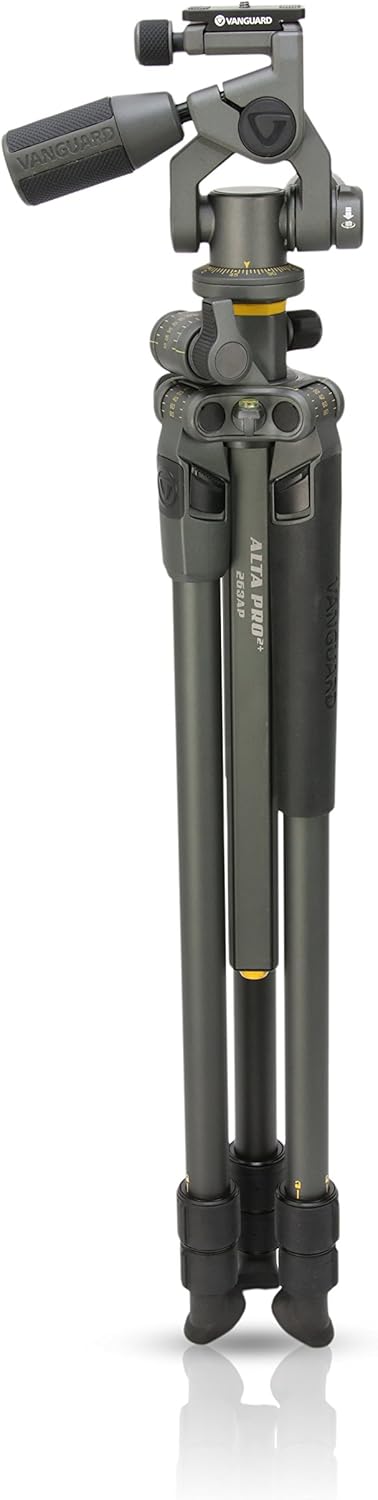
To set up your tripod, first release the leg locks and extend the legs to your desired height. The tripod features advanced twist-locks that require only a 35° turn to lock or unlock, allowing for rapid deployment.
3.2. Adjusting Leg Angles
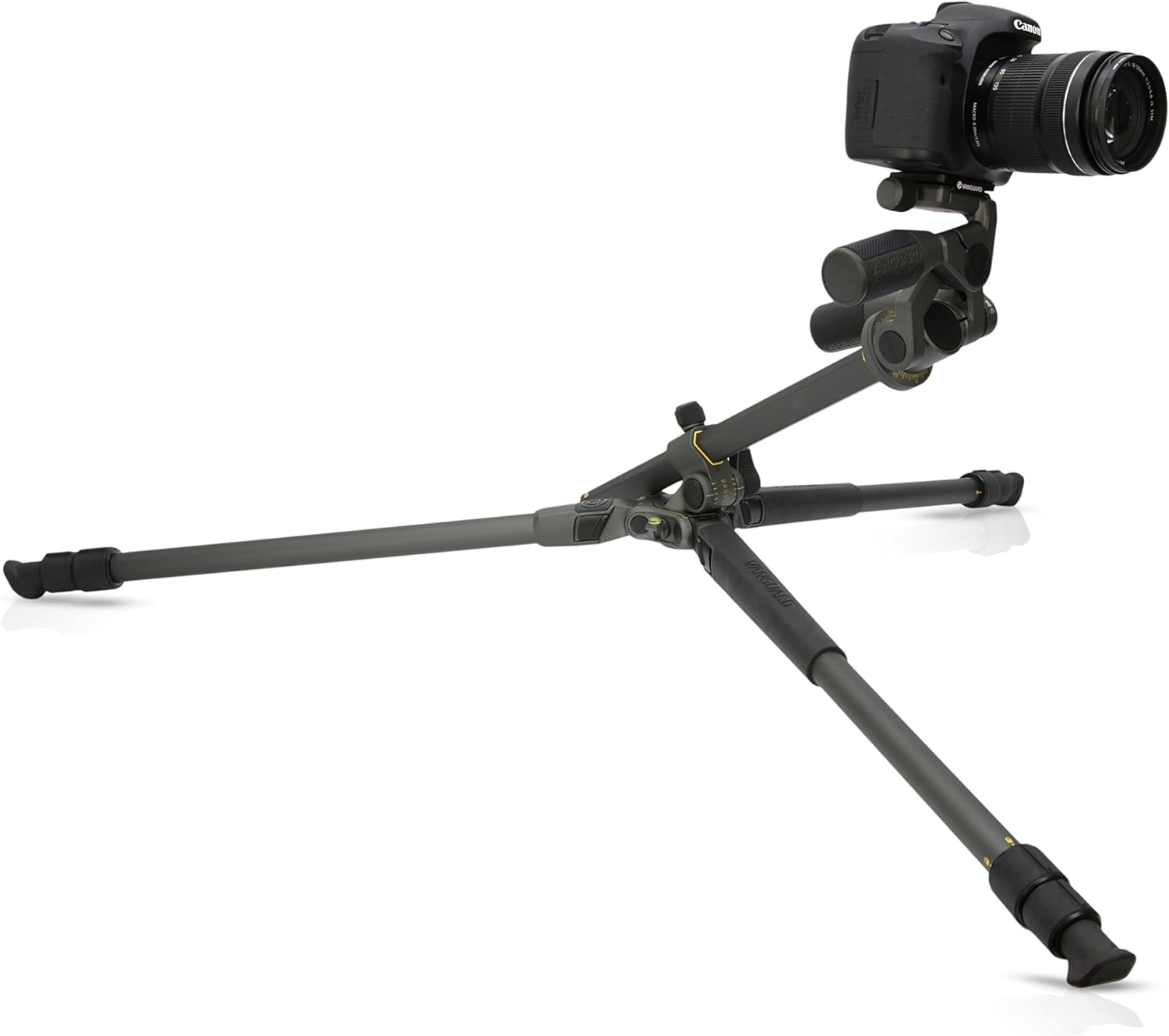
The tripod offers four distinct leg angle settings: 20°, 40°, 60°, and 80°. To adjust, press the leg angle selector button located at the top of each leg and move the leg to the desired angle. This allows for stable positioning on uneven surfaces or for low-angle shooting.

3.3. Multi-Angle Center Column (MACC) Deployment
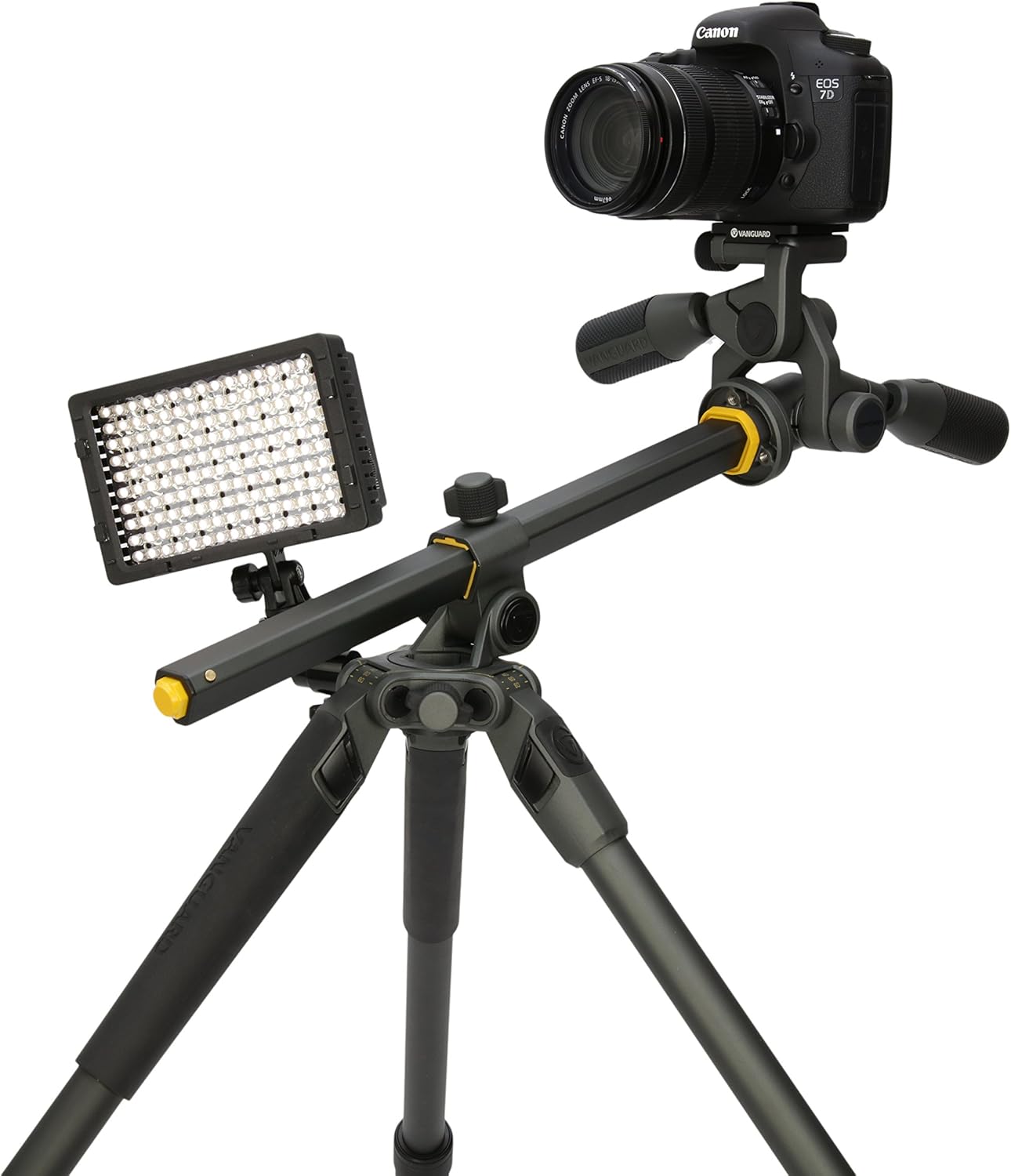
The MACC system allows the center column to pivot from 0° to 180° in various vertical and horizontal positions. To deploy, unlock the center column and pivot it to the desired angle. The unique hexagonal column ensures enhanced rigidity and stability in any position.
4. Operating the Tripod
4.1. Using the PH-32 Pan Head
The ALTA PH-32 pan head offers excellent two-handle ergonomics for precise control. One handle provides 360° panning and -30° to +90° back-to-front tilt, while the other controls a side-to-side tilt range of -60° to +90°. The handle lengths are adjustable for user comfort. It includes a quick panorama function button and a 360° scale for panoramic stitching, along with a universal Arca-type quick release system with a built-in safety pin.

4.2. Attaching Accessories
The tripod features a 3/8" thread bonus connection point (Alta Link) on the canopy, allowing you to attach various accessories such as reflectors, articulated arms, flexible arms, lights, or monitors directly to the tripod for enhanced functionality.
4.3. Low-Angle and Macro Photography
Utilize the adjustable leg angles and the MACC system to achieve extremely low shooting positions, ideal for macro photography or capturing unique perspectives close to the ground.

5. Maintenance
To ensure the longevity and optimal performance of your Vanguard Alta Pro 2+ 263AP Tripod, follow these maintenance guidelines:
- Cleaning: After each use, especially in dusty, sandy, or wet environments, wipe down the tripod legs and head with a clean, damp cloth. Avoid using harsh chemicals.
- Lubrication: Periodically check the movement of the leg locks and center column. If they feel stiff, apply a small amount of silicone-based lubricant. Do not over-lubricate.
- Storage: Store the tripod in its included bag in a dry, cool place away from direct sunlight and extreme temperatures. Ensure it is clean and dry before storage.
- Inspection: Regularly inspect all screws, bolts, and moving parts for any looseness or damage. Tighten as necessary, but do not overtighten.
6. Troubleshooting
This section addresses common issues you might encounter with your tripod. For more complex problems, please contact Vanguard customer support.
| Problem | Possible Cause | Solution |
|---|---|---|
| Legs not extending/retracting smoothly | Dirt/debris in twist-locks; lack of lubrication | Clean leg sections and twist-locks. Apply silicone lubricant if needed. |
| Center column stiff to adjust | Dirt/debris; insufficient lubrication | Clean the center column and its housing. Apply silicone lubricant. |
| Pan head movement is not smooth | Tightened too much; internal issue | Ensure all locking knobs are sufficiently loosened. If issue persists, contact support. |
| Tripod feels unstable | Legs not fully extended/locked; uneven terrain; excessive load | Ensure all leg sections are fully extended and twist-locks are engaged. Adjust leg angles for stability on uneven ground. Do not exceed maximum load capacity. |
7. Specifications
| Feature | Detail |
|---|---|
| Model Name | ALTA PRO 2+ 263AP |
| Product Dimensions | 4.72 x 4.72 x 29.92 inches |
| Item Weight | 5.7 pounds |
| Material | Aluminum |
| Maximum Height | 69 Inches |
| Weight Limit (Load Capacity) | 11 Pounds |
| Leg Sections | 3 |
| Leg Diameter | 26mm |
| Tripod Head Type | Pan Heads (Alta PH-32) |
| Special Feature | Lightweight, Multi-Angle Center Column |
| Compatible Devices | Camera |
| Color | Grey |
| Manufacturer | Vanguard |
| Country of Origin | Myanmar |
8. Warranty and Support
Vanguard products are designed for durability and performance. For detailed warranty information, product registration, or technical support, please visit the official Vanguard website or refer to the warranty card included with your product.
You can also visit the official Vanguard store on Amazon for more information and support: VANGUARD Store
Related documentsALTA PRO 2+ 263AP


Ask a question about this manual
Ask about setup, troubleshooting, compatibility, parts, safety, or missing instructions. Manuals+ will review the question and use this page’s manual context to help answer it.