
SCYTHE SCMG-5100
Contents
Scythe Mugen 5 Rev.B (SCMG-5100) CPU Cooler User Manual
Comprehensive guide for installation, operation, and maintenance.
1. Introduction
The Scythe Mugen 5 Rev.B (SCMG-5100) is a high-performance CPU cooler designed to provide efficient and quiet cooling for a wide range of Intel and AMD processors. Featuring a tower design with six heat pipes and a large heatsink, it ensures optimal heat dissipation. Its asymmetrical design offers high memory compatibility, making it suitable for various system configurations. This manual provides detailed instructions for the proper installation, operation, and maintenance of your Scythe Mugen 5 Rev.B CPU Cooler.
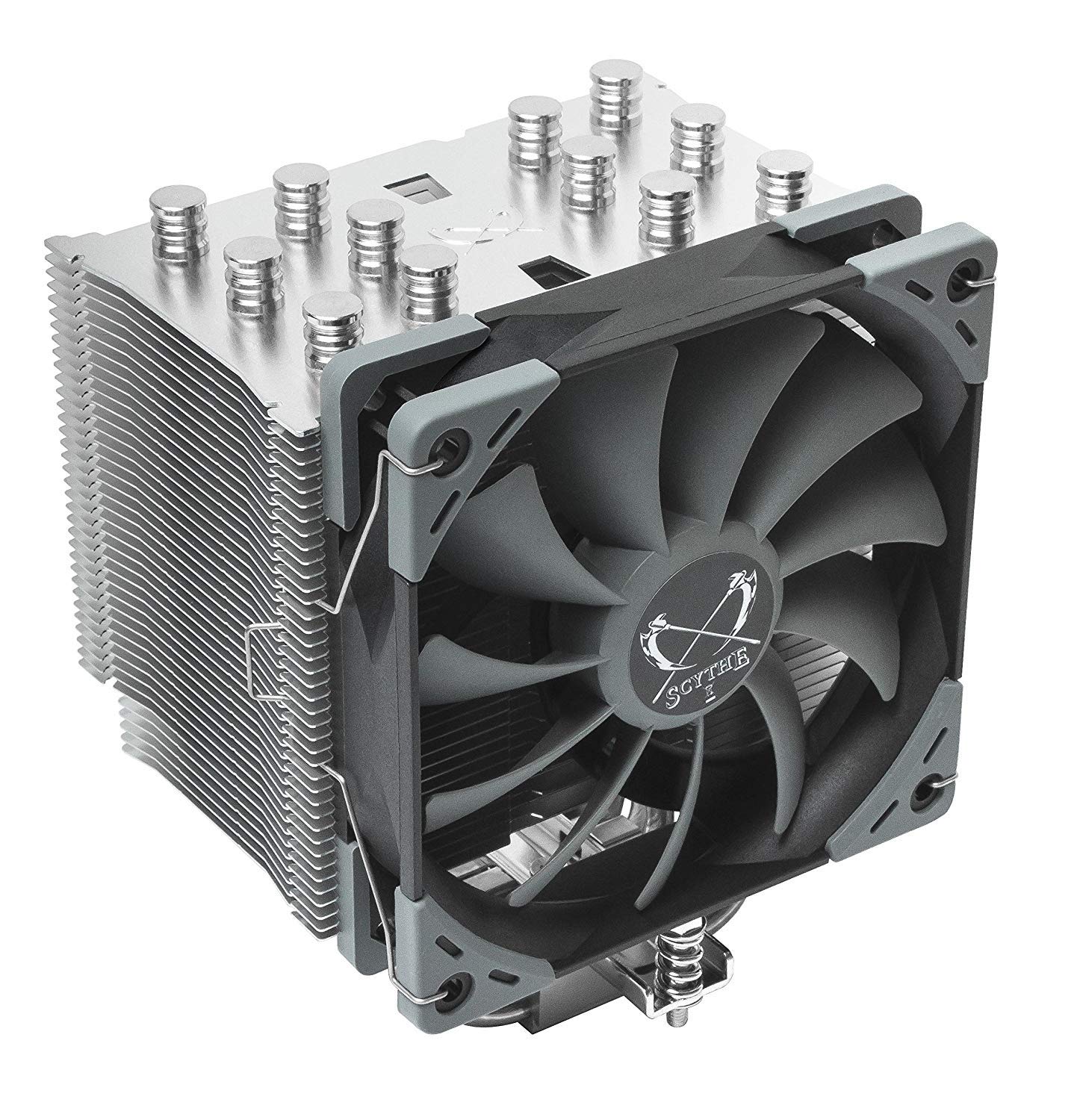
Figure 1: Scythe Mugen 5 Rev.B CPU Cooler.
2. Package Contents
Before beginning installation, please verify that all components are present in the package.
- Scythe Mugen 5 Rev.B Heatsink
- 120mm PWM Fan
- Mounting Hardware for Intel Sockets (LGA 775, 1150, 1151, 1155, 1156, 1366, 2011-(v3), 2066)
- Mounting Hardware for AMD Sockets (AM2(+), AM3(+), AM4, FM1, FM2(+))
- Thermal Paste
- Long Magnetic Screwdriver
- User Manual (this document)

Figure 2: Included accessories and mounting hardware.
3. Setup and Installation
Proper installation is crucial for optimal performance.
3.1 Preparation
- Ensure your system is powered off and unplugged from the wall outlet.
- Remove the side panel of your PC case to access the motherboard.
- If replacing an existing cooler, carefully remove it and clean any old thermal paste from the CPU surface using isopropyl alcohol.
3.2 Mounting the Backplate and Spacers
The Mugen 5 Rev.B utilizes a secure backplate mounting system.
- Position the appropriate backplate (Intel or AMD) on the rear side of your motherboard, aligning the holes with the CPU socket mounting holes.
- From the front side of the motherboard, insert the standoffs through the mounting holes and into the backplate.
- Secure the standoffs with the provided screws.
3.3 Applying Thermal Paste
Apply a small amount of the included thermal paste to the center of your CPU's Integrated Heat Spreader (IHS). A pea-sized dot or a thin line is generally sufficient. Do not spread the paste manually; the pressure from the cooler will spread it evenly.
3.4 Attaching the Heatsink
Carefully place the heatsink onto the CPU, aligning the mounting holes on the heatsink's base with the standoffs. Use the long magnetic screwdriver provided to secure the heatsink to the mounting bars. Tighten screws in an alternating diagonal pattern until snug.

Figure 3: Close-up of the heatsink base and heat pipes.
3.5 Installing the Fan
Attach the 120mm PWM fan to the heatsink using the included fan clips. Ensure the fan is oriented to push air through the heatsink towards the rear exhaust of your PC case. Connect the fan's 4-pin connector to the CPU_FAN header on your motherboard.

Figure 4: Scythe Mugen 5 Rev.B installed in a PC system.
4. Operating Instructions
The Scythe Mugen 5 Rev.B is designed for quiet and efficient operation.
- Automatic Fan Control: The included PWM fan will automatically adjust its speed based on CPU temperature, as controlled by your motherboard's BIOS/UEFI settings. This ensures optimal cooling performance while minimizing noise.
- Noise Levels: The fan operates quietly, with a volume range of 4 to 24.9 dBA, making it suitable for silent PC builds.
- Airflow: The fan provides an air flow rate of 28.2 to 86.93 m³/h, effectively moving heat away from the CPU.
5. Maintenance
Regular maintenance helps ensure the longevity and optimal performance of your CPU cooler.
- Dust Removal: Periodically inspect the heatsink fins and fan blades for dust accumulation. Use compressed air or a soft brush to gently remove dust. Ensure the fan is held stationary while cleaning to prevent damage to the bearings.
- Thermal Paste: While the included thermal paste is high quality, it is recommended to reapply fresh thermal paste if you ever remove the cooler from the CPU.
6. Troubleshooting
If you encounter issues with your Scythe Mugen 5 Rev.B, refer to the following common problems and solutions.
6.1 High CPU Temperatures
- Check Thermal Paste: Ensure thermal paste was applied correctly and evenly. Reapply if necessary.
- Verify Mounting Pressure: Confirm the cooler is securely mounted and making good contact with the CPU. All screws should be tightened evenly.
- Fan Orientation: Ensure the fan is pushing air through the heatsink in the correct direction (typically towards the rear exhaust fan of the case).
- Case Airflow: Check your PC case's overall airflow. Ensure intake and exhaust fans are properly configured and not obstructed.
6.2 Excessive Fan Noise
- Dust Accumulation: Clean any dust from the fan blades and heatsink fins.
- Cable Obstruction: Ensure no cables are touching the fan blades.
- Fan Settings: Check your motherboard's BIOS/UEFI settings for fan curves. Adjust to a quieter profile if temperatures allow.
- Loose Fan: Verify the fan is securely attached to the heatsink with the clips.
7. Specifications
| Feature | Detail |
|---|---|
| Model Number | SCMG-5100 |
| Dimensions (W x H x D) | 130 x 154.5 x 110 mm (5.12"L x 6.08"W x 4.33"H) |
| Weight (including fan) | 890 g (1.96 lbs) |
| Heat Pipes | 6 |
| Fan Speed | 300 ~ 1200 RPM |
| Fan Volume | 4 ~ 24.9 dBA |
| Air Flow Rate | 28.2 ~ 86.93 m³/h (51.17 CFM) |
| Power Connector Type | 4-Pin PWM |
| Voltage | 12 Volts |
| Wattage | 130 watts |
| Cooling Method | Air |
| Compatible Devices | Desktop PCs |
| Material | Aluminum (fins), Copper (heat pipes, base) |
| Intel Socket Compatibility | LGA 775, 1150, 1151, 1155, 1156, 1366, 2011-(v3), 2066 |
| AMD Socket Compatibility | AM2(+), AM3(+), AM4, FM1, FM2(+) |
8. Warranty and Support
For warranty information, technical support, or further assistance, please visit the official Scythe website or contact their customer service department. Keep your proof of purchase for warranty claims.
Manufacturer: Scythe
Ask a question about this manual
Ask about setup, troubleshooting, compatibility, parts, safety, or missing instructions. Manuals+ will review the question and use this page’s manual context to help answer it.