
VIKING 013112-000
Viking Fan Kit Part 013112-000 Instruction Manual
Model: 013112-000 | Brand: VIKING
1. Product Overview
The Viking Fan Kit Part 013112-000 is a replacement fan assembly designed for cooling applications. This kit includes a brushless DC fan mounted on a metal plate, intended for integration into compatible systems requiring efficient air circulation.
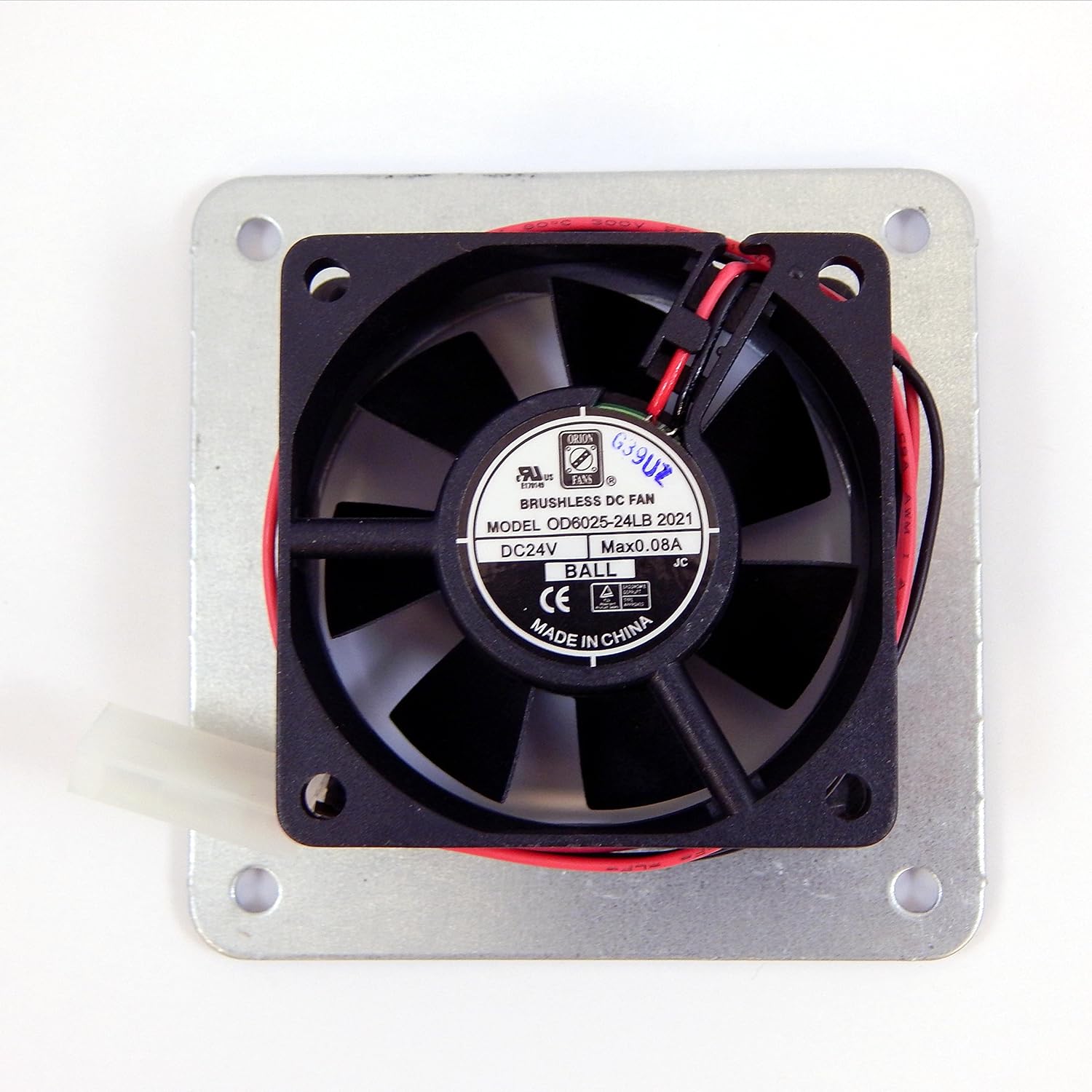
This image displays the Viking Fan Kit, model 013112-000. It features a black brushless DC fan mounted on a square metal plate. The fan has a 3-pin power connector with red and black wires. The label on the fan indicates it operates at DC24V and has a maximum current of 0.08A. The fan is designed for cooling and is made of metal.
2. Safety Information
Please read and understand all safety instructions before installing or operating the fan kit. Failure to do so may result in injury or damage to the product.
- Ensure power is disconnected from the system before installation or maintenance.
- Handle the fan by its frame; avoid touching the fan blades.
- Verify correct voltage and polarity before connecting the fan to a power source. This fan operates on 12 Volts (DC).
- Keep fingers and loose objects away from moving fan blades during operation.
- Do not operate the fan in wet or excessively dusty environments.
3. Package Contents
Verify that all components are present and undamaged upon opening the package:
- 1 x Viking Fan Kit Part 013112-000 (Fan assembly with metal mounting plate and 3-pin connector)
4. Setup and Installation
This section provides instructions for the proper installation of your Viking Fan Kit.
Installation Steps:
- Prepare the Installation Area: Ensure the area where the fan will be installed is clean, dry, and free of obstructions. Confirm there is adequate space for airflow.
- Disconnect Power: Before beginning installation, ensure that the power supply to the system or device where the fan will be installed is completely disconnected.
- Mount the Fan: Align the mounting holes on the fan's metal plate with the corresponding mounting points on your system. Secure the fan using appropriate screws or fasteners (not included) through the four corner holes. Ensure the fan is mounted securely to prevent vibration.
- Connect Power: Locate the 3-pin power connector on the fan. Connect this connector to the compatible 3-pin fan header on your system's motherboard or power supply. Ensure the connector is fully seated and the polarity is correct (red wire typically positive, black wire negative).
- Verify Installation: Double-check all connections and mounting points to ensure everything is secure and properly installed.
- Restore Power: Once installation is complete and verified, restore power to the system.
5. Operating Instructions
The Viking Fan Kit Part 013112-000 is designed for continuous operation once properly installed and powered. It functions by drawing air through its blades to create airflow for cooling purposes.
- Upon system power-up, the fan should begin rotating, indicating proper function.
- Monitor the fan's operation periodically to ensure it is spinning freely and quietly.
- Ensure that air intake and exhaust vents in your system are not obstructed to allow for optimal cooling performance.
6. Maintenance
Regular maintenance helps ensure the longevity and optimal performance of your fan kit.
- Dust Removal: Periodically (e.g., every 3-6 months), disconnect power and use compressed air or a soft brush to gently remove dust buildup from the fan blades and frame. Accumulation of dust can impede airflow and reduce cooling efficiency.
- Inspect Wiring: Occasionally check the power cable and connector for any signs of wear, fraying, or loose connections.
- Listen for Unusual Noises: If the fan starts making unusual noises (e.g., grinding, rattling), it may indicate a bearing issue or obstruction. Disconnect power and inspect the fan.
7. Troubleshooting
If you encounter issues with your Viking Fan Kit, refer to the table below for common problems and their solutions.
| Problem | Possible Cause | Solution |
|---|---|---|
| Fan does not spin | No power; Loose connection; Incorrect voltage; Fan failure | Ensure system power is on. Check 3-pin connector is fully seated. Verify power supply is providing 12V DC. If all checks fail, the fan may need replacement. |
| Fan is noisy | Dust buildup; Obstruction; Worn bearings; Loose mounting | Disconnect power and clean fan blades. Remove any obstructions. Ensure fan is securely mounted. If noise persists, bearings may be worn, requiring replacement. |
| Insufficient airflow | Dust buildup; Obstructed vents; Fan spinning too slowly | Clean fan and system vents. Ensure fan is receiving adequate voltage. |
8. Specifications
| Brand | VIKING |
| Model Number | 013112-000 |
| Part Number | 013112-000 |
| Voltage | 12 Volts (DC) |
| Power Connector Type | 3-Pin |
| Cooling Method | Air |
| Compatible Devices | Gaming Console, Desktop |
| Material | Metal |
| Item Weight | 4.3 ounces |
| Product Dimensions | 5 x 5 x 2 inches |
| Batteries Included | No |
| Batteries Required | No |
9. Warranty and Support
For warranty information or technical support regarding your Viking Fan Kit Part 013112-000, please refer to the original purchase documentation or contact the retailer from whom the product was acquired. You may also visit the official VIKING brand website for further assistance and contact details.
Please retain this manual for future reference.
Ask a question about this manual
Ask about setup, troubleshooting, compatibility, parts, safety, or missing instructions. Manuals+ will review the question and use this page’s manual context to help answer it.