
Introduction
This manual provides essential instructions for the safe and effective use of your Chicago Electric Power Tools Cordless Micro Engraver, Model 98227. This diamond-tipped ballpoint micro engraver is designed for detailed engraving on various materials such as wood, metal, ceramic, and glass. Please read this manual thoroughly before operation and retain it for future reference.
Safety Information
WARNING: To prevent serious injury and/or property damage:
- Wear ANSI approved safety goggles and heavy duty work gloves during use.
- Use only with bits rated to at least 15,200 RPM.
- Not a toy; keep away from children.
- Position batteries in proper polarity and do not install batteries of different types, charge levels, or capacities together.
- Inspect before use; do not use if parts loose or damaged.
- Use for intended purposes only.
- WARNING: Some dust created by power sanding, sawing, grinding, drilling, and other construction activities, contains chemicals known [to the State of California] to cause cancer, birth defects or other reproductive harm. Some examples of these chemicals are:
- Lead from lead-based paints.
- Crystalline silica from bricks and cement or other masonry products.
- Arsenic and chromium from chemically treated lumber. Your risk from these exposures varies, depending on how often you do this type of work. To reduce your exposure to these chemicals: work in a well ventilated area, and work with approved safety equipment, such as those dust masks that are specially designed to filter out microscopic particles. (California Health & Safety Code § 25249.5, et seq.)
- Wash hands after handling.
Package Contents
- Cordless Micro Engraver
- Diamond-Tipped Stainless Steel Bit (pre-installed)
- Two AAA Batteries
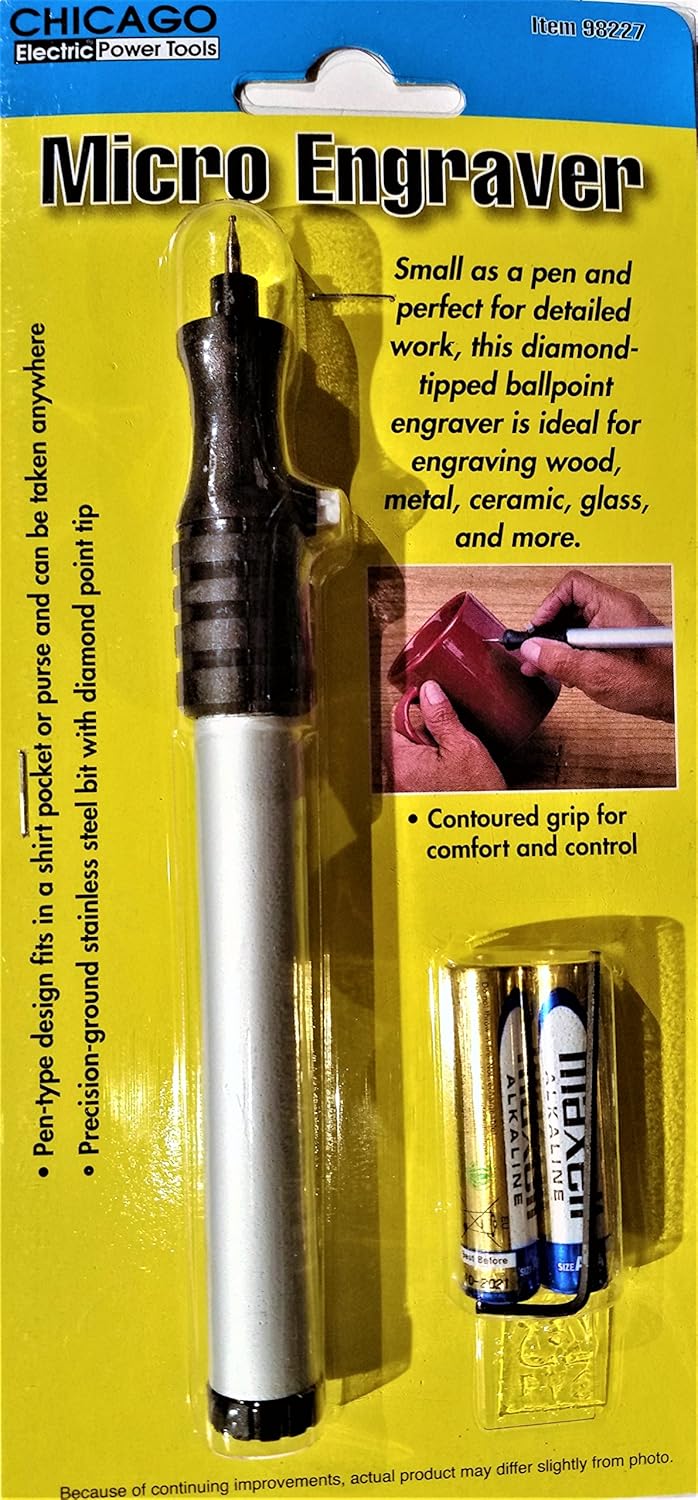
Image 1: Front view of the Cordless Micro Engraver in its original packaging, showing the tool and included AAA batteries.
Setup
Battery Replacement
The micro engraver requires two AAA batteries. Follow these steps to install or replace batteries:
- Twist the end cap off the base of the engraver and remove any used AAA batteries.
- Replace with new batteries, ensuring proper polarity (+/-) as indicated inside the battery compartment.
- Screw the end cap back onto the base securely.

Image 2: Back view of the product packaging, detailing battery replacement steps and safety warnings.
Operating Instructions
The Cordless Micro Engraver is designed for precision work. Its pen-type design and contoured grip allow for comfortable and controlled operation.
- Prepare Your Workpiece: Ensure the surface you intend to engrave is clean and stable. Secure small items to prevent movement during engraving.
- Activate the Engraver: Locate the power button or switch on the engraver. Press or slide it to the "ON" position. The diamond-tipped bit will begin to vibrate.
- Engraving Technique: Hold the engraver like a pen. Apply light, consistent pressure to the surface you are engraving. Guide the tip to create your desired design or marking. Avoid excessive pressure, as this can damage the tip or the material.
- Practice: If you are new to engraving, practice on a scrap piece of material similar to your final workpiece to get a feel for the tool and achieve desired results.
- Deactivate the Engraver: When finished, turn the power button or switch to the "OFF" position.
The precision-ground stainless steel bit with a diamond point tip is suitable for detailed work on materials such as wood, metal, ceramic, and glass.
Maintenance
- Cleaning: After each use, gently wipe the engraver body with a clean, dry cloth. If necessary, use a slightly damp cloth, then dry thoroughly. Do not use harsh chemicals or abrasive cleaners.
- Bit Inspection: Regularly inspect the diamond-tipped bit for wear or damage. A worn tip may reduce engraving effectiveness. Replacement bits may be available from the manufacturer or authorized retailers.
- Battery Care: Remove batteries if the engraver will not be used for an extended period to prevent leakage and corrosion. Store batteries in a cool, dry place.
- Storage: Store the engraver in a clean, dry place, away from direct sunlight and extreme temperatures. Keep it out of reach of children.
Troubleshooting
| Problem | Possible Cause | Solution |
|---|---|---|
| Engraver does not turn on or operate weakly. |
|
|
| Engraving is faint or inconsistent. |
|
|
| Engraver vibrates excessively or makes unusual noise. |
|
|
Specifications
| Model Number | 98227 |
| Brand | Chicago Electric Power Tools |
| Power Source | 2 x AAA Batteries (included) |
| Bit Type | Diamond-Tipped Stainless Steel |
| Overall Dimensions | 6-1/4" L x 7/8" W x 3/4" H |
| Item Weight | 2.56 ounces |
| UPC | 0792363982276 |
Warranty and Support
For warranty information or technical support regarding your Chicago Electric Power Tools Cordless Micro Engraver, please refer to the original purchase documentation or contact the retailer where the product was purchased. The manufacturer, Harbor Freight Tools, can be contacted via their official website for general inquiries.
Manufacturer: Harbor Freight Tools
Website: www.HarborFreight.com