
1. Important Safeguards
When using electrical appliances, basic safety precautions should always be followed to reduce the risk of fire, electric shock, and injury to persons. Read all instructions carefully before using the MISTRAL MO350 Electric Oven.
- Do not touch hot surfaces. Always use oven mitts or pot holders when handling hot items.
- To protect against electric shock, do not immerse cord, plugs, or the appliance in water or other liquid.
- Close supervision is necessary when any appliance is used by or near children.
- Unplug from outlet when not in use and before cleaning. Allow to cool before putting on or taking off parts.
- Do not operate any appliance with a damaged cord or plug, or after the appliance malfunctions or has been damaged in any manner.
- Do not use outdoors.
- Do not let cord hang over edge of table or counter, or touch hot surfaces.
- Do not place on or near a hot gas or electric burner, or in a heated oven.
- Extreme caution must be used when moving an appliance containing hot oil or other hot liquids.
- Do not use the appliance for other than intended use.
- Oversized foods or metal utensils must not be inserted in a toaster oven as they may create a fire or risk of electric shock.
- A fire may occur if the oven is covered or touching flammable material, including curtains, draperies, walls, and the like, when in operation.
- Do not place any materials other than manufacturer's recommended accessories in this oven when not in use.
- Do not place cardboard, plastic, paper, or similar materials in the oven.
- Do not cover crumb tray or any part of the oven with metal foil. This will cause overheating of the oven.
2. Product Overview
The MISTRAL MO350 35L Electric Oven is designed for versatile cooking. Familiarize yourself with its components before use.

Figure 2.1: Front view of the MISTRAL MO350 35L Electric Oven, showing the control panel and glass door.
Components:
- Temperature Control Knob: Adjusts oven temperature from 100°C to 250°C.
- Function Selector Knob: Selects one of the 6 available heating functions.
- Timer Knob: Sets cooking time up to 60 minutes with an audible bell.
- Glass Door: Transparent door for monitoring cooking progress.
- Oven Racks: For placing food items.
- Baking Tray: For baking and roasting.
- Crumb Tray: Collects crumbs and drips for easy cleaning.
- Internal Light: Illuminates the oven interior during operation.
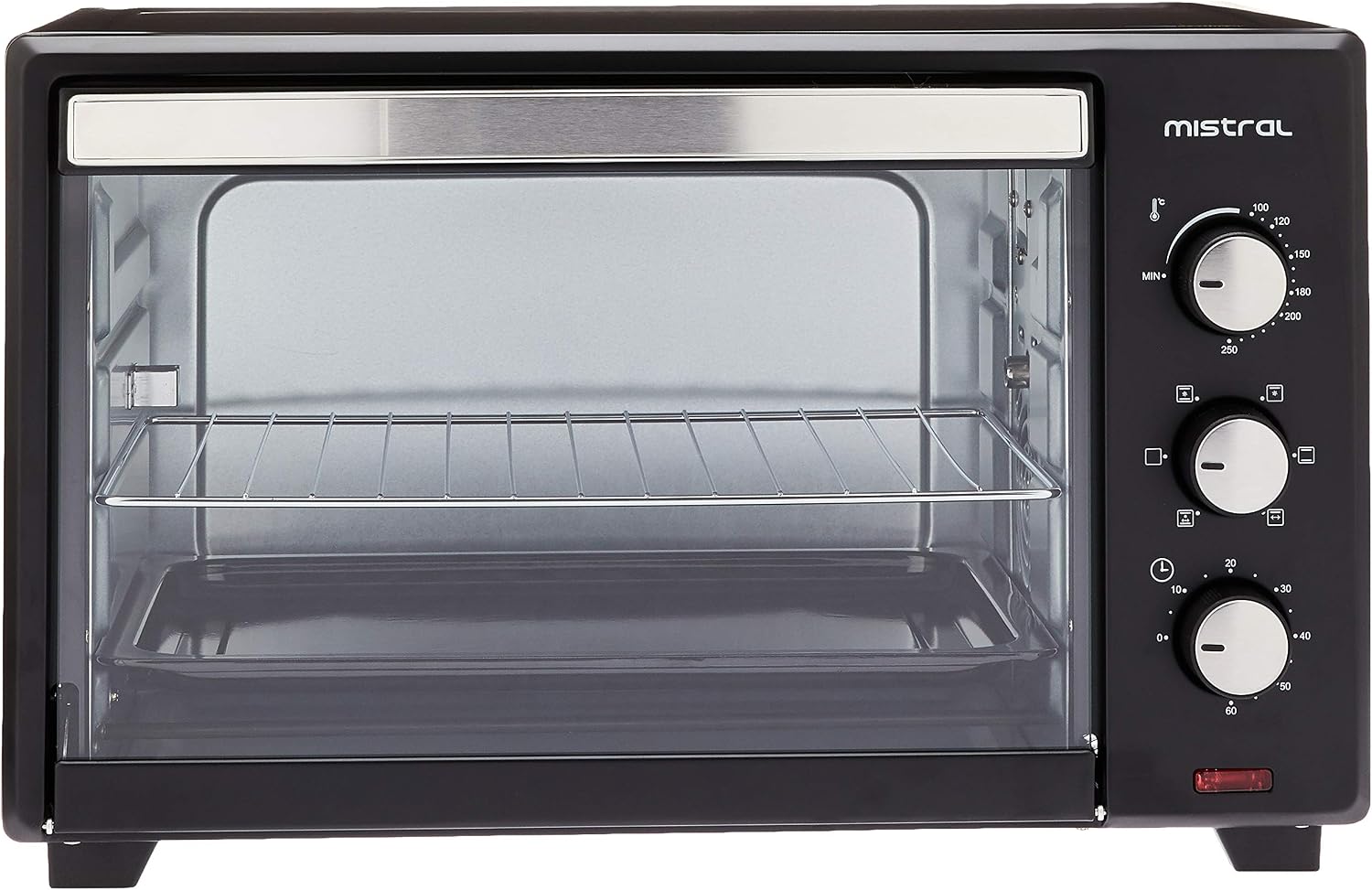
Figure 2.2: Close-up of the control panel, highlighting the temperature, function, and timer knobs.

Figure 2.3: Interior view of the oven, showing the heating elements and rack positions.
3. Setup and Installation
3.1 Unpacking
- Carefully remove the oven and all accessories from the packaging.
- Remove any packing materials, stickers, or labels from the oven.
- Check for any damage during transit. If damaged, do not operate and contact customer support.
3.2 Placement
- Place the oven on a stable, level, and heat-resistant surface.
- Ensure there is adequate space (at least 10-15 cm) around the oven for proper ventilation. Do not place it directly against a wall or under cabinets.
- Keep the oven away from flammable materials such as curtains, tablecloths, and paper.
- Ensure the power cord is not pinched or touching hot surfaces.
3.3 Initial Cleaning and First Use
- Before first use, wipe the interior and exterior of the oven with a damp cloth. Wash all accessories (racks, tray) in warm, soapy water, rinse, and dry thoroughly.
- Plug the oven into a grounded electrical outlet.
- To eliminate any manufacturing odors, operate the oven empty for approximately 15 minutes. Set the temperature to 250°C and the function to both top and bottom heating. Ensure the area is well-ventilated during this process. A small amount of smoke or odor is normal during initial use.
4. Operating Instructions
This section guides you through the basic operation of your MISTRAL MO350 Electric Oven.
4.1 Pre-heating the Oven
Pre-heating is crucial for achieving optimal cooking results, especially for baking. Always pre-heat the oven to the desired temperature before placing food inside.
- Place the oven rack in the desired position.
- Turn the Temperature Control Knob to the required temperature (100°C - 250°C).
- Turn the Function Selector Knob to the desired heating function (e.g., top and bottom heating).
- Turn the Timer Knob to the desired pre-heating time, typically 10-15 minutes. The power indicator light will illuminate.
- Once the pre-heating time has elapsed, the oven is ready for cooking.
4.2 Selecting Cooking Functions
The oven features 6 heating functions to suit various cooking needs. Rotate the Function Selector Knob to choose:
- Upper Heating: Ideal for browning or grilling the top of dishes.
- Lower Heating: Suitable for gentle cooking or crisping the bottom of dishes.
- Upper and Lower Heating: Standard setting for most baking and roasting.
- (Additional 3 functions will vary based on specific model features, typically combinations with convection or rotisserie if present. Refer to recipe for specific function recommendations.)
4.3 Setting the Timer
The 60-minute timer helps you manage cooking times precisely.
- After setting the temperature and function, turn the Timer Knob clockwise to the desired cooking duration.
- The oven will begin heating. The internal light will be on during operation.
- When the set time expires, a bell will sound, and the oven will automatically turn off.
- To turn off the oven manually before the timer expires, turn the Timer Knob counter-clockwise to the 'OFF' position.
4.4 Using the Internal Light
The built-in internal light allows you to monitor your food without opening the oven door, helping to maintain consistent oven temperature.
- The internal light automatically illuminates when the oven is in operation (timer is set).
5. Cleaning and Maintenance
Regular cleaning and proper maintenance will ensure the longevity and optimal performance of your oven.
5.1 Before Cleaning
- Always unplug the oven from the power outlet and allow it to cool completely before cleaning.
5.2 Exterior Cleaning
- Wipe the exterior surfaces with a damp cloth and mild detergent.
- Do not use abrasive cleaners or scouring pads, as they may scratch the finish.
- Ensure no water enters the control panel area.
5.3 Interior Cleaning
- Remove the oven racks, baking tray, and crumb tray. Wash them in warm, soapy water, rinse, and dry thoroughly.
- Wipe the interior walls of the oven with a damp cloth and mild detergent. For stubborn stains, a non-abrasive oven cleaner designed for conventional ovens can be used, following the product instructions carefully.
- Clean the glass door with a glass cleaner or a damp cloth.
- Ensure the oven interior is completely dry before plugging it back in and using it.
5.4 Crumb Tray
- The crumb tray should be cleaned regularly to prevent grease buildup and potential fire hazards. Slide out the tray, discard crumbs, and wash it.
6. Troubleshooting
If you encounter issues with your MISTRAL MO350 Electric Oven, refer to the following common problems and solutions.
| Problem | Possible Cause | Solution |
|---|---|---|
| Oven does not turn on. | Not plugged in; power outage; timer not set. | Ensure oven is plugged into a working outlet. Check household circuit breaker. Set the timer knob to a desired cooking time. |
| Food not cooking evenly. | Incorrect rack position; oven not pre-heated; uneven food placement. | Adjust rack position. Always pre-heat the oven. Arrange food evenly on the tray. Rotate food halfway through cooking if necessary. |
| Excessive smoke during cooking. | Food spills; grease buildup; first use burn-off. | Clean the oven interior and crumb tray thoroughly. Ensure no food residue is left. (Initial smoke is normal for first use). |
| Timer bell does not sound. | Timer knob not set correctly. | Ensure the timer knob is turned past the 10-minute mark and then back to the desired time to engage the mechanism. |
If the problem persists after attempting these solutions, please contact customer support.
7. Specifications
Key technical specifications for the MISTRAL MO350 35L Electric Oven:
| Feature | Specification |
|---|---|
| Brand | MISTRAL |
| Model Number | MO350 |
| Capacity | 35 Litres |
| Colour | Black |
| Product Dimensions (D x W x H) | 35D x 57.5W x 37.5H centimetres |
| Item Weight | 9.6 Kilograms |
| Temperature Control | 100°C - 250°C |
| Timer | 60 minutes with bell |
| Heating Functions | 6 selections |
| Control Type | Knob |
| Door Style | Dropdown Door |
| Material (Door) | Glass |
| Power Source | Electric |
8. Warranty and Support
8.1 Manufacturer's Warranty
This MISTRAL MO350 Electric Oven comes with a One Year Local (Singapore) Manufacturer Warranty, effective from the date of purchase. Please retain your proof of purchase for warranty claims.
The warranty covers manufacturing defects under normal household use. It does not cover damage resulting from misuse, accident, alteration, neglect, unauthorized repair, or commercial use.
8.2 Customer Support
For technical assistance, warranty claims, or spare parts, please contact MISTRAL customer support:
- Website: www.mistral.com.sg (Example link, please refer to official Mistral website for actual support contact)
- Email: support@mistral.com.sg (Example email)
- Phone: +65 XXXX XXXX (Example phone number)
When contacting support, please have your model number (MO350) and proof of purchase readily available.

