
Product Overview
The XIAOKOA 2.4G Wireless Headset Microphone, Model N-80-JP, is designed for clear and stable audio transmission. Utilizing 2.4G wireless technology, it minimizes interference and provides stable signal transmission up to 30 meters in open areas. This lightweight, ear-hook style microphone allows for hands-free operation, making it suitable for various applications such as teaching, presentations, events, and tour guiding.

Image: The XIAOKOA 2.4G Wireless Headset Microphone being used in various scenarios including teaching, fitness classes, tour guiding, and events, demonstrating its versatility and hands-free design.
Package Contents
- 1 x Transmitter (Headset Microphone)
- 1 x Receiver
- 1 x 6.35mm Adapter
- 1 x Split USB Charging Cable
- 1 x User Manual (Japanese)

Image: A visual representation of the package contents, including the headset transmitter, receiver, 6.35mm adapter, split USB charging cable, and user manual.
Setup Instructions
Automatic Pairing
The transmitter and receiver are designed for automatic pairing. Simply power on both devices, and they will connect automatically without requiring any manual pairing procedures. This allows for immediate use.
Connecting to a PA Device
- Identify the audio input jack on your PA device (amplifier, speaker, etc.).
- The receiver supports both 3.5mm and 6.35mm jacks. If your PA device has a 6.35mm jack, attach the provided 6.35mm adapter to the receiver's 3.5mm plug.
- Insert the receiver (with or without the adapter) into the appropriate audio input jack of your PA device.
- Ensure both the transmitter and receiver are powered on.

Image: A diagram illustrating the plug-and-play connection of the wireless microphone receiver to a PA system, highlighting the 50-meter stable transmission range.
Operating Instructions
Wearing the Microphone
The microphone features an ear-hook design for a secure and comfortable fit. Place the ear-hook over your ear and adjust the microphone boom so that the microphone is positioned near your mouth for optimal sound pickup.
Volume Control
The transmitter is equipped with volume buttons (+ and -) allowing you to adjust the microphone's volume directly. This provides convenient control without needing to access the PA device.
Microphone Modes
The microphone can be used in two ways: as a headset for hands-free operation or held in hand for direct speaking. The flexible soft hose allows for 360° adjustment of the microphone position.
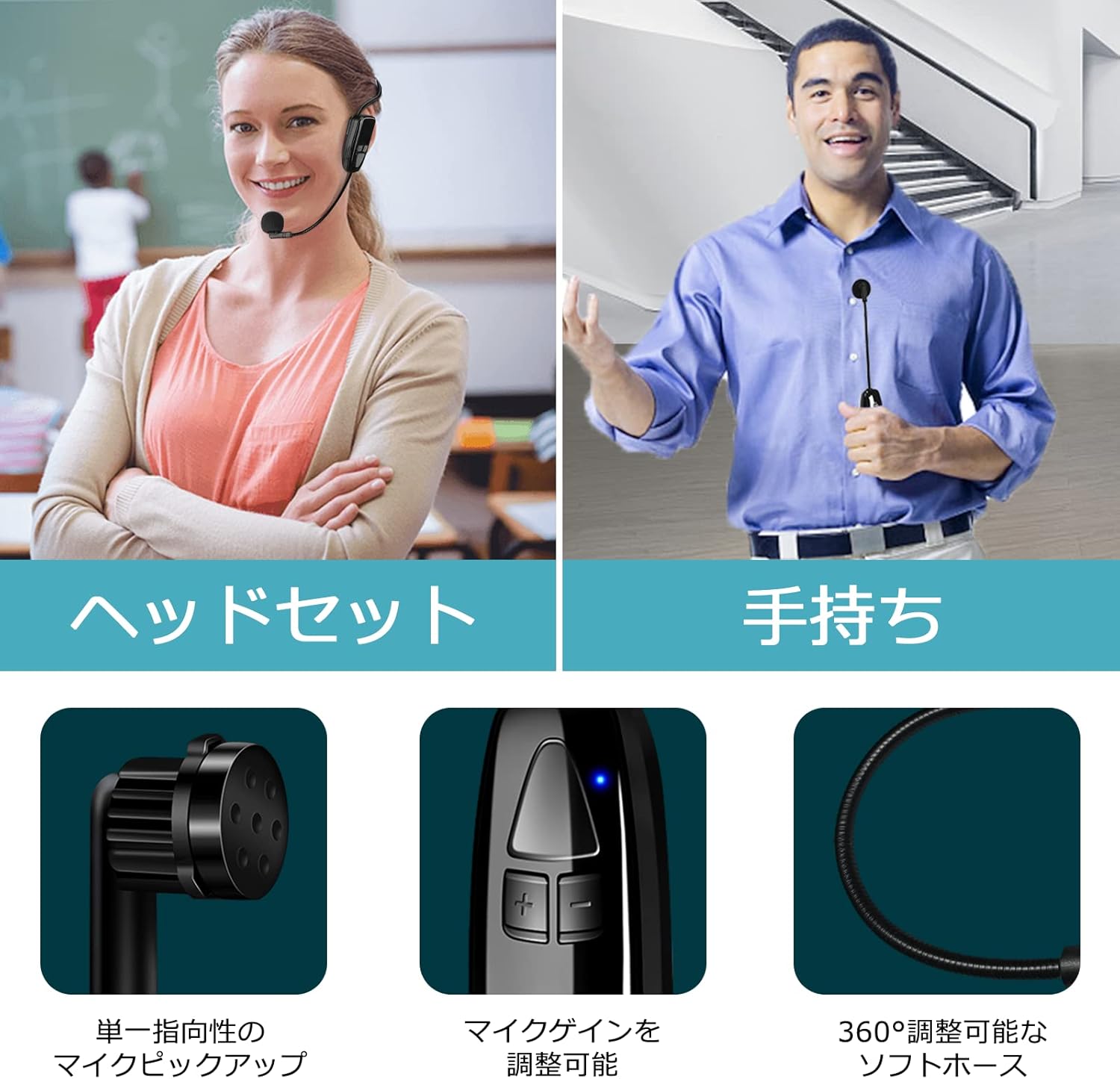
Image: This image displays the two usage modes: headset and handheld. It also highlights the unidirectional microphone pickup and the adjustable volume controls on the transmitter.
Charging
The device is USB rechargeable. A split USB charging cable is included, allowing you to charge both the transmitter and receiver simultaneously. A full charge takes approximately 1.5 hours and provides up to 6 hours of continuous use. Note that actual usage time may vary depending on volume levels and other factors.

Image: The transmitter and receiver connected to a split USB charging cable, illustrating simultaneous charging. Battery icons indicate charging status and battery life.
Compatibility and Important Notes
Important Compatibility Information:
- This product is not compatible with laptops, tablets, cameras, Macbooks, smartphones, iPhones, iPads, or Bluetooth speakers.
- It does not have Bluetooth functionality.
- It does not have a recording function.
- It does not support AUX terminals.
This microphone is primarily designed for use with PA systems, amplifiers, and speakers that have 3.5mm or 6.35mm microphone input jacks.

Image: A visual guide to device compatibility, showing the microphone connecting to PA systems and speakers, while explicitly indicating incompatibility with laptops, smartphones, and other devices.
Specifications
| Brand | XIAOKOA |
| Model Name | N-80-JP |
| Connectivity Technology | 2.4G Wireless |
| Connector Type | 3.5mm, 6.35mm (with adapter) |
| Compatible Devices | Amplifiers, Speakers |
| Color | Black |
| Included Components | USB Charging Cable, Microphone Cover |
| Polar Pattern | Unidirectional |
| Audio Sensitivity | 88 dB |
| Operating Frequency | 2483 MHz |
| Power Type | Battery Operated (1 Lithium Ion Battery) |
| Continuous Usage Time | Up to 6 hours |
| Charging Time | Approx. 1.5 hours |
| Weight (entire unit) | Approx. 65g |
Maintenance
- Cleaning: Use a soft, dry cloth to clean the microphone and receiver. Do not use liquid cleaners or solvents.
- Storage: Store the device in a cool, dry place away from direct sunlight and extreme temperatures.
- Battery Care: To prolong battery life, avoid fully discharging the battery frequently. Charge the device regularly, even if not in use for extended periods.
- Microphone Cover: Replace the microphone foam cover if it becomes worn or damaged to maintain sound quality and hygiene.
Troubleshooting
- No Sound:
- Ensure both the transmitter and receiver are powered on and fully charged.
- Verify that the receiver is correctly plugged into the microphone input of your PA device.
- Check the volume level on both the transmitter and your PA device.
- Confirm that your PA device is set to the correct input source.
- Interference/Poor Sound Quality:
- Ensure the transmitter and receiver are within the effective operating range (up to 30 meters in open areas).
- Avoid obstacles between the transmitter and receiver that might block the signal.
- Move away from other 2.4G wireless devices that might cause interference.
- Check for any physical damage to the microphone or cables.
- Device Not Charging:
- Ensure the USB charging cable is securely connected to both the device and a power source.
- Try using a different USB port or power adapter.
- Inspect the charging cable for any damage.
If you encounter issues not covered here, please contact customer support.
Warranty and Support
This product comes with a 1-year warranty service. In case of initial defects, a free replacement will be provided within one month of purchase.
For any questions or concerns, please feel free to contact us. To contact support:
- Go to the product page.
- Click on the seller name "XIAOKOA" (or "XIAOKOA-JP").
- On the seller's storefront page, click the "Ask a question" button.


