1. Introduction
The Seymour Duncan PowerStage 170 is a compact, 170-watt guitar power amplifier designed to integrate seamlessly with your pedalboard or digital modeler. It provides a portable and powerful solution for musicians requiring reliable amplification in various settings, from studio recording to live performances. This manual provides essential information for setup, operation, and maintenance of your PowerStage 170.
2. Features
- Compact Power Amp: The PowerStage 170 is a 170-watt guitar power amplifier, serving as a perfect complement to your pedals or digital modeler, offering a compact, lightweight solution for gigs and recording sessions.
- Pedalboard Friendly: This device is designed to fit directly on your pedalboard, providing a convenient and portable amplification solution.
- Audio Precision: Featuring an intuitive 3-band analog EQ, the PowerStage allows for quick fine-tuning of your tone for any cabinet and venue, without altering settings on your pedals or digital modeler.
- Dynamic Control: A large Master Volume knob facilitates easy adjustment during solos. When overdrive and distortion pedals are bypassed, the PowerStage functions as your clean channel.
- Reliable and Convenient: The PowerStage ensures reliable, musical power for every performance, simplifying setups and eliminating common backline issues.
3. Controls and Connections
Front Panel Controls

Figure 1: Front panel view of the Seymour Duncan PowerStage 170, showing the main controls and indicators.
- Level Knob: This large knob controls the overall master output volume of the amplifier.
- EQ Knobs (Bass, Mid, Treble): These three knobs allow for precise tonal shaping of your sound. Adjust Bass for low-end frequencies, Mid for midrange presence, and Treble for high-end clarity.
- Power Indicator: Illuminates when the unit is powered on.
- Temp Indicator: Illuminates if the amplifier's internal temperature exceeds safe operating limits. Allow the unit to cool down if this occurs.
- O.C. (Over Current) Indicator: Illuminates if an over-current condition is detected, typically due to an impedance mismatch or short circuit at the speaker output.
Rear Panel Connections
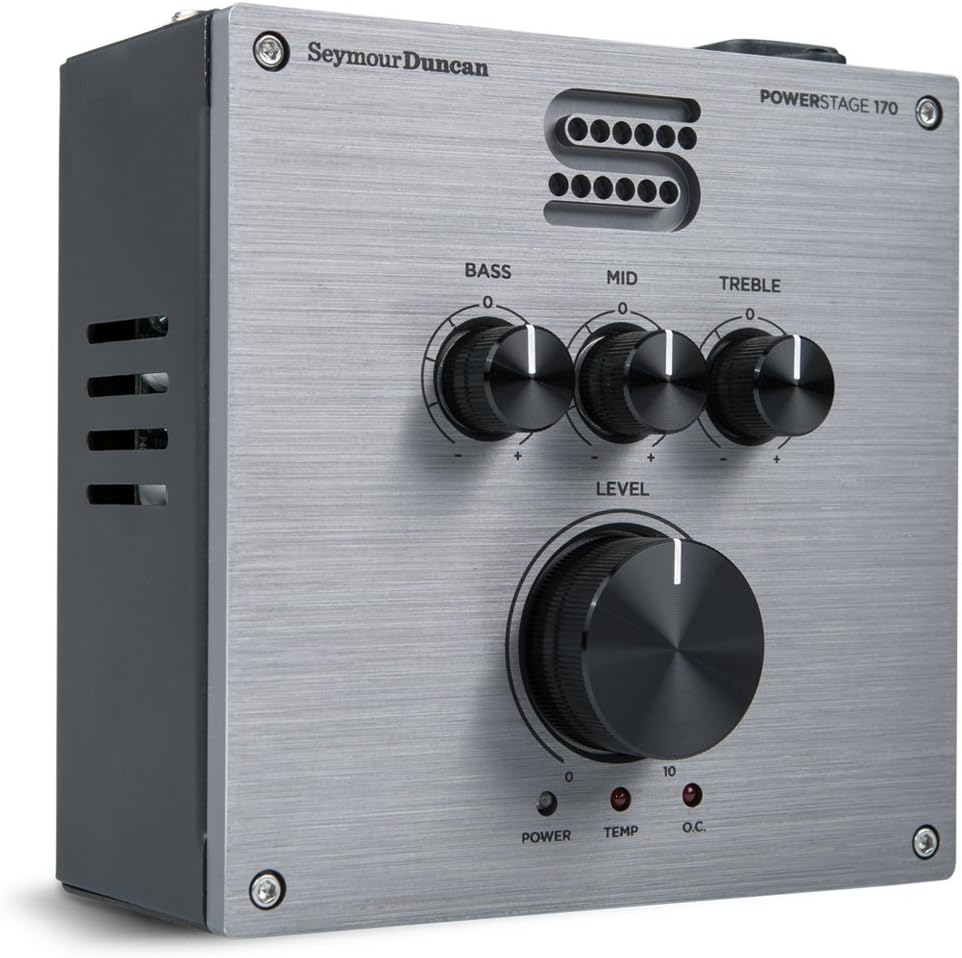
Figure 2: Angled front view of the PowerStage 170, providing a clearer look at the side profile and input/output jacks.
- Input (6.35mm Jack): Connect your guitar signal, pedalboard output, or digital modeler output here.
- Speaker Out (6.35mm Jack): Connect this output to your passive speaker cabinet. Ensure your cabinet's impedance is between 4 and 16 ohms.
- DC 9V Out: Provides 9V DC power for external pedals, reducing the need for additional power supplies on your pedalboard.
- Power Input: Connect the provided power adapter here. The unit operates on 9 Volts DC.
4. Setup
- Power Connection: Connect the provided power adapter to the Power Input jack on the rear panel. Plug the adapter into a suitable power outlet.
- Speaker Connection: Using a high-quality speaker cable, connect the Speaker Out jack on the rear panel to your passive speaker cabinet. Verify that your speaker cabinet's impedance is within the 4-16 ohm range.
- Instrument/Pedalboard Connection: Connect your guitar, the output of your pedalboard, or your digital modeler's output to the Input jack on the rear panel.
- Optional Pedal Power: If desired, use the DC 9V Out jack to power other 9V DC pedals on your pedalboard.
5. Operating Instructions
- Power On: Ensure all connections are secure. Flip the ON/OFF switch on the rear panel to the 'ON' position. The Power indicator light on the front panel should illuminate.
- Initial Volume Setting: Start with the Level knob set to its minimum position (fully counter-clockwise) before playing to avoid sudden loud sounds.
- Adjusting Tone (EQ): Use the Bass, Mid, and Treble knobs to shape your desired tone. These are analog controls that allow for intuitive adjustments.
- Master Volume: Gradually increase the Level knob to achieve your desired output volume.
- Clean Channel Functionality: When your overdrive and distortion pedals are disengaged, the PowerStage 170 operates as a transparent clean amplifier, allowing the natural tone of your guitar and other effects to shine through.
6. Troubleshooting
- No Sound:
- Check all cable connections (instrument, speaker, power).
- Ensure the PowerStage 170 is powered on and the Power indicator is lit.
- Verify that the Level knob is not at minimum.
- Confirm your guitar's volume is up and any pedals in the chain are functioning correctly.
- Distorted/Unclear Sound:
- Check for impedance mismatch with your speaker cabinet (should be 4-16 ohms).
- Reduce the Level knob or the output level from your pedalboard/modeler.
- Adjust the EQ knobs to find a balanced tone.
- Temp Indicator Lit:
- The unit is overheating. Turn off the PowerStage 170 and allow it to cool down in a well-ventilated area. Ensure no vents are blocked.
- O.C. Indicator Lit:
- An over-current condition is detected. Immediately turn off the unit. Check your speaker cable for shorts and ensure the speaker cabinet's impedance is correct.
7. Specifications
| Specification | Value |
|---|---|
| Model Number | MSD POWERSTAGE-170 |
| Output Wattage | 170 Watts |
| Item Weight | 2.8 pounds |
| Product Dimensions | 8.8 x 7.15 x 4.25 inches |
| Color | Silver |
| Compatible Devices | Guitar |
| Connector Type | 6.35mm Jack |
| Signal Format | Analog |
| Power Source | Corded Electric |
| Voltage | 9 Volts |
8. Warranty and Support
For warranty information, technical support, or service inquiries, please refer to the official Seymour Duncan website or contact their customer service department. Keep your purchase receipt as proof of purchase for warranty claims.