
Armitron 45/7088NVY
Armitron Sport Women's Digital Chronograph Watch User Manual
Model: 45/7088NVY
Product Overview
The Armitron Sport Women's Digital Chronograph Watch, model 45/7088NVY, is a versatile timepiece designed for active lifestyles. It features a durable resin case and strap, an easy-to-read LCD display, and a range of digital functions.
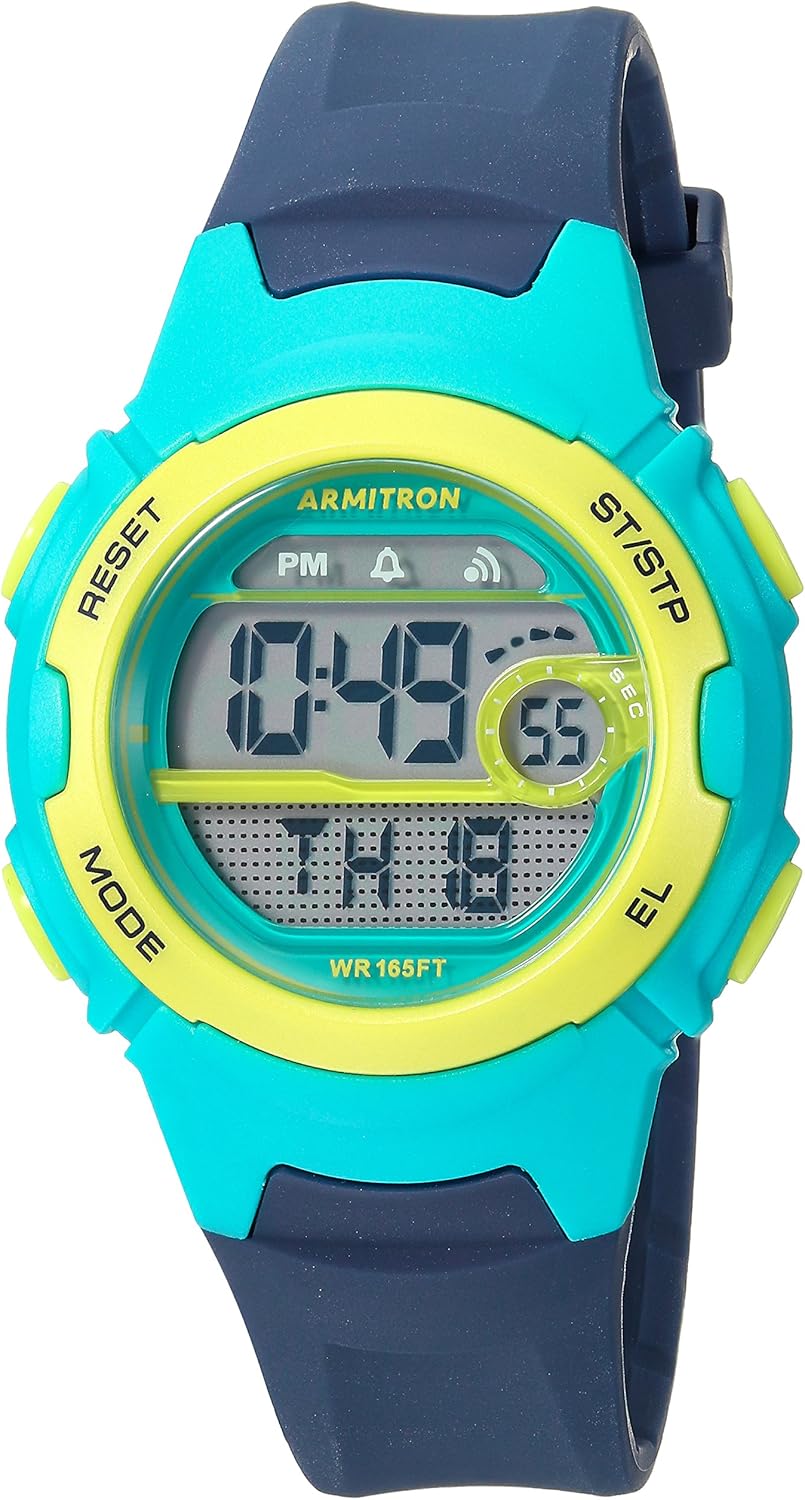
Front view of the Armitron Sport Women's Digital Chronograph Watch in Navy Blue, showing the digital display and control buttons.
Key features include a chronograph for timing events, an alarm, hourly chime, countdown timer, military time display, dual time zone capability, and a backlight for low-light conditions. The watch is powered by a reliable quartz movement and is water resistant up to 50 meters (165 feet).
Setup and Initial Configuration
Battery Installation
This watch comes with a pre-installed Lithium Metal battery. No user battery installation is typically required upon purchase. If battery replacement is needed, it is recommended to seek professional watch repair services to ensure water resistance is maintained.
Setting Time and Date
- Press the MODE button repeatedly until the time setting mode is displayed (often indicated by flashing digits).
- Use the RESET button to select the digit or setting you wish to adjust (e.g., hours, minutes, year, month, day).
- Use the ST/STP button to increase the selected value. Hold the button to advance rapidly.
- Once all settings are correct, press the MODE button again to exit the setting mode and return to the normal time display.
12/24 Hour Format
While in the time setting mode, you can typically toggle between 12-hour (AM/PM) and 24-hour (military time) formats by pressing the ST/STP button when the hour digits are flashing.
Operating Instructions
Mode Navigation
Press the MODE button to cycle through the different functions: Time Display → Chronograph → Alarm → Countdown Timer → Dual Time.
Chronograph (Stopwatch)
- Navigate to the Chronograph mode using the MODE button.
- Press ST/STP to start the stopwatch.
- Press ST/STP again to stop the stopwatch.
- Press RESET to reset the stopwatch to zero.
- To record lap times, press RESET while the stopwatch is running. The lap time will display briefly, and the stopwatch will continue running in the background. Press ST/STP to stop, then RESET to view total time or reset.
Alarm Setting
- Navigate to the Alarm mode using the MODE button.
- Press RESET to select the hour or minute digits for adjustment.
- Use ST/STP to adjust the selected value.
- Press MODE to save and exit.
- To activate/deactivate the alarm, press ST/STP while in Alarm mode. An alarm icon will appear/disappear on the display.
Hourly Chime
While in Alarm mode, press the RESET button to toggle the hourly chime on or off. A chime icon will indicate its status.
Countdown Timer
- Navigate to the Countdown Timer mode using the MODE button.
- Press RESET to select the hour, minute, or second digits for adjustment.
- Use ST/STP to adjust the selected value.
- Press MODE to save the set time.
- Press ST/STP to start or pause the countdown.
- Press RESET to reset the timer to its initial set value.
Dual Time
- Navigate to the Dual Time mode using the MODE button.
- Press RESET to select the hour or minute digits for adjustment.
- Use ST/STP to adjust the selected value for the second time zone.
- Press MODE to save and exit.
Backlight
Press the EL (Electro-Luminescent) button, typically located on the side of the watch, to illuminate the display for a few seconds in low-light conditions.
Maintenance and Care
Cleaning Your Watch
To clean your watch, wipe it gently with a soft, damp cloth. Avoid using harsh chemicals, solvents, or abrasive cleaners, as these can damage the resin case and strap or affect the watch's water resistance.
Water Resistance
This watch is water resistant to 50 meters (165 feet). This rating means it is suitable for short periods of recreational swimming. It is not suitable for diving, snorkeling, or high-impact water sports. Avoid pressing buttons underwater, as this can compromise the water seal.

A chart illustrating different levels of watch water resistance and their corresponding activities. This watch is rated for "Swimming" (50M/165FT).
Storage
When not in use, store your watch in a cool, dry place away from direct sunlight and extreme temperatures. Prolonged exposure to direct sunlight can cause the resin material to degrade over time.
Troubleshooting
- Display is blank or dim: The battery may be low or depleted. Replace the battery (professional service recommended).
- Buttons are unresponsive: Ensure the watch is not in a locked mode (if applicable, though not a common feature for this model). If the issue persists, a reset may be needed (consult professional service if no clear reset procedure is in manual).
- Time is incorrect: Re-enter the time setting mode and adjust the time and date as per the "Setting Time and Date" section. Check if the 12/24 hour format is set correctly.
- Water inside the watch: Immediately cease use and take the watch to a qualified watch repair professional. Do not attempt to dry it yourself, as this can cause further damage.
Specifications
| Feature | Detail |
|---|---|
| Model Number | 45/7088NVY |
| Case Diameter | 33.5mm |
| Material | Resin (Case and Strap) |
| Movement | Quartz |
| Water Resistance | 50 meters (165 feet) |
| Functions | Chronograph, Alarm, Hourly Chime, Countdown Timer, Military Time, Dual Time, Backlight |
| Battery Type | 1 Lithium Metal (included) |
| Approx. Weight | 2.4 ounces |

A visual guide comparing different watch case diameters, illustrating how various sizes appear.
Warranty and Support
Armitron watches typically come with a limited warranty covering manufacturing defects. For specific warranty details, including duration and coverage, please refer to the warranty card included with your purchase or visit the official Armitron website.
For customer support, service, or repair inquiries, please contact Armitron directly through their official channels. Keep your proof of purchase and model number (45/7088NVY) readily available when contacting support.
You can find more information and contact details on the official Armitron website: www.armitron.com
Related documents45/7088NVY

Ask a question about this manual
Ask about setup, troubleshooting, compatibility, parts, safety, or missing instructions. Manuals+ will review the question and use this page’s manual context to help answer it.