
DURACELL DRLJS20
Contents
Duracell DRLJS20 Lithium-Ion Jump Starter User Manual
Model: DRLJS20 | UPC: 609525764734
Product Overview
The Duracell DRLJS20 is a compact and powerful 1100 Peak Amp Lithium-Ion Emergency Jump Starter designed to provide reliable jump-starting for gas engines up to 8 cylinders. It features advanced safety technologies and additional functionalities for convenience.
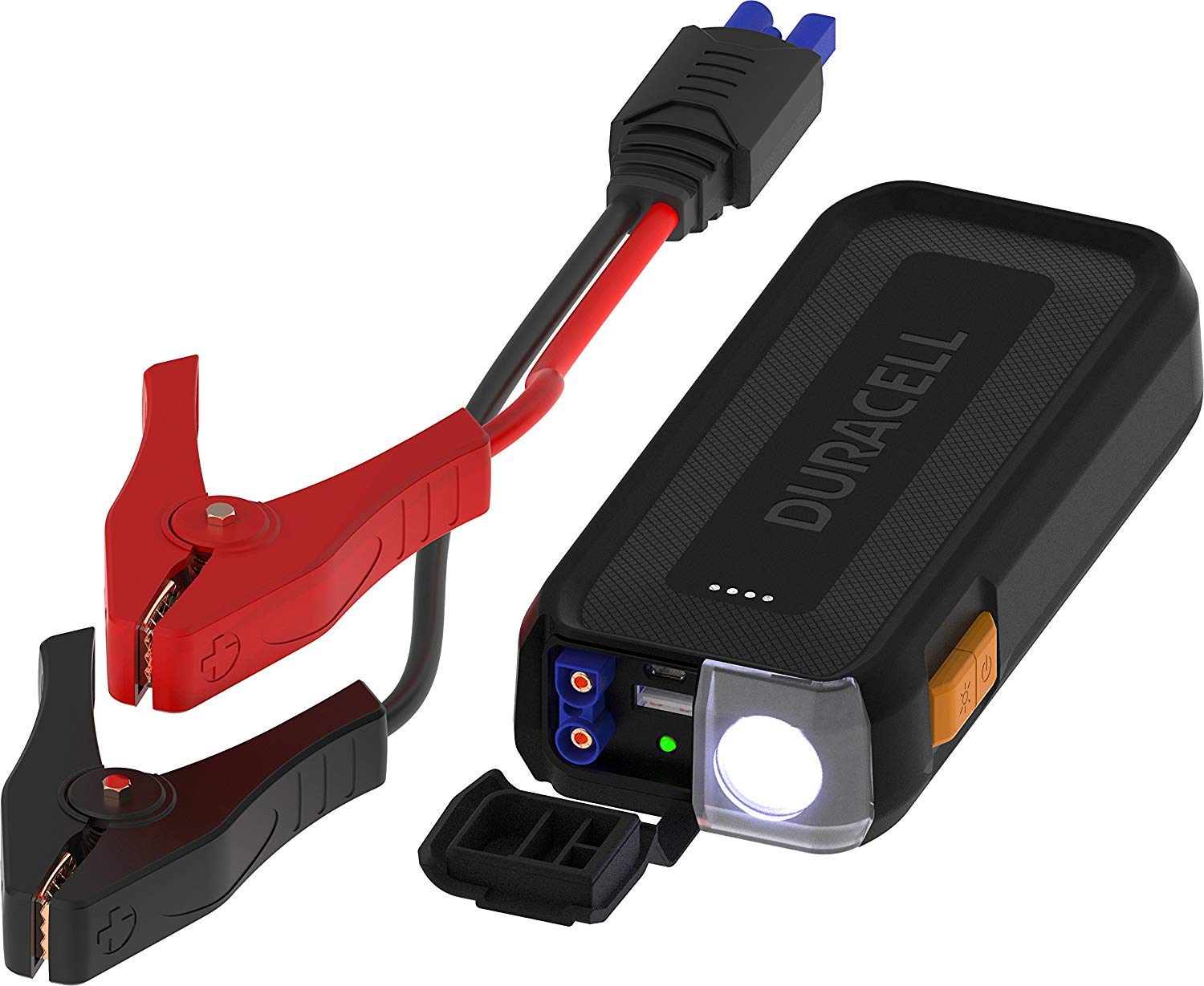
Image: The Duracell DRLJS20 Lithium-Ion Jump Starter unit, featuring a black casing with the Duracell logo, an integrated LED work light, USB port, and connection points for the included red and black jumper cables. The cables with their clamps are shown alongside the main unit.
Key Features:
- 1100 Peak Amps: Capable of jump-starting gas engines up to 8 cylinders / 5.0L.
- Safe Jump Technology: Prevents sparking and protects against reverse polarity, reverse current, short circuits, and overheating.
- Long-lasting Charge: Holds its charge for up to one year and provides up to 25 jumpstarts per charge.
- USB Charging: Includes one built-in 2.4A USB port for charging smartphones and tablets.
- LED Work Light: Features an ultra-bright 200 lumen LED work light with low, high, and SOS modes.
- Weatherproof Construction: IP65 rated for reliable performance in demanding conditions.
What's in the Box
- Duracell DRLJS20 Jump Starter Unit
- Spark Proof Jumper Cables
- 12V DC Car Charger
- Carry Bag
- User Guide (this manual)
Setup and Initial Charge
Before first use, fully charge your Duracell DRLJS20 Jump Starter. It is recommended to recharge the unit after each use and at least once every 12 months to maintain optimal battery health.
Charging the Unit:
- Locate the 12V DC car charger included in the package.
- Plug the car charger into the 12V DC input port on the jump starter unit.
- Plug the other end of the car charger into your vehicle's 12V accessory outlet (cigarette lighter socket).
- The unit's charge indicator lights will illuminate to show charging progress. All lights will be solid when fully charged.
Note: For optimal performance, ensure the jump starter is fully charged before attempting to jump-start a vehicle.
Operating Instructions: Jump Starting a Vehicle
Follow these steps carefully to safely jump-start your vehicle using the Duracell DRLJS20.
Video: This video demonstrates the process of using the Duracell DRLJS20 Lithium-Ion Jump Starter to start a vehicle with a dead battery. It shows how to connect the cables, initiate the jump-start, and highlights features like its portability, USB charging capability, weather resistance, and spark-proof design.
- Prepare the Vehicle: Ensure the vehicle's ignition is off and all accessories (lights, radio, etc.) are turned off. Place the vehicle in park (automatic) or neutral (manual) and engage the parking brake.
- Connect the Jumper Cables:
- Connect the red (positive +) clamp to the positive (+) terminal of the vehicle's battery.
- Connect the black (negative -) clamp to a clean, unpainted metal part of the vehicle's engine block or chassis, away from the battery and fuel lines. Do not connect the black clamp directly to the negative battery terminal.
- Connect to Jump Starter: Insert the blue connector end of the jumper cables into the jump starter's output port. Ensure a secure connection.
- Initiate Jump Start: Turn on the Duracell DRLJS20 Jump Starter. The unit's indicator lights will confirm readiness.
- Start the Vehicle: Attempt to start your vehicle. If it doesn't start immediately, wait 30-60 seconds before trying again. Do not crank the engine for more than 5 seconds at a time.
- Disconnect Cables: Once the vehicle starts, immediately disconnect the jumper cables from the jump starter unit. Then, disconnect the black (negative -) clamp from the vehicle, followed by the red (positive +) clamp.
- Recharge: Recharge the jump starter as soon as possible after use.
Using the USB Port:
The DRLJS20 can also charge your portable electronic devices.
- Plug your device's USB charging cable into the 2.4A USB output port on the jump starter.
- Connect the other end of the cable to your smartphone, tablet, or other USB-powered device.
- The jump starter will begin charging your device.
Using the LED Work Light:
The integrated LED work light provides illumination in low-light conditions.
- Press the light button (usually an orange button on the side) once for low brightness.
- Press again for high brightness.
- Press a third time for SOS mode (flashing).
- Press a fourth time to turn the light off.
Maintenance
- Recharge Regularly: To prolong battery life, fully recharge the unit after each use and at least once every 12 months, even if not used.
- Storage: Store the jump starter in a cool, dry place, away from direct sunlight and extreme temperatures. Use the provided carry bag for protection.
- Cleaning: Clean the unit with a soft, dry cloth. Do not use harsh chemicals or abrasive cleaners. Ensure the ports are free of dust and debris.
- Cable Inspection: Periodically inspect the jumper cables and clamps for any signs of damage, wear, or corrosion. Replace if necessary.
Troubleshooting
| Problem | Possible Cause | Solution |
|---|---|---|
| Unit does not turn on or charge. | Battery is completely depleted or unit is faulty. | Ensure charger is properly connected. Allow unit to charge for several hours. If still unresponsive, contact customer support. |
| Vehicle does not start after jump attempt. | Incorrect cable connection, vehicle battery too dead, or other vehicle issue. | Verify all cable connections are secure and correct (positive to positive, negative to chassis). Ensure jump starter is fully charged. If vehicle still doesn't start, the battery may be beyond jump-starting or there's another mechanical issue. Consult a mechanic. |
| Unit gets warm during use. | Normal operation during high power output. | This is normal. If it becomes excessively hot or emits smoke/odor, disconnect immediately and contact support. |
| USB device not charging. | USB cable issue, device not compatible, or jump starter battery low. | Try a different USB cable. Ensure the jump starter has sufficient charge. Some devices may require specific charging protocols. |
Specifications
| Feature | Detail |
|---|---|
| Brand | DURACELL |
| Model Number | DRLJS20 |
| Peak Output Current | 1100 Amps |
| Battery Type | Lithium Ion |
| Engine Compatibility | Up to 8 cylinder / 5.0L gas engines |
| USB Output | 1 x 2.4A USB port |
| Work Light | 200 Lumen LED (Low, High, SOS modes) |
| Weather Resistance | IP65 Weatherproof Construction |
| Item Weight | 2 pounds |
| Product Dimensions | 7 x 1.5 x 3.2 inches |
| UPC | 609525764734 |
Warranty and Support
For warranty information or technical support, please contact Duracell customer service. Keep your purchase receipt as proof of purchase.
Manufacturer: Duracell
Please refer to the official Duracell website or the packaging for the most up-to-date warranty terms and contact information.
Documents and downloads
Ask a question about this manual
Ask about setup, troubleshooting, compatibility, parts, safety, or missing instructions. Manuals+ will review the question and use this page’s manual context to help answer it.