
Introduction
Welcome to your Motorola MS352 Outdoor Wave Bluetooth Speaker. This manual provides essential information for setting up, operating, and maintaining your device. Please read it thoroughly before use to ensure proper functionality and safety.
Important Safety Information
Observe the following safety precautions to prevent damage to the device or personal injury:
- Do not expose the speaker to extreme temperatures, direct sunlight, or high humidity.
- Do not attempt to disassemble, repair, or modify the device. This will void the warranty.
- While the speaker is IPX4 water-resistant, avoid submerging it in water or exposing it to heavy jets of water. Ensure all ports are securely closed before exposure to moisture.
- Use only the provided micro-USB charging cable or a certified equivalent.
- Dispose of batteries responsibly according to local regulations. Do not incinerate.
Package Contents
Verify that all items are present in your package:
- Motorola MS352 Outdoor Wave Bluetooth Speaker
- Micro-USB Charging Cable
- 3.5mm Audio Cable
- User Manual (this document)

Image: The Motorola MS352 speaker packaged in its retail box, showing the product name and brand.
Product Overview
The Motorola MS352 is a robust portable Bluetooth speaker designed for outdoor environments. It integrates Touch2Share technology, a conference speakerphone, and a backup power bank function.
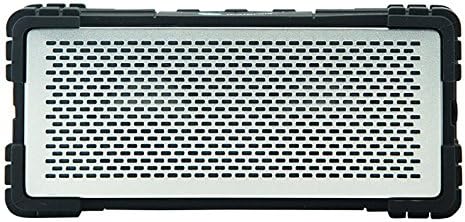
Image: Front view of the Motorola MS352 Outdoor Wave Bluetooth Speaker, highlighting its metallic grille and rugged black casing.
Key Features:
- Portable Bluetooth speaker with Touch2Share technology
- Integrated conference speakerphone
- Dual drivers for stereo audio output
- 2,000 mAh Lithium Battery providing up to 8 hours of playback
- Backup power bank functionality for charging other devices
- Durable aluminium housing with rubberized over-mold for protection
- IPX4 water-resistant rating
- 3.5mm audio input for wired connections

Image: Top view of the Motorola MS352 speaker, showing the control buttons for power, volume, and playback, along with the Motorola logo.
Setup
Charging the Speaker:
- Connect the micro-USB charging cable to the speaker's charging port, typically located under a protective flap.
- Connect the other end of the cable to a USB power adapter (not included) or a powered computer USB port.
- The charging indicator light will illuminate. A full charge typically takes approximately 3-4 hours.
Powering On/Off:
Press and hold the Power button (usually marked with a power symbol) on the top of the speaker for approximately 2-3 seconds to turn it on or off. An audible tone will confirm the action.
Operating Instructions
Bluetooth Pairing:
- Ensure the speaker is powered on and within 10 meters (33 feet) of your Bluetooth device.
- The speaker will automatically enter pairing mode, indicated by a flashing LED light.
- On your mobile device, navigate to Bluetooth settings and search for available devices.
- Select "Motorola MS352" from the list.
- Once paired, the speaker will emit an audible confirmation tone, and the LED light will become solid.
Touch2Share Technology:
The Touch2Share feature allows for seamless music sharing between compatible Motorola devices. Refer to the specific instructions for your other Motorola device to utilize this feature.
Using as a Speakerphone:
When your speaker is connected to a smartphone via Bluetooth, you can use it as a hands-free speakerphone. Incoming calls can be answered or ended by pressing the designated call button on the speaker. The built-in microphone will capture your voice.
Wired Connection (AUX):
To connect an audio device without Bluetooth, use the provided 3.5mm audio cable. Plug one end into the speaker's AUX input port and the other end into your audio device's headphone jack. The speaker will automatically switch to AUX mode.
Using as a Power Bank:
The MS352 can provide backup power to charge other devices. Connect your device's charging cable to the speaker's USB output port (if available). This feature will draw power from the speaker's internal battery.
Maintenance
- Clean the speaker's exterior with a soft, dry, lint-free cloth. Do not use liquid cleaners, aerosols, or solvents.
- Ensure all ports and protective flaps are clean and dry before charging or connecting any cables, especially after exposure to water or dust.
- Store the speaker in a cool, dry place away from direct sunlight and extreme temperatures when not in use for extended periods.
Troubleshooting
| Problem | Solution |
|---|---|
| Speaker does not power on. | Ensure the battery is charged. Connect the speaker to a power source using the micro-USB cable and try again. |
| Cannot pair via Bluetooth. | Ensure the speaker is in pairing mode (flashing LED). Turn off and on Bluetooth on your device. Move your device closer to the speaker. Clear previous Bluetooth connections on your device if necessary. |
| No sound from the speaker. | Check the volume levels on both the speaker and your connected device. Ensure the correct input mode is selected (Bluetooth or AUX). If using AUX, ensure the cable is fully inserted. |
| Poor audio quality or intermittent connection. | Move the speaker and your connected device closer together. Avoid obstacles between the devices. Ensure there are no other strong wireless signals interfering. |
| Speaker not charging. | Verify the micro-USB cable is securely connected to both the speaker and the power source. Try a different USB port or power adapter. Ensure the charging port is clean and free of debris. |
Specifications
- Model: MS352
- Connectivity: Bluetooth
- Battery: 1 Lithium Ion, 2,000 mAh
- Run Time: Up to 8 hours
- Speaker Output Power: 8.4 Watts (2 x 4.2W)
- Water Resistance: IPX4
- Product Dimensions: 8.6 x 18.6 x 5.6 cm
- Weight: 640 g
- Material: Aluminium housing, rubberized over-mold
- Special Features: Touch2Share, Conference Speakerphone, Backup Power Bank, 3.5mm Audio Input
Warranty and Support
For warranty information, technical support, or service inquiries, please refer to the official Motorola website or contact their customer service department. Keep your proof of purchase, such as a receipt or invoice, as it may be required for warranty claims.
Manufacturer: Motorola
Date First Available: 14 August 2024
ASIN: B06XZQCCZ7
UPC: 0843677002737