
1. Product Overview
The Emaks 45W/65W Laptop Charger is designed to provide reliable power to a wide range of HP laptops. This AC adapter features a blue tip connector (4.5x3.0mm) and is compatible with both 45W and 65W power requirements. It incorporates multiple safety features to protect your device during charging.

Image 1.1: Emaks 45W/65W Laptop Charger and power cord.
Package Contents:
- 1 x Emaks 45W/65W AC Adapter
- 1 x Power Cord
2. Safety Information
To ensure safe operation and prevent damage to your device or the charger, please observe the following safety guidelines:
- Overheating Protection: The charger is equipped with a smart chip to prevent overheating. Ensure adequate ventilation around the adapter during use.
- Overload Protection: High-quality wires are used to provide overload protection. Avoid connecting the charger to devices that exceed its specified wattage.
- Anti-Interference Feature: Designed with isolation materials to minimize electromagnetic interference.
- Short Circuit Protection: Built-in mechanisms protect against short circuits.
- Use only with compatible voltage and amperage requirements as specified in the product specifications.
- Do not expose the charger to water, moisture, or extreme temperatures.
- Avoid dropping or subjecting the charger to strong impacts.
- Keep out of reach of children.

Image 2.1: Emaks charger features including copper wires, efficiency level, anti-interference, and high capacitor.
3. Setup
Follow these steps to set up your Emaks laptop charger:
- Verify Compatibility: Before connecting, ensure your laptop requires a 4.5x3.0mm blue tip connector and is compatible with 45W or 65W power adapters. Refer to your laptop's original adapter or specifications.
- Connect Power Cord: Insert the power cord into the AC adapter's input port.
- Connect to Laptop: Carefully insert the blue tip connector into your laptop's charging port. Ensure a firm and secure connection.
- Plug into Outlet: Plug the other end of the power cord into a grounded electrical outlet.

Image 3.1: Visual guide to confirm the correct 4.5x3.0mm blue tip connector size for your laptop.
Video 3.1: Demonstration of connecting the Emaks 65W 45W charger to a laptop, highlighting the blue tip connector.
4. Operating Instructions
Once properly connected, the charger will automatically begin supplying power to your laptop. The charging status is typically indicated by an LED light on your laptop or a battery icon on your operating system's taskbar.
- The charger supports both 45W and 65W power delivery, automatically adjusting to your laptop's requirements.
- For optimal performance, use the charger in a well-ventilated area.
- Disconnect the charger from the power outlet and your laptop when not in use for extended periods.

Image 4.1: Illustration of the Emaks 65W charger providing fast charging to a laptop.
Video 4.1: Overview of the Emaks 65W 45W charger for HP laptops, demonstrating its features and connection.
5. Maintenance
Proper maintenance extends the life of your charger:
- Keep the charger and cables clean and free from dust and debris. Use a soft, dry cloth for cleaning.
- Avoid bending or crimping the cables excessively, especially near the connectors, to prevent internal wire damage.
- Store the charger in a cool, dry place when not in use.
- Do not attempt to open or repair the charger. This will void the warranty and may pose a safety risk.
6. Troubleshooting
If you encounter issues with your Emaks charger, consider the following:
- Charger Not Working:
- Ensure the power cord is securely connected to both the adapter and the wall outlet.
- Verify the blue tip connector is fully inserted into your laptop's charging port.
- Test the wall outlet with another device to confirm it is functional.
- Check for any visible damage to the charger or cables.
- Laptop Not Charging:
- Confirm your laptop model is listed in the compatibility section (Section 8).
- Ensure the output voltage (19.5V) and amperage (3.33A for 65W, 2.31A for 45W) match your laptop's requirements.
- Restart your laptop.
- Loose Connection: If the connector feels loose, ensure it is the correct size (4.5x3.0mm blue tip) and that the port on your laptop is not damaged.
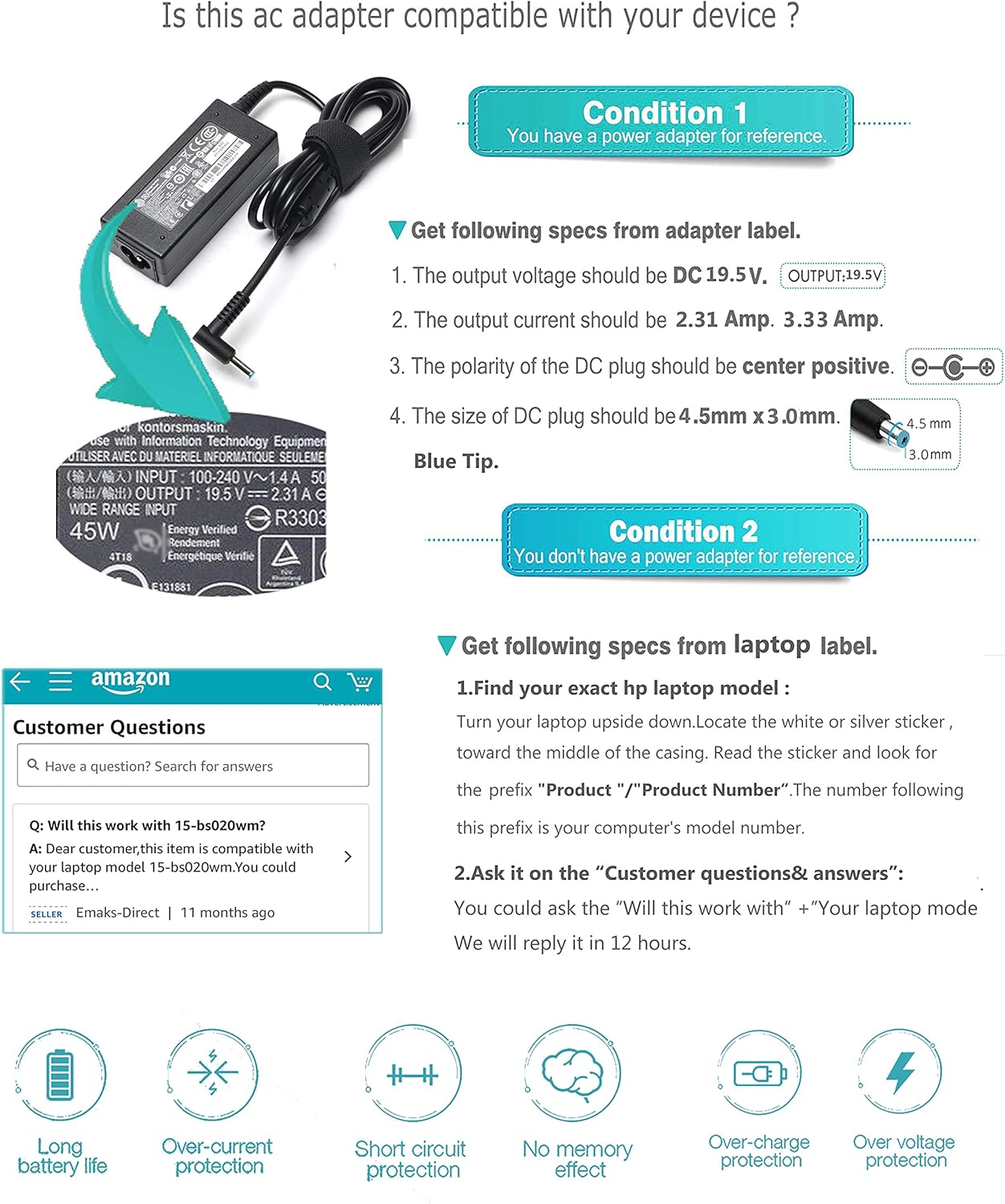
Image 6.1: Instructions on how to verify AC adapter and laptop compatibility by checking adapter and laptop labels.
7. Specifications
| Feature | Detail |
|---|---|
| Brand | Emaks |
| Model Number | DL65195333 / SK90A195231 |
| Input Voltage | 100-240V ~ 50-60Hz 1.8A |
| Output Voltage | 19.5 Volts |
| Output Amperage | 3.33 Amps (for 65W), 2.31 Amps (for 45W) |
| Wattage | 65 Watts (also supports 45 Watts) |
| Connector Type | 4.5x3.0mm Blue Tip |
| Item Weight | 6.1 ounces |
| Product Dimensions | 4.1 x 2 x 1 inches |
| Power Source | Corded Electric |
| Special Feature | Fast Charging |
| Manufacturer | Dong Guan Simer Electronics Co LTD |

Image 7.1: Detailed product dimensions and a table showing wattage compatibility (65W, 45W, 30W).
8. Compatibility
This Emaks charger is compatible with a wide range of HP laptops that use a 4.5x3.0mm blue tip charging port. Key compatible series include:
- HP Pavilion: (X360) 11, 13, 14, 15, 17 series
- HP Stream: 11, 13, 14, 15 X360 series, Stream 11 Pro G3, Stream 11 Pro G4 EE
- HP Chromebook: 11, 13, 14 series, Chromebook 11 EE G2 G3 G4 G5
- HP Elitebook: 820 G3 G4, 830 G5, 840 G3 G4 G5, 850 G3 G4 G5
- HP ProBook: 450 G3 G5, 640 G2 G3 G4 G5, 650 G2 G3
- HP Spectre: x360, x2
- HP 15-a, 15-d, 15-f, 15-g, 15-r, 17-f, 17-g, 17-p TouchSmart series
- HP Turbo: 14-af110nr, 14-af180nr, 15-af130nr
For a detailed list of specific compatible models, please refer to the product listing or contact customer support. Always verify the connector type and power requirements of your specific laptop model.

Image 8.1: Visual representation of the charger's compatibility with HP Pavilion, Probook, Chromebook, Zbook, Stream, Spectre, X360, and Elitebook series.
9. Warranty and Support
Emaks is a USA-based company committed to customer satisfaction.
- 30-Day Money Back Guarantee: If you are not satisfied with your purchase, you may return it within 30 days for a full refund.
- 18-Month Replacement Time: The product is covered by an 18-month replacement warranty for manufacturing defects.
- Lifetime Support Guarantee: Emaks provides lifetime technical support for its products.
For warranty claims, technical assistance, or any other inquiries, please contact Emaks customer support through the retailer's platform or the official Emaks website.