1. Introduction
This manual provides instructions for the ZdalaMit SE-R0429 replacement remote control, designed for use with various Toshiba Soundbar models. This remote control offers direct functionality without the need for programming or pairing. Simply install batteries, and it is ready for use.
2. Package Contents
- 1x ZdalaMit SE-R0429 Replacement Remote Control
Note: Batteries and a user manual are not included in the package.
3. Setup and Battery Installation
The ZdalaMit SE-R0429 remote control requires two (2) AAA alkaline batteries for operation. Follow these steps to install the batteries:
- Locate the battery compartment on the back of the remote control.
- Slide the battery compartment cover downwards to open it.
- Insert two (2) AAA 1.5V alkaline batteries, ensuring the positive (+) and negative (-) terminals align correctly with the markings inside the compartment.
- Slide the battery compartment cover back into place until it clicks securely.

Figure 3.1: Battery compartment with AAA batteries installed. Ensure correct polarity.
Once batteries are installed, the remote control is ready for immediate use with compatible Toshiba Soundbar models. No programming or pairing is required.
4. Remote Control Functions
The ZdalaMit SE-R0429 remote control features standard buttons for operating your Toshiba Soundbar. Refer to the image below for button layout and descriptions.
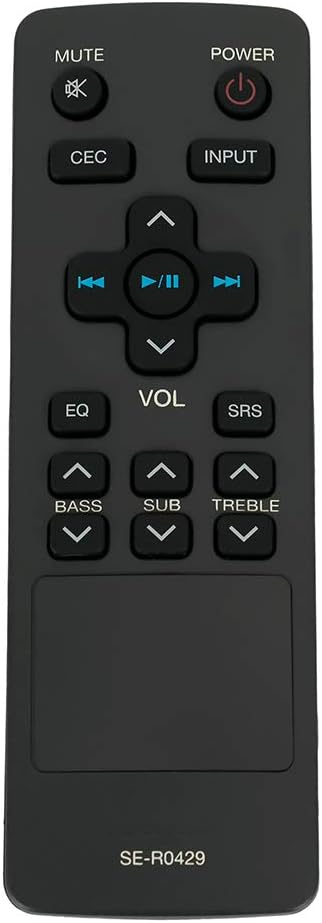
Figure 4.1: Front view of the ZdalaMit SE-R0429 remote control.

Figure 4.2: Angled view of the ZdalaMit SE-R0429 remote control, highlighting its ergonomic design.
Button Descriptions:
| Button | Function |
|---|---|
| POWER | Turns the soundbar On or Off. |
| MUTE | Mutes or unmutes the soundbar audio. |
| CEC | Activates or deactivates Consumer Electronics Control (CEC) functions, if supported by your soundbar and connected devices. |
| INPUT | Cycles through available input sources (e.g., HDMI, Optical, Bluetooth). |
| VOL +/- | Adjusts the main volume level. |
| EQ | Cycles through preset equalizer modes (e.g., Movie, Music, News). |
| SRS | Activates or deactivates SRS (Sound Retrieval System) audio enhancement, if available. |
| BASS +/- | Adjusts the bass level. |
| SUB +/- | Adjusts the subwoofer volume level. |
| TREBLE +/- | Adjusts the treble level. |
| Playback Controls (Rewind, Play/Pause, Fast Forward, Up/Down Navigation) | Controls media playback and menu navigation, depending on the soundbar's current mode and capabilities. |
5. Compatibility
This ZdalaMit SE-R0429 replacement remote control is compatible with the following Toshiba Soundbar models:
- Toshiba SBX4250
- Toshiba SBX4250KN
- Toshiba SBX5065KU
- Toshiba SBX1250
- Toshiba AH701014
- Toshiba SBX5065KC
- Toshiba SBX5065
- Toshiba SBX4250KB
If your soundbar model is not listed, functionality may vary or not be supported. Please verify your soundbar model before use.
6. Specifications
- Model: SE-R0429
- Power Supply: 2 x 1.5V AAA Alkaline Batteries (not included)
- Dimensions: 5.56 x 1.79 x 0.55 inches (approximately)
- Item Weight: 1.41 ounces (approximately)
- Color: Black
- Special Feature: Pre-programmed (no setup required)
7. Troubleshooting
- Remote not responding:
- Ensure batteries are installed correctly with the correct polarity (+/-).
- Replace old batteries with new AAA alkaline batteries.
- Check for any obstructions between the remote control and the soundbar's infrared (IR) receiver.
- Confirm that your soundbar model is listed in the compatibility section (Section 5).
- Specific buttons not working:
- Some advanced functions may be specific to the original remote or soundbar model. Refer to your soundbar's original manual for specific feature support.
8. Maintenance
To ensure the longevity and proper functioning of your remote control:
- Avoid exposing the remote to extreme temperatures, direct sunlight, or moisture.
- Clean the remote control with a soft, dry cloth. Do not use liquid cleaners or abrasive materials.
- If the remote will not be used for an extended period, remove the batteries to prevent leakage.
9. Warranty and Support
Information regarding specific warranty terms or direct manufacturer support for this replacement remote control is not provided in this manual. For any queries or issues, please refer to the retailer where the product was purchased.


